> ## Documentation Index
> Fetch the complete documentation index at: https://portkey-docs-feat-rerank-documentation.mintlify.site/llms.txt
> Use this file to discover all available pages before exploring further.
# Anyscale
> Portkey helps bring Anyscale APIs to production with its abstractions for observability, fallbacks, caching, and more. Use the Anyscale API **through** Portkey for.
1. **Enhanced Logging**: Track API usage with detailed insights.
2. **Production Reliability**: Automated fallbacks, load balancing, and caching.
3. **Continuous Improvement**: Collect and apply user feedback.
4. **Enhanced Fine-Tuning**: Combine logs & user feedback for targetted fine-tuning.
### 1.1 Setup & Logging
1. Set `$ export OPENAI_API_KEY=ANYSCALE_API_KEY`
2. Obtain your [**Portkey API Key**](https://app.portkey.ai/).
3. Switch to **Portkey Gateway URL:** `https://api.portkey.ai/v1/proxy`
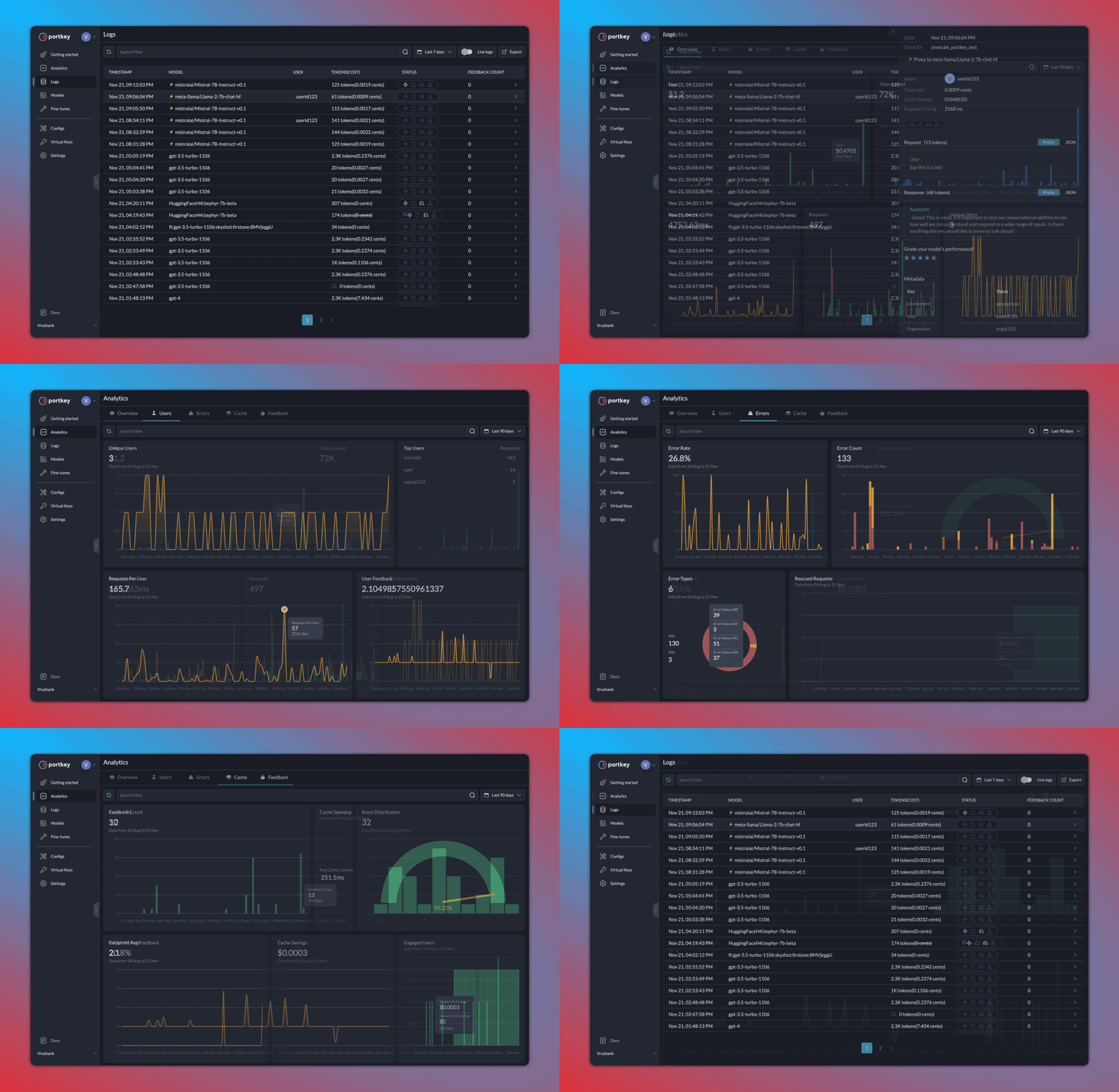
See full logs of requests (latency, cost, tokens)—and dig deeper into the data with their analytics suite.
```py theme={"system"}
""" OPENAI PYTHON SDK """
import openai
PORTKEY_GATEWAY_URL = "https://api.portkey.ai/v1"
PORTKEY_HEADERS = {
'Authorization': 'Bearer ANYSCALE_KEY',
'Content-Type': 'application/json',
# **************************************
'x-portkey-api-key': 'PORTKEY_API_KEY', # Get from https://app.portkey.ai/,
'x-portkey-provider': 'anyscale' # Tell Portkey that the request is for Anyscale
# **************************************
}
client = openai.OpenAI(base_url=PORTKEY_GATEWAY_URL, default_headers=PORTKEY_HEADERS)
response = client.chat.completions.create(
model="mistralai/Mistral-7B-Instruct-v0.1",
messages=[{"role": "user", "content": "Say this is a test"}]
)
print(response.choices[0].message.content)
```
```py theme={"system"}
""" OPENAI NODE SDK """
import OpenAI from 'openai';
const PORTKEY_GATEWAY_URL = "https://api.portkey.ai/v1"
const PORTKEY_HEADERS = {
'Authorization': 'Bearer ANYSCALE_KEY',
'Content-Type': 'application/json',
// **************************************
'x-portkey-api-key': 'PORTKEY_API_KEY', // Get from https://app.portkey.ai/,
'x-portkey-provider': 'anyscale' // Tell Portkey that the request is for Anyscale
// **************************************
}
const openai = new OpenAI({baseURL:PORTKEY_GATEWAY_URL, defaultHeaders:PORTKEY_HEADERS});
async function main() {
const chatCompletion = await openai.chat.completions.create({
messages: [{ role: 'user', content: 'Say this is a test' }],
model: 'mistralai/Mistral-7B-Instruct-v0.1',
});
console.log(chatCompletion.choices[0].message.content);
}
main();
```
```py theme={"system"}
""" REQUESTS LIBRARY """
import requests
PORTKEY_GATEWAY_URL = "https://api.portkey.ai/v1/chat/completions"
PORTKEY_HEADERS = {
'Authorization': 'Bearer ANYSCALE_KEY',
'Content-Type': 'application/json',
# **************************************
'x-portkey-api-key': 'PORTKEY_API_KEY', # Get from https://app.portkey.ai/,
'x-portkey-provider': 'anyscale' # Tell Portkey that the request is for Anyscale
# **************************************
}
DATA = {
"messages": [{"role": "user", "content": "What happens when you mix red & yellow?"}],
"model": "mistralai/Mistral-7B-Instruct-v0.1"
}
response = requests.post(PORTKEY_GATEWAY_URL, headers=PORTKEY_HEADERS, json=DATA)
print(response.text)
```
```sh theme={"system"}
""" CURL """
curl "https://api.portkey.ai/v1/chat/completions" \
-H "Content-Type: application/json" \
-H "Authorization: Bearer ANYSCALE_KEY" \
-H "x-portkey-api-key: PORTKEY_API_KEY" \
-H "x-portkey-provider: anyscale" \
-d '{
"model": "meta-llama/Llama-2-70b-chat-hf",
"messages": [{"role": "user", "content": "Say 'Test'."}]
}'
```
### 1.2. Enhanced Observability
* **Trace** requests with single id.
* **Append custom tags** for request segmenting & in-depth analysis.
Just add their relevant headers to your request:
```py theme={"system"}
""" OPENAI PYTHON SDK """
import json, openai
PORTKEY_GATEWAY_URL = "https://api.portkey.ai/v1"
TRACE_ID = 'anyscale_portkey_test'
METADATA = {
"_environment": "production",
"_user": "userid123",
"_organisation": "orgid123",
"_prompt": "summarisationPrompt"
}
PORTKEY_HEADERS = {
'Authorization': 'Bearer ANYSCALE_KEY',
'Content-Type': 'application/json',
'x-portkey-api-key': 'PORTKEY_API_KEY',
'x-portkey-provider': 'anyscale',
# **************************************
'x-portkey-trace-id': TRACE_ID, # Send the trace id
'x-portkey-metadata': json.dumps(METADATA) # Send the metadata
# **************************************
}
client = openai.OpenAI(base_url=PORTKEY_GATEWAY_URL, default_headers=PORTKEY_HEADERS)
response = client.chat.completions.create(
model="mistralai/Mistral-7B-Instruct-v0.1",
messages=[{"role": "user", "content": "Say this is a test"}]
)
print(response.choices[0].message.content)
```
```py theme={"system"}
""" OPENAI NODE SDK """
import OpenAI from 'openai';
const PORTKEY_GATEWAY_URL = "https://api.portkey.ai/v1"
const TRACE_ID = 'anyscale_portkey_test'
const METADATA = {
"_environment": "production",
"_user": "userid123",
"_organisation": "orgid123",
"_prompt": "summarisationPrompt"
}
const PORTKEY_HEADERS = {
'Authorization': 'Bearer ANYSCALE_KEY',
'Content-Type': 'application/json',
'x-portkey-api-key': 'PORTKEY_API_KEY',
'x-portkey-provider': 'anyscale',
// **************************************
'x-portkey-trace-id': TRACE_ID, // Send the trace id
'x-portkey-metadata': JSON.stringify(METADATA) // Send the metadata
// **************************************
}
const openai = new OpenAI({baseURL:PORTKEY_GATEWAY_URL, defaultHeaders:PORTKEY_HEADERS});
async function main() {
const chatCompletion = await openai.chat.completions.create({
messages: [{ role: 'user', content: 'Say this is a test' }],
model: 'mistralai/Mistral-7B-Instruct-v0.1',
});
console.log(chatCompletion.choices[0].message.content);
}
main();
```
```py theme={"system"}
""" REQUESTS LIBRARY """
import requests, json
PORTKEY_GATEWAY_URL = "https://api.portkey.ai/v1/chat/completions"
TRACE_ID = 'anyscale_portkey_test'
METADATA = {
"_environment": "production",
"_user": "userid123",
"_organisation": "orgid123",
"_prompt": "summarisationPrompt"
}
PORTKEY_HEADERS = {
'Authorization': 'Bearer ANYSCALE_KEY',
'Content-Type': 'application/json',
'x-portkey-api-key': 'PORTKEY_API_KEY',
'x-portkey-provider': 'anyscale',
# **************************************
'x-portkey-trace-id': TRACE_ID, # Send the trace id
'x-portkey-metadata': json.dumps(METADATA) # Send the metadata
# **************************************
}
DATA = {
"messages": [{"role": "user", "content": "What happens when you mix red & yellow?"}],
"model": "mistralai/Mistral-7B-Instruct-v0.1"
}
response = requests.post(PORTKEY_GATEWAY_URL, headers=PORTKEY_HEADERS, json=DATA)
print(response.text)
```
```sh theme={"system"}
""" CURL """
curl "https://api.portkey.ai/v1/chat/completions" \
-H 'Content-Type: application/json' \
-H 'Authorization: Bearer ANYSCALE_KEY' \
-H 'x-portkey-api-key: PORTKEY_KEY' \
-H 'x-portkey-provider: anyscale' \
-H 'x-portkey-trace-id: TRACE_ID' \
-H 'x-portkey-metadata: {"_environment": "production","_user": "userid123","_organisation": "orgid123","_prompt": "summarisationPrompt"}' \
-d '{
"model": "meta-llama/Llama-2-70b-chat-hf",
"messages": [{"role": "user", "content": "Say 'Test'."}]
}'
```
Here’s how your logs will appear on your Portkey dashboard:
 ### 2. Caching, Fallbacks, Load Balancing
* **Fallbacks**: Ensure your application remains functional even if a primary service fails.
* **Load Balancing**: Efficiently distribute incoming requests among multiple models.
* **Semantic Caching**: Reduce costs and latency by intelligently caching results.
Toggle these features by saving *Configs* (from the Portkey dashboard > Configs tab).
If we want to enable semantic caching + fallback from Llama2 to Mistral, your Portkey config would look like this:
```py theme={"system"}
{
"cache": { "mode": "semantic" },
"strategy": { "mode": "fallback" },
"targets": [
{
"provider": "anyscale",
"api_key": "...",
"override_params": { "model": "meta-llama/Llama-2-7b-chat-hf" }
},
{
"provider": "anyscale",
"api_key": "...",
"override_params": { "model": "mistralai/Mistral-7B-Instruct-v0.1" }
}
]
}
```
Now, just send the Config ID with `x-portkey-config` header:
```py theme={"system"}
""" OPENAI PYTHON SDK """
import openai, json
PORTKEY_GATEWAY_URL = "https://api.portkey.ai/v1"
PORTKEY_HEADERS = {
'Content-Type': 'application/json',
'x-portkey-api-key': 'PORTKEY_API_KEY',
# **************************************
'x-portkey-config': 'CONFIG_ID'
# **************************************
}
client = openai.OpenAI(base_url=PORTKEY_GATEWAY_URL, default_headers=PORTKEY_HEADERS)
response = client.chat.completions.create(
model="mistralai/Mistral-7B-Instruct-v0.1",
messages=[{"role": "user", "content": "Say this is a test"}]
)
print(response.choices[0].message.content)
```
```py theme={"system"}
""" OPENAI NODE SDK """
import OpenAI from 'openai';
const PORTKEY_GATEWAY_URL = "https://api.portkey.ai/v1"
const PORTKEY_HEADERS = {
'Content-Type': 'application/json',
'x-portkey-api-key': 'PORTKEY_API_KEY',
// **************************************
'x-portkey-config': 'CONFIG_ID'
// **************************************
}
const openai = new OpenAI({baseURL:PORTKEY_GATEWAY_URL, defaultHeaders:PORTKEY_HEADERS});
async function main() {
const chatCompletion = await openai.chat.completions.create({
messages: [{ role: 'user', content: 'Say this is a test' }],
model: 'mistralai/Mistral-7B-Instruct-v0.1',
});
console.log(chatCompletion.choices[0].message.content);
}
main();
```
```py theme={"system"}
""" REQUESTS LIBRARY """
import requests, json
PORTKEY_GATEWAY_URL = "https://api.portkey.ai/v1/chat/completions"
PORTKEY_HEADERS = {
'Content-Type': 'application/json',
'x-portkey-api-key': 'PORTKEY_API_KEY',
# **************************************
'x-portkey-config': 'CONFIG_ID'
# **************************************
}
DATA = {"messages": [{"role": "user", "content": "What happens when you mix red & yellow?"}]}
response = requests.post(PORTKEY_GATEWAY_URL, headers=PORTKEY_HEADERS, json=DATA)
print(response.text)
```
```sh theme={"system"}
""" CURL """
curl "https://api.portkey.ai/v1/chat/completions" \
-H "Content-Type: application/json" \
-H "x-portkey-api-key: PORTKEY_API_KEY" \
-H "x-portkey-config: CONFIG_ID" \
-d '{ "messages": [{"role": "user", "content": "Say 'Test'."}] }'
```
For more on Configs and other gateway feature like Load Balancing, [check out the docs.](https://portkey.ai/docs/product/ai-gateway-streamline-llm-integrations)
### 3. Collect Feedback
Gather weighted feedback from users and improve your app:
```py theme={"system"}
""" REQUESTS LIBRARY """
import requests
import json
PORTKEY_FEEDBACK_URL = "https://api.portkey.ai/v1/feedback" # Portkey Feedback Endpoint
PORTKEY_HEADERS = {
"x-portkey-api-key": "PORTKEY_API_KEY",
"Content-Type": "application/json",
}
DATA = {
"trace_id": "anyscale_portkey_test", # On Portkey, you can append feedback to a particular Trace ID
"value": 1,
"weight": 0.5
}
response = requests.post(PORTKEY_FEEDBACK_URL, headers=PORTKEY_HEADERS, data=json.dumps(DATA))
print(response.text)
```
```sh theme={"system"}
""" CURL """
curl "https://api.portkey.ai/v1/feedback" \
-H "x-portkey-api-key: PORTKEY_API_KEY" \
-H "Content-Type: application/json" \
-d '{
"trace_id": "anyscale_portkey_test",
"value": 1,
"weight": 0.5
}'
```
### 4. Continuous Fine-Tuning

Once you start logging your requests and their feedback with Portkey, it becomes very easy to 1️) Curate & create data for fine-tuning, 2) Schedule fine-tuning jobs, and 3) Use the fine-tuned models!
Fine-tuning is currently enabled for select orgs - please request access on [Portkey Discord](https://discord.gg/sDk9JaNfK8) and we'll get back to you ASAP.
### 2. Caching, Fallbacks, Load Balancing
* **Fallbacks**: Ensure your application remains functional even if a primary service fails.
* **Load Balancing**: Efficiently distribute incoming requests among multiple models.
* **Semantic Caching**: Reduce costs and latency by intelligently caching results.
Toggle these features by saving *Configs* (from the Portkey dashboard > Configs tab).
If we want to enable semantic caching + fallback from Llama2 to Mistral, your Portkey config would look like this:
```py theme={"system"}
{
"cache": { "mode": "semantic" },
"strategy": { "mode": "fallback" },
"targets": [
{
"provider": "anyscale",
"api_key": "...",
"override_params": { "model": "meta-llama/Llama-2-7b-chat-hf" }
},
{
"provider": "anyscale",
"api_key": "...",
"override_params": { "model": "mistralai/Mistral-7B-Instruct-v0.1" }
}
]
}
```
Now, just send the Config ID with `x-portkey-config` header:
```py theme={"system"}
""" OPENAI PYTHON SDK """
import openai, json
PORTKEY_GATEWAY_URL = "https://api.portkey.ai/v1"
PORTKEY_HEADERS = {
'Content-Type': 'application/json',
'x-portkey-api-key': 'PORTKEY_API_KEY',
# **************************************
'x-portkey-config': 'CONFIG_ID'
# **************************************
}
client = openai.OpenAI(base_url=PORTKEY_GATEWAY_URL, default_headers=PORTKEY_HEADERS)
response = client.chat.completions.create(
model="mistralai/Mistral-7B-Instruct-v0.1",
messages=[{"role": "user", "content": "Say this is a test"}]
)
print(response.choices[0].message.content)
```
```py theme={"system"}
""" OPENAI NODE SDK """
import OpenAI from 'openai';
const PORTKEY_GATEWAY_URL = "https://api.portkey.ai/v1"
const PORTKEY_HEADERS = {
'Content-Type': 'application/json',
'x-portkey-api-key': 'PORTKEY_API_KEY',
// **************************************
'x-portkey-config': 'CONFIG_ID'
// **************************************
}
const openai = new OpenAI({baseURL:PORTKEY_GATEWAY_URL, defaultHeaders:PORTKEY_HEADERS});
async function main() {
const chatCompletion = await openai.chat.completions.create({
messages: [{ role: 'user', content: 'Say this is a test' }],
model: 'mistralai/Mistral-7B-Instruct-v0.1',
});
console.log(chatCompletion.choices[0].message.content);
}
main();
```
```py theme={"system"}
""" REQUESTS LIBRARY """
import requests, json
PORTKEY_GATEWAY_URL = "https://api.portkey.ai/v1/chat/completions"
PORTKEY_HEADERS = {
'Content-Type': 'application/json',
'x-portkey-api-key': 'PORTKEY_API_KEY',
# **************************************
'x-portkey-config': 'CONFIG_ID'
# **************************************
}
DATA = {"messages": [{"role": "user", "content": "What happens when you mix red & yellow?"}]}
response = requests.post(PORTKEY_GATEWAY_URL, headers=PORTKEY_HEADERS, json=DATA)
print(response.text)
```
```sh theme={"system"}
""" CURL """
curl "https://api.portkey.ai/v1/chat/completions" \
-H "Content-Type: application/json" \
-H "x-portkey-api-key: PORTKEY_API_KEY" \
-H "x-portkey-config: CONFIG_ID" \
-d '{ "messages": [{"role": "user", "content": "Say 'Test'."}] }'
```
For more on Configs and other gateway feature like Load Balancing, [check out the docs.](https://portkey.ai/docs/product/ai-gateway-streamline-llm-integrations)
### 3. Collect Feedback
Gather weighted feedback from users and improve your app:
```py theme={"system"}
""" REQUESTS LIBRARY """
import requests
import json
PORTKEY_FEEDBACK_URL = "https://api.portkey.ai/v1/feedback" # Portkey Feedback Endpoint
PORTKEY_HEADERS = {
"x-portkey-api-key": "PORTKEY_API_KEY",
"Content-Type": "application/json",
}
DATA = {
"trace_id": "anyscale_portkey_test", # On Portkey, you can append feedback to a particular Trace ID
"value": 1,
"weight": 0.5
}
response = requests.post(PORTKEY_FEEDBACK_URL, headers=PORTKEY_HEADERS, data=json.dumps(DATA))
print(response.text)
```
```sh theme={"system"}
""" CURL """
curl "https://api.portkey.ai/v1/feedback" \
-H "x-portkey-api-key: PORTKEY_API_KEY" \
-H "Content-Type: application/json" \
-d '{
"trace_id": "anyscale_portkey_test",
"value": 1,
"weight": 0.5
}'
```
### 4. Continuous Fine-Tuning
Once you start logging your requests and their feedback with Portkey, it becomes very easy to 1️) Curate & create data for fine-tuning, 2) Schedule fine-tuning jobs, and 3) Use the fine-tuned models!
Fine-tuning is currently enabled for select orgs - please request access on [Portkey Discord](https://discord.gg/sDk9JaNfK8) and we'll get back to you ASAP.
 #### Conclusion
Integrating Portkey with Anyscale helps you build resilient LLM apps from the get-go. With features like semantic caching, observability, load balancing, feedback, and fallbacks, you can ensure optimal performance and continuous improvement.
[Read full Portkey docs here.](https://portkey.ai/docs/) | [Reach out to the Portkey team.](https://discord.gg/sDk9JaNfK8)
#### Conclusion
Integrating Portkey with Anyscale helps you build resilient LLM apps from the get-go. With features like semantic caching, observability, load balancing, feedback, and fallbacks, you can ensure optimal performance and continuous improvement.
[Read full Portkey docs here.](https://portkey.ai/docs/) | [Reach out to the Portkey team.](https://discord.gg/sDk9JaNfK8)