> ## Documentation Index
> Fetch the complete documentation index at: https://portkey-docs-feat-rerank-documentation.mintlify.site/llms.txt
> Use this file to discover all available pages before exploring further.
# How to Run Structured Output Evals at Scale
Building production-ready AI applications requires more than just choosing the right model and infrastructure. Just like traditional software development relies on comprehensive testing, AI applications need rigorous evaluation to ensure they perform reliably in the real world.
Consider a customer support chatbot for a food delivery service. If it incorrectly processes a refund request, your company bears the financial cost. If it misunderstands a complaint about food allergies, the consequences could be even more severe. These high-stakes scenarios demand systematic evaluation before deployment.
You can find the full code [here](#complete-script)
## The Problem with Generic Evaluations
Many teams start with off-the-shelf metrics like "helpfulness" rated 1-5. As Hamel Hussain notes in his evaluation guide: **"Binary evaluations force clearer thinking and more consistent labeling."**
Instead of vague scales, effective evaluations should:
* **Use binary metrics**: Pass/fail decisions that force clarity
* **Be domain-specific**: Tied directly to your application's success criteria
* **Be verifiable**: Validated against expert-labeled data
## What We'll Build
In this cookbook, we'll take a ground-up approach to building custom evaluations for your AI application using Portkey.
We'll work through a practical example: an AI agent that analyzes Amazon product reviews. Our agent needs to:
1. Classify sentiment (positive/negative/neutral)
2. Return results in a specific JSON format
### Our Evaluation Framework
Using real Amazon review data, we'll build evaluations that check:
1. **Format compliance**: Does the output match our required JSON schema `{"sentiment": "positive"}`?
By the end of this guide, you'll have a reusable framework for building evaluations specific to your own AI applications.
## Prerequisites
* Python 3.7+
* Basic API knowledge
* Command line familiarity
* Portkey account
* OpenAI/Anthropic API key
* 10 minutes to configure
***
# Part 1: Building Your Evaluation Framework
### Design Your Evaluation Prompt
**Best Practice**: Start with clear, specific instructions and concrete examples. Ambiguous prompts lead to inconsistent evaluations.
Portkey’s Prompt Library is a centralized platform for managing, versioning, and deploying prompts across your AI applications. It provides:
* **Version Control**: Track changes and rollback to previous versions
* **Variable Substitution**: Use mustache-style templates (`{{variable}}`) for dynamic content
* **Model Configuration**: Set provider, model, and parameters in one place
* **Team Collaboration**: Share and manage prompts across your organization
**Navigate to Portkey's Prompt Library**
Navigate to **Prompts** → **Create Prompt** in your Portkey dashboard
* **Name**: `sentiment-analysis-evaluator`
* **Provider**: OpenAI (or your preferred provider)
* **Model**: gpt-4o-mini
* **Temperature**: 0 (for consistency)
```
You are a sentiment analysis expert. Always respond with valid JSON.
```
Add this template with mustache variables:
```
Analyze the sentiment of this Amazon product review.
REQUIREMENTS:
1. Classify as exactly one of: positive, negative, or neutral
2. Use lowercase only
3. Return valid JSON in this exact format: {"categories": [""]}
4. Base classification on the overall tone, ignoring minor complaints in positive reviews
EXAMPLES:
Input: "This charger works perfectly! Fast charging, great price. Minor issue with cable length but I'd buy again."
Output: {"sentiment": ["positive"]}
Input: "Product did not arrive on time. Does what it says. Nothing special."
Output: {"sentiment": ["negative"]}
Input: "Complete waste of money. Broke after 2 days. Customer service was useless."
Output: {"sentiment": ["negative"]}
REVIEW TO ANALYZE:
{{amazon_review}}
```
Save the prompt and copy the Prompt ID (e.g., `prm_abc123`)
The variable `{{amazon_review}}` must match exactly what you'll pass in your API calls. Mismatched variables are a common source of errors.
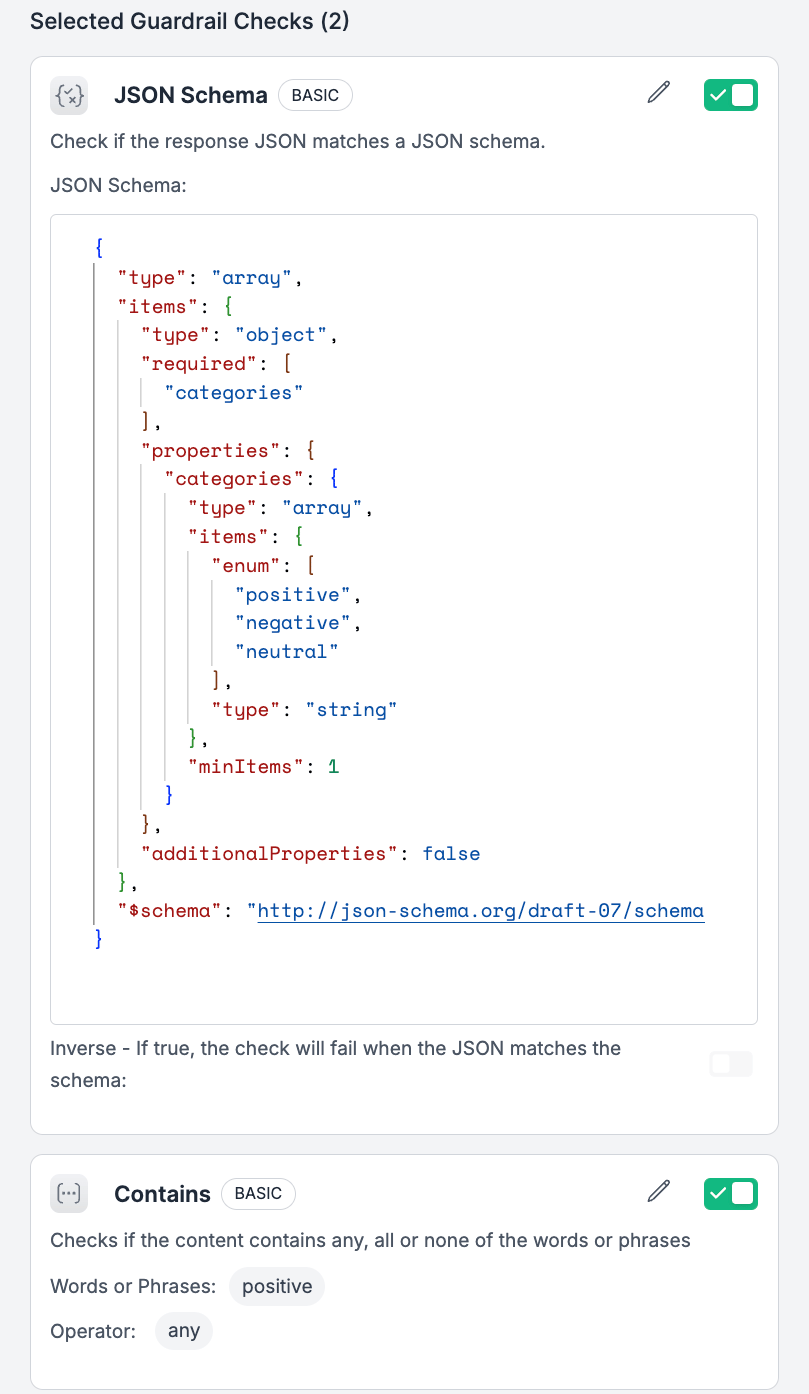
### Create the JSON Schema Validator
Go to **Guardrails** → **Create Guardrail**
* **Name**: `sentiment-json-validator`
* **Type**: JSON Schema Validator
* **Position**: After (validates model output)
```json theme={"system"}
{
"$schema": "http://json-schema.org/draft-07/schema#",
"type": "object",
"required": ["categories"],
"properties": {
"categories": {
"type": "array",
"items": {
"type": "string",
"enum": ["positive", "negative"]
},
"minItems": 1,
"maxItems": 1
}
},
"additionalProperties": false
}
```
This Guardrail will act as a check after the response and validate if the model repose is a valid JSON schema as we need.
 ### Combine with a Config
Configs orchestrate how requests route with Portkey. You can define a config as a JSON inside Portkey app and access it in your Portkey Client using `config_id`.
Navigate to **Configs** → **Create Config**
* **Name**: `sentiment-eval-config`
```json theme={"system"}
{
"output_guardrails": ["your-json-schem-guardrail-id"]
}
```
Copy the Config ID (e.g., `cfg_xyz789`)
* ✅ A prompt that clearly defines the sentiment analysis task
* ✅ Output validation that ensures consistent JSON formatting
* ✅ A config that ties everything together
## Part 2: Running Batch Evaluations
Now that we have our prompt template and guardrails configured, let's run evaluations at scale using Portkey's batch processing capabilities. Batch processing allows you to evaluate hundreds or thousands of examples efficiently and cost-effectively.
### Why Batch Processing for Evaluations?
Portkey’s batching engine lets you run thousands of LLM calls across any provider—whether or not they support native batching. It handles everything for you: queuing, retries, timeouts, and async execution. You don’t need to manage infrastructure; Portkey ensures high-throughput, reliable inference at scale. Plus, every call in the batch is fully observable, with token usage, cost, and latency available for monitoring and optimization.
### Setting Up the Evaluation Pipeline
Let's build a complete pipeline that:
1. Fetches real Amazon reviews from Hugging Face
2. Formats them for batch processing
3. Runs them through our configured prompt
4. Collects results with automatic scoring
First, install the required dependencies:
```bash theme={"system"}
pip install requests pandas
```
Now, let's walk through the complete batch evaluation script:
```python theme={"system"}
"""
Portkey Batch Evaluation Pipeline
This script demonstrates how to:
1. Fetch Amazon reviews from Hugging Face
2. Create JSONL file with proper format
3. Upload to Portkey
4. Create and monitor batch job
5. Retrieve results and save to CSV
"""
import requests
import json
import pandas as pd
import time
# Configuration
PORTKEY_API_KEY = "YOUR_PORTKEY_API_KEY" # Replace with your API key
PROMPT_ID = "YOUR_PROMPT_ID" # Replace with your prompt ID from Part 1
BASE_URL = "https://api.portkey.ai/v1"
```
### Step 1: Fetch Amazon Reviews
We'll use the Hugging Face datasets API to fetch real Amazon product reviews:
```python theme={"system"}
# Step 1: Fetch Amazon reviews from Hugging Face
print("\n=== Step 1: Fetching Amazon reviews ===")
url = "https://datasets-server.huggingface.co/rows"
params = {
"dataset": "sentence-transformers/amazon-reviews",
"config": "pair",
"split": "train",
"offset": 0,
"length": 10 # Start with 10 reviews for testing
}
response = requests.get(url, params=params)
data = response.json()
reviews = []
for row in data['rows']:
if 'row' in row and 'review' in row['row']:
reviews.append(row['row']['review'])
print(f"Fetched {len(reviews)} reviews")
```
You can increase the `length` parameter to evaluate more reviews. For production evaluations, you might process hundreds or thousands of reviews.
### Step 2: Create JSONL File
Portkey's batch API expects a JSONL (JSON Lines) file where each line is a separate request:
```python theme={"system"}
# Step 2: Create JSONL file
print("\n=== Step 2: Creating JSONL file ===")
jsonl_entries = []
for idx, review in enumerate(reviews, 1):
entry = {
"custom_id": f"request-{idx}",
"method": "POST",
"url": f"/v1/prompts/{PROMPT_ID}/completions",
"body": {
"variables": {
"amazon_review": review # This replaces {{amazon_review}} in prompt
}
}
}
jsonl_entries.append(entry)
filename = "amazon_reviews_batch.jsonl"
with open(filename, 'w') as file:
for entry in jsonl_entries:
file.write(json.dumps(entry) + '\n')
print(f"Created {filename} with {len(jsonl_entries)} entries")
```
### Step 3: Upload File to Portkey
```python theme={"system"}
# Step 3: Upload file to Portkey
print("\n=== Step 3: Uploading file to Portkey ===")
upload_url = f"{BASE_URL}/files"
headers = {"x-portkey-api-key": PORTKEY_API_KEY}
with open(filename, 'rb') as file:
files = {'file': (filename, file, 'application/jsonl')}
data = {'purpose': 'batch'}
response = requests.post(upload_url, headers=headers, files=files, data=data)
file_data = response.json()
file_id = file_data['id']
print(f"File uploaded. File ID: {file_id}")
```
### Step 4: Create Batch Job
Now we create the batch job, specifying our config ID to apply guardrails:
```python theme={"system"}
# Step 4: Create batch job
print("\n=== Step 4: Creating batch job ===")
batch_url = f"{BASE_URL}/batches"
headers = {
"x-portkey-api-key": PORTKEY_API_KEY,
"Content-Type": "application/json"
}
batch_data = {
"input_file_id": file_id,
"endpoint": f"/v1/prompts/{PROMPT_ID}/completions",
"completion_window": "immediate",
"metadata": {
"evaluation_name": "amazon_sentiment_eval_v1"
},
"portkey_options": {
"x-portkey-config": CONFIG_ID
}
}
response = requests.post(batch_url, headers=headers, json=batch_data)
batch_response = response.json()
batch_id = batch_response['id']
print(f"Batch created. Batch ID: {batch_id}")
```
Don't forget to add your Config ID to the batch request. This ensures your guardrails (PII check, output validation, and feedback scoring) are applied to every request in the batch.
### Step 5: Monitor Batch Status
```python theme={"system"}
# Step 5: Check batch status
print("\n=== Step 5: Checking batch status ===")
status_url = f"{BASE_URL}/batches/{batch_id}"
headers = {"x-portkey-api-key": PORTKEY_API_KEY}
while True:
response = requests.get(status_url, headers=headers)
status_data = response.json()
status = status_data.get('status')
request_counts = status_data.get('request_counts', {})
print(f"Status: {status} | Completed: {request_counts.get('completed', 0)}/{request_counts.get('total', 0)}")
if status == 'completed':
break
elif status == 'failed':
print("Batch failed!")
break
time.sleep(2)
```
### Step 6: Retrieve and Process Results
```python theme={"system"}
# Step 6: Get batch output
# Step 6: Get batch output
print("\n=== Step 6: Getting batch output ===")
output_url = f"{BASE_URL}/batches/{batch_id}/output"
response = requests.get(output_url, headers=headers)
# Parse JSONL response
results = []
for line in response.text.strip().split('\n'):
if line:
results.append(json.loads(line))
print(f"Retrieved {len(results)} results")
# Step 7: Save to CSV
print("\n=== Step 7: Saving results to CSV ===")
csv_data = []
for result in results:
custom_id = result.get('custom_id', '')
# Get original review
idx = int(custom_id.split('-')[1]) - 1
original_review = reviews[idx] if idx < len(reviews) else ""
# Extract response
response_body = result.get('response', {}).get('body', {})
choices = response_body.get('choices', [])
if choices:
assistant_response = choices[0].get('message', {}).get('content', '')
# Parse the JSON response to get sentiment
try:
sentiment_data = json.loads(assistant_response)
sentiment = sentiment_data.get('categories', ['unknown'])[0]
except:
sentiment = 'parse_error'
else:
assistant_response = "No response"
sentiment = 'no_response'
status_code = result.get('response', {}).get('status_code', '')
csv_data.append({
'custom_id': custom_id,
'original_review': original_review,
'sentiment': sentiment,
'full_response': assistant_response,
'status_code': status_code,
'JSON Schema Validate': status_code == 246 # Add new column
})
# Create DataFrame and save
df = pd.DataFrame(csv_data)
output_filename = "batch_evaluation_results.csv"
df.to_csv(output_filename, index=False)
print(f"Results saved to {output_filename}")
# Display summary
print(f"\nSummary:")
print(f"Total requests: {len(results)}")
print(f"Successful: {len(df[df['status_code'] == 200])}")
# Show sentiment distribution
print("\nSentiment Distribution:")
print(df['sentiment'].value_counts())
# Prepare data for display
display_df = df.copy()
# Truncate original_review to 50 characters
display_df['original_review'] = display_df['original_review'].apply(lambda x: str(x)[:50] + '...' if len(str(x)) > 50 else x)
# Truncate full_response to 30 characters
display_df['full_response'] = display_df['full_response'].apply(lambda x: str(x)[:30] + '...' if len(str(x)) > 30 else x)
# Select and reorder columns for display
display_columns = ['custom_id', 'sentiment', 'status_code', 'JSON Schema Validate', 'original_review']
display_df = display_df[display_columns]
# Display the CSV in a nice table format
print("\nDetailed Results:")
print(tabulate(display_df, headers='keys', tablefmt='simple', showindex=False))
```
## Understanding the Results
The script outputs a CSV with your evaluation results. Here's what matters:
* **status\_code 200**: Request passed JSON schema validation ✅
* **status\_code 246**: Request failed JSON schema validation ❌
Example output:
```
Summary:
Total requests: 10
Successful: 8
Schema Validation Passed: 8
Schema Validation Failed: 2
Sentiment Distribution:
positive 5
negative 3
parse_error 2
```
## What to Do Next
If you see 246 status codes, check:
* Is your prompt output format clear?
* Did you include enough examples?
* Is the JSON structure in your prompt exactly right?
Change `length: 10` to `length: 100` or `length: 1000` to test more reviews
Create guardrails for:
* Checking if negative reviews mention refunds
* Validating positive reviews aren't too short
* Flagging reviews that need human review
## Conclusion
You now have:
* A working evaluation pipeline
* Automatic JSON validation
* Batch processing for scale
* Clear pass/fail metrics
Start with 100 reviews, fix any issues, then scale to thousands.
## Resources
* [Portkey Docs](https://docs.portkey.ai) - API reference
* [Discord](https://discord.gg/portkey) - Get help
* Support: [support@portkey.ai](mailto:support@portkey.ai)
***
### Complete Script
Here's the complete script you can save and run:
```python theme={"system"}
import requests
import json
import pandas as pd
import time
from tabulate import tabulate
# Configuration
PORTKEY_API_KEY = "YOUR_PORTKEY_API_KEY" # Replace with your API key
PROMPT_ID = "YOUR_PROMPT_ID" # Replace with your prompt ID
CONFIG_ID = "YOUR_CONFIG_ID" # Replace with your config ID
BASE_URL = "https://api.portkey.ai/v1"
# Step 1: Fetch Amazon reviews from Hugging Face
print("\n=== Step 1: Fetching Amazon reviews ===")
url = "https://datasets-server.huggingface.co/rows"
params = {
"dataset": "sentence-transformers/amazon-reviews",
"config": "pair",
"split": "train",
"offset": 0,
"length": 10 # Start with 10 reviews for testing
}
response = requests.get(url, params=params)
data = response.json()
reviews = []
for row in data['rows']:
if 'row' in row and 'review' in row['row']:
reviews.append(row['row']['review'])
print(f"Fetched {len(reviews)} reviews")
# Step 2: Create JSONL file
print("\n=== Step 2: Creating JSONL file ===")
jsonl_entries = []
for idx, review in enumerate(reviews, 1):
entry = {
"custom_id": f"request-{idx}",
"method": "POST",
"url": f"/v1/prompts/{PROMPT_ID}/completions",
"body": {
"variables": {
"amazon_review": review # This replaces {{amazon_review}} in prompt
}
}
}
jsonl_entries.append(entry)
filename = "amazon_reviews_batch.jsonl"
with open(filename, 'w') as file:
for entry in jsonl_entries:
file.write(json.dumps(entry) + '\n')
print(f"Created {filename} with {len(jsonl_entries)} entries")
# Step 3: Upload file to Portkey
print("\n=== Step 3: Uploading file to Portkey ===")
upload_url = f"{BASE_URL}/files"
headers = {"x-portkey-api-key": PORTKEY_API_KEY}
with open(filename, 'rb') as file:
files = {'file': (filename, file, 'application/jsonl')}
data = {'purpose': 'batch'}
response = requests.post(upload_url, headers=headers, files=files, data=data)
file_data = response.json()
file_id = file_data['id']
print(f"File uploaded. File ID: {file_id}")
# Step 4: Create batch job
print("\n=== Step 4: Creating batch job ===")
batch_url = f"{BASE_URL}/batches"
headers = {
"x-portkey-api-key": PORTKEY_API_KEY,
"Content-Type": "application/json"
}
batch_data = {
"input_file_id": file_id,
"endpoint": f"/v1/prompts/{PROMPT_ID}/completions",
"completion_window": "immediate",
"metadata": {
"evaluation_name": "amazon_sentiment_eval_v1"
},
"portkey_options": {
"x-portkey-config": CONFIG_ID
}
}
response = requests.post(batch_url, headers=headers, json=batch_data)
batch_response = response.json()
batch_id = batch_response['id']
print(f"Batch created. Batch ID: {batch_id}")
```
Check batch status
```py theme={"system"}
# Step 5: Check batch status
print("\n=== Step 5: Checking batch status ===")
status_url = f"{BASE_URL}/batches/{batch_id}"
headers = {"x-portkey-api-key": PORTKEY_API_KEY}
while True:
response = requests.get(status_url, headers=headers)
status_data = response.json()
status = status_data.get('status')
request_counts = status_data.get('request_counts', {})
print(f"Status: {status} | Completed: {request_counts.get('completed', 0)}/{request_counts.get('total', 0)}")
if status == 'completed':
break
elif status == 'failed':
print("Batch failed!")
break
time.sleep(2)
```
Get batch output
```py theme={"system"}
# Step 6: Get batch output
print("\n=== Step 6: Getting batch output ===")
output_url = f"{BASE_URL}/batches/{batch_id}/output"
response = requests.get(output_url, headers=headers)
# Parse JSONL response
results = []
for line in response.text.strip().split('\n'):
if line:
results.append(json.loads(line))
print(f"Retrieved {len(results)} results")
# Step 7: Save to CSV
print("\n=== Step 7: Saving results to CSV ===")
csv_data = []
for result in results:
custom_id = result.get('custom_id', '')
# Get original review
idx = int(custom_id.split('-')[1]) - 1
original_review = reviews[idx] if idx < len(reviews) else ""
# Extract response
response_body = result.get('response', {}).get('body', {})
choices = response_body.get('choices', [])
if choices:
assistant_response = choices[0].get('message', {}).get('content', '')
# Parse the JSON response to get sentiment
try:
sentiment_data = json.loads(assistant_response)
sentiment = sentiment_data.get('categories', ['unknown'])[0]
except:
sentiment = 'parse_error'
else:
assistant_response = "No response"
sentiment = 'no_response'
status_code = result.get('response', {}).get('status_code', '')
csv_data.append({
'custom_id': custom_id,
'original_review': original_review,
'sentiment': sentiment,
'full_response': assistant_response,
'status_code': status_code,
'JSON Schema Validate': status_code == 246 # Add new column
})
# Create DataFrame and save
df = pd.DataFrame(csv_data)
output_filename = "batch_evaluation_results.csv"
df.to_csv(output_filename, index=False)
print(f"Results saved to {output_filename}")
# Display summary
print(f"\nSummary:")
print(f"Total requests: {len(results)}")
print(f"Successful: {len(df[df['status_code'] == 200])}")
# Show sentiment distribution
print("\nSentiment Distribution:")
print(df['sentiment'].value_counts())
# Prepare data for display
display_df = df.copy()
# Truncate original_review to 50 characters
display_df['original_review'] = display_df['original_review'].apply(lambda x: str(x)[:50] + '...' if len(str(x)) > 50 else x)
# Truncate full_response to 30 characters
display_df['full_response'] = display_df['full_response'].apply(lambda x: str(x)[:30] + '...' if len(str(x)) > 30 else x)
# Select and reorder columns for display
display_columns = ['custom_id', 'sentiment', 'status_code', 'JSON Schema Validate', 'original_review']
display_df = display_df[display_columns]
# Display the CSV in a nice table format
print("\nDetailed Results:")
print(tabulate(display_df, headers='keys', tablefmt='simple', showindex=False))
```
### Combine with a Config
Configs orchestrate how requests route with Portkey. You can define a config as a JSON inside Portkey app and access it in your Portkey Client using `config_id`.
Navigate to **Configs** → **Create Config**
* **Name**: `sentiment-eval-config`
```json theme={"system"}
{
"output_guardrails": ["your-json-schem-guardrail-id"]
}
```
Copy the Config ID (e.g., `cfg_xyz789`)
* ✅ A prompt that clearly defines the sentiment analysis task
* ✅ Output validation that ensures consistent JSON formatting
* ✅ A config that ties everything together
## Part 2: Running Batch Evaluations
Now that we have our prompt template and guardrails configured, let's run evaluations at scale using Portkey's batch processing capabilities. Batch processing allows you to evaluate hundreds or thousands of examples efficiently and cost-effectively.
### Why Batch Processing for Evaluations?
Portkey’s batching engine lets you run thousands of LLM calls across any provider—whether or not they support native batching. It handles everything for you: queuing, retries, timeouts, and async execution. You don’t need to manage infrastructure; Portkey ensures high-throughput, reliable inference at scale. Plus, every call in the batch is fully observable, with token usage, cost, and latency available for monitoring and optimization.
### Setting Up the Evaluation Pipeline
Let's build a complete pipeline that:
1. Fetches real Amazon reviews from Hugging Face
2. Formats them for batch processing
3. Runs them through our configured prompt
4. Collects results with automatic scoring
First, install the required dependencies:
```bash theme={"system"}
pip install requests pandas
```
Now, let's walk through the complete batch evaluation script:
```python theme={"system"}
"""
Portkey Batch Evaluation Pipeline
This script demonstrates how to:
1. Fetch Amazon reviews from Hugging Face
2. Create JSONL file with proper format
3. Upload to Portkey
4. Create and monitor batch job
5. Retrieve results and save to CSV
"""
import requests
import json
import pandas as pd
import time
# Configuration
PORTKEY_API_KEY = "YOUR_PORTKEY_API_KEY" # Replace with your API key
PROMPT_ID = "YOUR_PROMPT_ID" # Replace with your prompt ID from Part 1
BASE_URL = "https://api.portkey.ai/v1"
```
### Step 1: Fetch Amazon Reviews
We'll use the Hugging Face datasets API to fetch real Amazon product reviews:
```python theme={"system"}
# Step 1: Fetch Amazon reviews from Hugging Face
print("\n=== Step 1: Fetching Amazon reviews ===")
url = "https://datasets-server.huggingface.co/rows"
params = {
"dataset": "sentence-transformers/amazon-reviews",
"config": "pair",
"split": "train",
"offset": 0,
"length": 10 # Start with 10 reviews for testing
}
response = requests.get(url, params=params)
data = response.json()
reviews = []
for row in data['rows']:
if 'row' in row and 'review' in row['row']:
reviews.append(row['row']['review'])
print(f"Fetched {len(reviews)} reviews")
```
You can increase the `length` parameter to evaluate more reviews. For production evaluations, you might process hundreds or thousands of reviews.
### Step 2: Create JSONL File
Portkey's batch API expects a JSONL (JSON Lines) file where each line is a separate request:
```python theme={"system"}
# Step 2: Create JSONL file
print("\n=== Step 2: Creating JSONL file ===")
jsonl_entries = []
for idx, review in enumerate(reviews, 1):
entry = {
"custom_id": f"request-{idx}",
"method": "POST",
"url": f"/v1/prompts/{PROMPT_ID}/completions",
"body": {
"variables": {
"amazon_review": review # This replaces {{amazon_review}} in prompt
}
}
}
jsonl_entries.append(entry)
filename = "amazon_reviews_batch.jsonl"
with open(filename, 'w') as file:
for entry in jsonl_entries:
file.write(json.dumps(entry) + '\n')
print(f"Created {filename} with {len(jsonl_entries)} entries")
```
### Step 3: Upload File to Portkey
```python theme={"system"}
# Step 3: Upload file to Portkey
print("\n=== Step 3: Uploading file to Portkey ===")
upload_url = f"{BASE_URL}/files"
headers = {"x-portkey-api-key": PORTKEY_API_KEY}
with open(filename, 'rb') as file:
files = {'file': (filename, file, 'application/jsonl')}
data = {'purpose': 'batch'}
response = requests.post(upload_url, headers=headers, files=files, data=data)
file_data = response.json()
file_id = file_data['id']
print(f"File uploaded. File ID: {file_id}")
```
### Step 4: Create Batch Job
Now we create the batch job, specifying our config ID to apply guardrails:
```python theme={"system"}
# Step 4: Create batch job
print("\n=== Step 4: Creating batch job ===")
batch_url = f"{BASE_URL}/batches"
headers = {
"x-portkey-api-key": PORTKEY_API_KEY,
"Content-Type": "application/json"
}
batch_data = {
"input_file_id": file_id,
"endpoint": f"/v1/prompts/{PROMPT_ID}/completions",
"completion_window": "immediate",
"metadata": {
"evaluation_name": "amazon_sentiment_eval_v1"
},
"portkey_options": {
"x-portkey-config": CONFIG_ID
}
}
response = requests.post(batch_url, headers=headers, json=batch_data)
batch_response = response.json()
batch_id = batch_response['id']
print(f"Batch created. Batch ID: {batch_id}")
```
Don't forget to add your Config ID to the batch request. This ensures your guardrails (PII check, output validation, and feedback scoring) are applied to every request in the batch.
### Step 5: Monitor Batch Status
```python theme={"system"}
# Step 5: Check batch status
print("\n=== Step 5: Checking batch status ===")
status_url = f"{BASE_URL}/batches/{batch_id}"
headers = {"x-portkey-api-key": PORTKEY_API_KEY}
while True:
response = requests.get(status_url, headers=headers)
status_data = response.json()
status = status_data.get('status')
request_counts = status_data.get('request_counts', {})
print(f"Status: {status} | Completed: {request_counts.get('completed', 0)}/{request_counts.get('total', 0)}")
if status == 'completed':
break
elif status == 'failed':
print("Batch failed!")
break
time.sleep(2)
```
### Step 6: Retrieve and Process Results
```python theme={"system"}
# Step 6: Get batch output
# Step 6: Get batch output
print("\n=== Step 6: Getting batch output ===")
output_url = f"{BASE_URL}/batches/{batch_id}/output"
response = requests.get(output_url, headers=headers)
# Parse JSONL response
results = []
for line in response.text.strip().split('\n'):
if line:
results.append(json.loads(line))
print(f"Retrieved {len(results)} results")
# Step 7: Save to CSV
print("\n=== Step 7: Saving results to CSV ===")
csv_data = []
for result in results:
custom_id = result.get('custom_id', '')
# Get original review
idx = int(custom_id.split('-')[1]) - 1
original_review = reviews[idx] if idx < len(reviews) else ""
# Extract response
response_body = result.get('response', {}).get('body', {})
choices = response_body.get('choices', [])
if choices:
assistant_response = choices[0].get('message', {}).get('content', '')
# Parse the JSON response to get sentiment
try:
sentiment_data = json.loads(assistant_response)
sentiment = sentiment_data.get('categories', ['unknown'])[0]
except:
sentiment = 'parse_error'
else:
assistant_response = "No response"
sentiment = 'no_response'
status_code = result.get('response', {}).get('status_code', '')
csv_data.append({
'custom_id': custom_id,
'original_review': original_review,
'sentiment': sentiment,
'full_response': assistant_response,
'status_code': status_code,
'JSON Schema Validate': status_code == 246 # Add new column
})
# Create DataFrame and save
df = pd.DataFrame(csv_data)
output_filename = "batch_evaluation_results.csv"
df.to_csv(output_filename, index=False)
print(f"Results saved to {output_filename}")
# Display summary
print(f"\nSummary:")
print(f"Total requests: {len(results)}")
print(f"Successful: {len(df[df['status_code'] == 200])}")
# Show sentiment distribution
print("\nSentiment Distribution:")
print(df['sentiment'].value_counts())
# Prepare data for display
display_df = df.copy()
# Truncate original_review to 50 characters
display_df['original_review'] = display_df['original_review'].apply(lambda x: str(x)[:50] + '...' if len(str(x)) > 50 else x)
# Truncate full_response to 30 characters
display_df['full_response'] = display_df['full_response'].apply(lambda x: str(x)[:30] + '...' if len(str(x)) > 30 else x)
# Select and reorder columns for display
display_columns = ['custom_id', 'sentiment', 'status_code', 'JSON Schema Validate', 'original_review']
display_df = display_df[display_columns]
# Display the CSV in a nice table format
print("\nDetailed Results:")
print(tabulate(display_df, headers='keys', tablefmt='simple', showindex=False))
```
## Understanding the Results
The script outputs a CSV with your evaluation results. Here's what matters:
* **status\_code 200**: Request passed JSON schema validation ✅
* **status\_code 246**: Request failed JSON schema validation ❌
Example output:
```
Summary:
Total requests: 10
Successful: 8
Schema Validation Passed: 8
Schema Validation Failed: 2
Sentiment Distribution:
positive 5
negative 3
parse_error 2
```
## What to Do Next
If you see 246 status codes, check:
* Is your prompt output format clear?
* Did you include enough examples?
* Is the JSON structure in your prompt exactly right?
Change `length: 10` to `length: 100` or `length: 1000` to test more reviews
Create guardrails for:
* Checking if negative reviews mention refunds
* Validating positive reviews aren't too short
* Flagging reviews that need human review
## Conclusion
You now have:
* A working evaluation pipeline
* Automatic JSON validation
* Batch processing for scale
* Clear pass/fail metrics
Start with 100 reviews, fix any issues, then scale to thousands.
## Resources
* [Portkey Docs](https://docs.portkey.ai) - API reference
* [Discord](https://discord.gg/portkey) - Get help
* Support: [support@portkey.ai](mailto:support@portkey.ai)
***
### Complete Script
Here's the complete script you can save and run:
```python theme={"system"}
import requests
import json
import pandas as pd
import time
from tabulate import tabulate
# Configuration
PORTKEY_API_KEY = "YOUR_PORTKEY_API_KEY" # Replace with your API key
PROMPT_ID = "YOUR_PROMPT_ID" # Replace with your prompt ID
CONFIG_ID = "YOUR_CONFIG_ID" # Replace with your config ID
BASE_URL = "https://api.portkey.ai/v1"
# Step 1: Fetch Amazon reviews from Hugging Face
print("\n=== Step 1: Fetching Amazon reviews ===")
url = "https://datasets-server.huggingface.co/rows"
params = {
"dataset": "sentence-transformers/amazon-reviews",
"config": "pair",
"split": "train",
"offset": 0,
"length": 10 # Start with 10 reviews for testing
}
response = requests.get(url, params=params)
data = response.json()
reviews = []
for row in data['rows']:
if 'row' in row and 'review' in row['row']:
reviews.append(row['row']['review'])
print(f"Fetched {len(reviews)} reviews")
# Step 2: Create JSONL file
print("\n=== Step 2: Creating JSONL file ===")
jsonl_entries = []
for idx, review in enumerate(reviews, 1):
entry = {
"custom_id": f"request-{idx}",
"method": "POST",
"url": f"/v1/prompts/{PROMPT_ID}/completions",
"body": {
"variables": {
"amazon_review": review # This replaces {{amazon_review}} in prompt
}
}
}
jsonl_entries.append(entry)
filename = "amazon_reviews_batch.jsonl"
with open(filename, 'w') as file:
for entry in jsonl_entries:
file.write(json.dumps(entry) + '\n')
print(f"Created {filename} with {len(jsonl_entries)} entries")
# Step 3: Upload file to Portkey
print("\n=== Step 3: Uploading file to Portkey ===")
upload_url = f"{BASE_URL}/files"
headers = {"x-portkey-api-key": PORTKEY_API_KEY}
with open(filename, 'rb') as file:
files = {'file': (filename, file, 'application/jsonl')}
data = {'purpose': 'batch'}
response = requests.post(upload_url, headers=headers, files=files, data=data)
file_data = response.json()
file_id = file_data['id']
print(f"File uploaded. File ID: {file_id}")
# Step 4: Create batch job
print("\n=== Step 4: Creating batch job ===")
batch_url = f"{BASE_URL}/batches"
headers = {
"x-portkey-api-key": PORTKEY_API_KEY,
"Content-Type": "application/json"
}
batch_data = {
"input_file_id": file_id,
"endpoint": f"/v1/prompts/{PROMPT_ID}/completions",
"completion_window": "immediate",
"metadata": {
"evaluation_name": "amazon_sentiment_eval_v1"
},
"portkey_options": {
"x-portkey-config": CONFIG_ID
}
}
response = requests.post(batch_url, headers=headers, json=batch_data)
batch_response = response.json()
batch_id = batch_response['id']
print(f"Batch created. Batch ID: {batch_id}")
```
Check batch status
```py theme={"system"}
# Step 5: Check batch status
print("\n=== Step 5: Checking batch status ===")
status_url = f"{BASE_URL}/batches/{batch_id}"
headers = {"x-portkey-api-key": PORTKEY_API_KEY}
while True:
response = requests.get(status_url, headers=headers)
status_data = response.json()
status = status_data.get('status')
request_counts = status_data.get('request_counts', {})
print(f"Status: {status} | Completed: {request_counts.get('completed', 0)}/{request_counts.get('total', 0)}")
if status == 'completed':
break
elif status == 'failed':
print("Batch failed!")
break
time.sleep(2)
```
Get batch output
```py theme={"system"}
# Step 6: Get batch output
print("\n=== Step 6: Getting batch output ===")
output_url = f"{BASE_URL}/batches/{batch_id}/output"
response = requests.get(output_url, headers=headers)
# Parse JSONL response
results = []
for line in response.text.strip().split('\n'):
if line:
results.append(json.loads(line))
print(f"Retrieved {len(results)} results")
# Step 7: Save to CSV
print("\n=== Step 7: Saving results to CSV ===")
csv_data = []
for result in results:
custom_id = result.get('custom_id', '')
# Get original review
idx = int(custom_id.split('-')[1]) - 1
original_review = reviews[idx] if idx < len(reviews) else ""
# Extract response
response_body = result.get('response', {}).get('body', {})
choices = response_body.get('choices', [])
if choices:
assistant_response = choices[0].get('message', {}).get('content', '')
# Parse the JSON response to get sentiment
try:
sentiment_data = json.loads(assistant_response)
sentiment = sentiment_data.get('categories', ['unknown'])[0]
except:
sentiment = 'parse_error'
else:
assistant_response = "No response"
sentiment = 'no_response'
status_code = result.get('response', {}).get('status_code', '')
csv_data.append({
'custom_id': custom_id,
'original_review': original_review,
'sentiment': sentiment,
'full_response': assistant_response,
'status_code': status_code,
'JSON Schema Validate': status_code == 246 # Add new column
})
# Create DataFrame and save
df = pd.DataFrame(csv_data)
output_filename = "batch_evaluation_results.csv"
df.to_csv(output_filename, index=False)
print(f"Results saved to {output_filename}")
# Display summary
print(f"\nSummary:")
print(f"Total requests: {len(results)}")
print(f"Successful: {len(df[df['status_code'] == 200])}")
# Show sentiment distribution
print("\nSentiment Distribution:")
print(df['sentiment'].value_counts())
# Prepare data for display
display_df = df.copy()
# Truncate original_review to 50 characters
display_df['original_review'] = display_df['original_review'].apply(lambda x: str(x)[:50] + '...' if len(str(x)) > 50 else x)
# Truncate full_response to 30 characters
display_df['full_response'] = display_df['full_response'].apply(lambda x: str(x)[:30] + '...' if len(str(x)) > 30 else x)
# Select and reorder columns for display
display_columns = ['custom_id', 'sentiment', 'status_code', 'JSON Schema Validate', 'original_review']
display_df = display_df[display_columns]
# Display the CSV in a nice table format
print("\nDetailed Results:")
print(tabulate(display_df, headers='keys', tablefmt='simple', showindex=False))
```