> ## Documentation Index
> Fetch the complete documentation index at: https://portkey-docs-feat-rerank-documentation.mintlify.site/llms.txt
> Use this file to discover all available pages before exploring further.
# Bring Your Own LLM
> Integrate your privately hosted LLMs with Portkey for unified management, observability, and reliability.
Portkey's Bring Your Own LLM feature allows you to seamlessly integrate privately hosted language models into your AI infrastructure. This powerful capability enables unified management of both private and commercial LLMs through a consistent interface while leveraging Portkey's comprehensive suite of observability and reliability features.
## Key Benefits
* **Unified API Access**: Manage private and commercial LLMs through a single, consistent interface
* **Enhanced Reliability**: Leverage Portkey's fallbacks, retries, and load balancing for your private deployments
* **Comprehensive Monitoring**: Track performance, usage, and costs alongside your commercial LLM usage
* **Simplified Access Control**: Manage team-specific permissions and usage limits
* **Secure Credential Management**: Protect sensitive authentication details through Portkey's secure vault
## Integration Options
**Prerequisites**
Your private LLM must implement an API specification compatible with one of Portkey's [supported providers](/integrations/llms) (e.g., OpenAI's `/chat/completions`, Anthropic's `/messages`, etc.).
Portkey offers two primary methods to integrate your private LLMs:
1. **Using Model Catalog**: Store your deployment details securely in Portkey's Model Catalog
2. **Direct Integration**: Pass deployment details in your requests without storing them
### Option 1: Using Model Catalog
#### Step 1: Add Your Private LLM to Model Catalog
Navigate to [**Model Catalog → Add Provider**](https://app.portkey.ai/model-catalog/providers) in your Portkey dashboard.
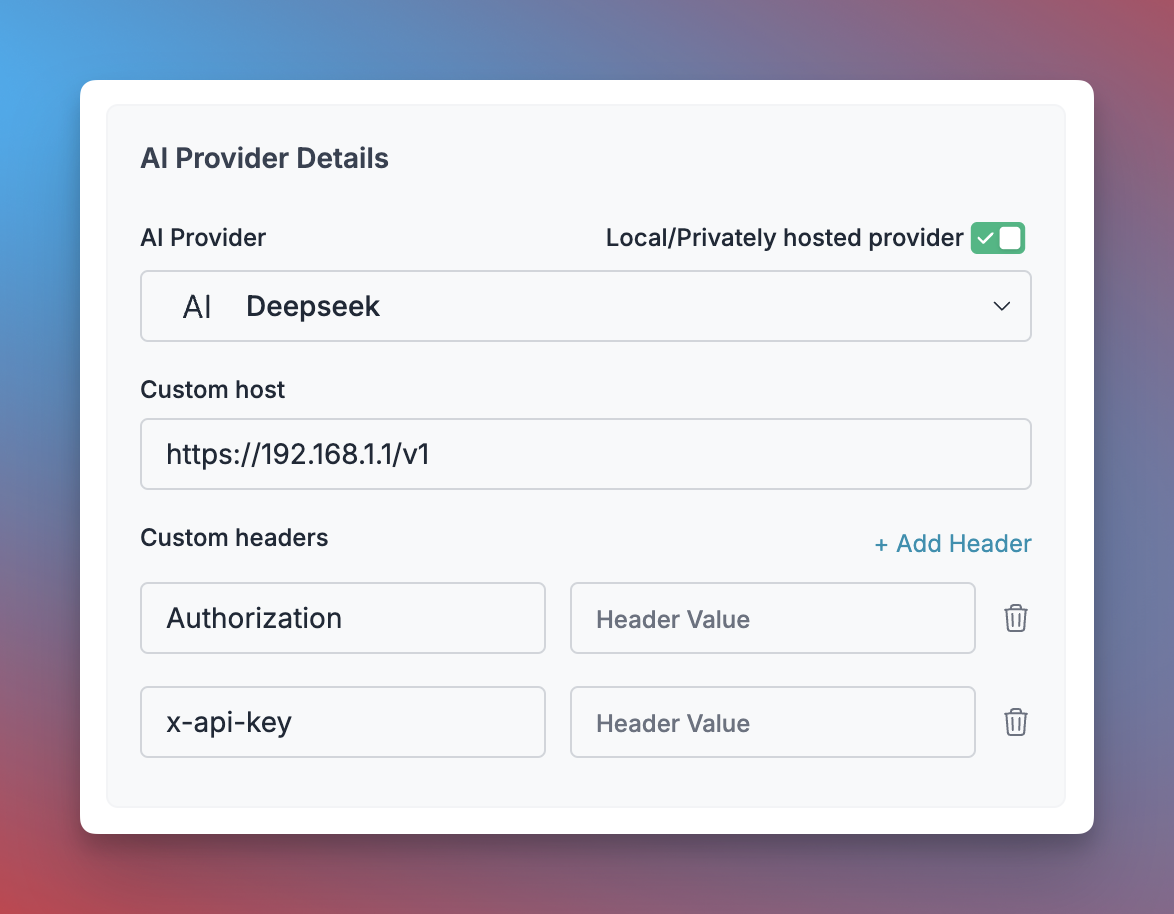 1. Click **"Add Provider"** and enable the **"Local/Privately hosted provider"** toggle
2. Configure your deployment:
* Select the matching provider API specification (typically `OpenAI`)
* Enter your model's base URL in the `Custom Host` field
* Add required authentication headers and their values
3. Name your provider (e.g., `my-private-llm`)
4. Click **"Create"** to save your configuration
#### Step 2: Use Your Provider in Requests
After adding your provider to the Model Catalog, you can use it in your applications:
```js NodeJS theme={"system"}
import Portkey from 'portkey-ai'
const portkey = new Portkey({
apiKey: "PORTKEY_API_KEY",
provider:"@YOUR_PRIVATE_LLM_PROVIDER"
})
async function main() {
const response = await portkey.chat.completions.create({
messages: [{ role: "user", content: "Explain quantum computing in simple terms" }],
model: "YOUR_MODEL_NAME", // The model name your private deployment expects
});
console.log(response.choices[0].message.content);
}
main();
```
```py Python theme={"system"}
from portkey_ai import Portkey
portkey = Portkey(
api_key="PORTKEY_API_KEY",
provider="@YOUR_PRIVATE_LLM_PROVIDER"
)
response = portkey.chat.completions.create(
model="YOUR_MODEL_NAME", # The model name your private deployment expects
messages=[
{"role": "user", "content": "Explain quantum computing in simple terms"}
]
)
print(response.choices[0].message.content)
```
```sh cURL theme={"system"}
curl https://api.portkey.ai/v1/chat/completions \
-H "Content-Type: application/json" \
-H "x-portkey-api-key: $PORTKEY_API_KEY" \
-H "x-portkey-provider: @my-private-llm" \
-d '{
"model": "YOUR_MODEL_NAME",
"messages": [
{ "role": "user", "content": "Explain quantum computing in simple terms" }
]
}'
```
### Option 2: Direct Integration Without Model Catalog
If you prefer not to store your private LLM details in Portkey's Model Catalog, you can pass them directly in your API requests:
```js NodeJS theme={"system"}
import Portkey from 'portkey-ai'
const portkey = new Portkey({
apiKey: "PORTKEY_API_KEY",
provider: "openai", // The API spec your LLM implements
customHost: "https://your-llm-server.com/v1/", // Include the API version
Authorization: "Bearer YOUR_AUTH_TOKEN", // Optional: Any auth headers needed
forwardHeaders: ["Authorization"] // Headers to forward without processing
})
async function main() {
const response = await portkey.chat.completions.create({
messages: [{ role: "user", content: "Explain quantum computing in simple terms" }],
model: "YOUR_MODEL_NAME",
});
console.log(response.choices[0].message.content);
}
main();
```
```py Python theme={"system"}
from portkey_ai import Portkey
portkey = Portkey(
api_key="PORTKEY_API_KEY",
provider="openai", # The API spec your LLM implements
custom_host="https://your-llm-server.com/v1/", # Include the API version
Authorization="Bearer YOUR_AUTH_TOKEN", # Optional: Any auth headers needed
forward_headers=["Authorization"] # Headers to forward without processing
)
response = portkey.chat.completions.create(
model="YOUR_MODEL_NAME",
messages=[{"role": "user", "content": "Explain quantum computing in simple terms"}]
)
print(response.choices[0].message.content)
```
```sh cURL theme={"system"}
curl https://api.portkey.ai/v1/chat/completions \
-H "Content-Type: application/json" \
-H "x-portkey-api-key: $PORTKEY_API_KEY" \
-H "x-portkey-provider: openai" \
-H "x-portkey-custom-host: https://your-llm-server.com/v1" \
-H "Authorization: Bearer YOUR_AUTH_TOKEN" \
-H "x-portkey-forward-headers: Authorization" \
-d '{
"model": "YOUR_MODEL_NAME",
"messages": [
{ "role": "user", "content": "Explain quantum computing in simple terms" }
]
}'
```
The `custom_host` must include the API version path (e.g., `/v1/`). Portkey will automatically append the endpoint path (`/chat/completions`, `/completions`, or `/embeddings`).
Portkey blocks requests to private and reserved IP ranges by default. If your private LLM runs on an internal network IP, see [Custom hosts](/product/ai-gateway/custom-hosts) for blocked patterns and how to allowlist specific hosts.
***
## Securely Forwarding Sensitive Headers
For headers containing sensitive information that shouldn't be logged or processed by Portkey, use the `forward_headers` parameter to pass them directly to your private LLM:
```js theme={"system"}
import Portkey from 'portkey-ai'
const portkey = new Portkey({
apiKey: "PORTKEY_API_KEY",
provider: "openai",
customHost: "https://your-llm-server.com/v1/",
// Headers to include with requests
Authorization: "Bearer sk_live_xxxxx",
xApiKey: "sensitive-key-value",
xOrgId: "org-12345",
// Headers to forward without processing
forwardHeaders: ["Authorization", "xApiKey", "xOrgId"]
})
```
In the JavaScript SDK, convert header names to **camelCase**. For example, `X-My-Custom-Header` becomes `xMyCustomHeader`.
```python theme={"system"}
from portkey_ai import Portkey
portkey = Portkey(
api_key="PORTKEY_API_KEY",
provider="openai",
custom_host="https://your-llm-server.com/v1/",
# Headers to include with requests
Authorization="Bearer sk_live_xxxxx",
x_api_key="sensitive-key-value",
x_org_id="org-12345",
# Headers to forward without processing
forward_headers=["Authorization", "x_api_key", "x_org_id"]
)
```
In the Python SDK, convert header names to **snake\_case**. For example, `X-My-Custom-Header` becomes `x_my_custom_header`.
```sh theme={"system"}
curl https://api.portkey.ai/v1/chat/completions \
-H "Content-Type: application/json" \
-H "x-portkey-api-key: $PORTKEY_API_KEY" \
-H "x-portkey-provider: openai" \
-H "x-portkey-custom-host: https://your-llm-server.com/v1" \
-H "Authorization: Bearer sk_live_xxxxx" \
-H "x-api-key: sensitive-key-value" \
-H "x-org-id: org-12345" \
-H "x-portkey-forward-headers: Authorization, x-api-key, x-org-id" \
-d '{
"model": "YOUR_MODEL_NAME",
"messages": [{ "role": "user", "content": "Hello!" }]
}'
```
### Using Forward Headers in Gateway Configs
You can also specify `forward_headers` in your Gateway Config for consistent header forwarding:
```json theme={"system"}
{
"strategy": { "mode": "fallback" },
"targets": [
{
"provider": "openai",
"custom_host": "https://your-private-llm.com/v1",
"forward_headers": ["Authorization", "x-api-key", "x-custom-token"]
},
{
"provider": "openai",
"api_key": "sk-xxxxx" // Fallback to commercial provider
}
]
}
```
## Advanced Features
### Using Private LLMs with Gateway Configs
Private LLMs work seamlessly with all Portkey Gateway features. Some common use cases:
* **Load Balancing**: Distribute traffic across multiple private LLM instances
* **Fallbacks**: Set up automatic failover between private and commercial LLMs
* **Conditional Routing**: Route requests to different LLMs based on metadata
```json theme={"system"}
{
"strategy": {
"mode": "fallback"
},
"targets": [
{
"provider": "openai",
"custom_host": "http://PRIVATE_LLM/v1",
"forward_headers": ["Authorization"]
},
{
"provider":"@openai-key"
}
]
}
```
Learn more about [Gateway Configs](/product/ai-gateway/configs).
***
## Monitoring and Analytics
Portkey provides comprehensive observability for your private LLM deployments, just like it does for commercial providers:
* **Log Analysis**: View detailed request and response logs
* **Performance Metrics**: Track latency, token usage, and error rates
* **User Attribution**: Associate requests with specific users via metadata
1. Click **"Add Provider"** and enable the **"Local/Privately hosted provider"** toggle
2. Configure your deployment:
* Select the matching provider API specification (typically `OpenAI`)
* Enter your model's base URL in the `Custom Host` field
* Add required authentication headers and their values
3. Name your provider (e.g., `my-private-llm`)
4. Click **"Create"** to save your configuration
#### Step 2: Use Your Provider in Requests
After adding your provider to the Model Catalog, you can use it in your applications:
```js NodeJS theme={"system"}
import Portkey from 'portkey-ai'
const portkey = new Portkey({
apiKey: "PORTKEY_API_KEY",
provider:"@YOUR_PRIVATE_LLM_PROVIDER"
})
async function main() {
const response = await portkey.chat.completions.create({
messages: [{ role: "user", content: "Explain quantum computing in simple terms" }],
model: "YOUR_MODEL_NAME", // The model name your private deployment expects
});
console.log(response.choices[0].message.content);
}
main();
```
```py Python theme={"system"}
from portkey_ai import Portkey
portkey = Portkey(
api_key="PORTKEY_API_KEY",
provider="@YOUR_PRIVATE_LLM_PROVIDER"
)
response = portkey.chat.completions.create(
model="YOUR_MODEL_NAME", # The model name your private deployment expects
messages=[
{"role": "user", "content": "Explain quantum computing in simple terms"}
]
)
print(response.choices[0].message.content)
```
```sh cURL theme={"system"}
curl https://api.portkey.ai/v1/chat/completions \
-H "Content-Type: application/json" \
-H "x-portkey-api-key: $PORTKEY_API_KEY" \
-H "x-portkey-provider: @my-private-llm" \
-d '{
"model": "YOUR_MODEL_NAME",
"messages": [
{ "role": "user", "content": "Explain quantum computing in simple terms" }
]
}'
```
### Option 2: Direct Integration Without Model Catalog
If you prefer not to store your private LLM details in Portkey's Model Catalog, you can pass them directly in your API requests:
```js NodeJS theme={"system"}
import Portkey from 'portkey-ai'
const portkey = new Portkey({
apiKey: "PORTKEY_API_KEY",
provider: "openai", // The API spec your LLM implements
customHost: "https://your-llm-server.com/v1/", // Include the API version
Authorization: "Bearer YOUR_AUTH_TOKEN", // Optional: Any auth headers needed
forwardHeaders: ["Authorization"] // Headers to forward without processing
})
async function main() {
const response = await portkey.chat.completions.create({
messages: [{ role: "user", content: "Explain quantum computing in simple terms" }],
model: "YOUR_MODEL_NAME",
});
console.log(response.choices[0].message.content);
}
main();
```
```py Python theme={"system"}
from portkey_ai import Portkey
portkey = Portkey(
api_key="PORTKEY_API_KEY",
provider="openai", # The API spec your LLM implements
custom_host="https://your-llm-server.com/v1/", # Include the API version
Authorization="Bearer YOUR_AUTH_TOKEN", # Optional: Any auth headers needed
forward_headers=["Authorization"] # Headers to forward without processing
)
response = portkey.chat.completions.create(
model="YOUR_MODEL_NAME",
messages=[{"role": "user", "content": "Explain quantum computing in simple terms"}]
)
print(response.choices[0].message.content)
```
```sh cURL theme={"system"}
curl https://api.portkey.ai/v1/chat/completions \
-H "Content-Type: application/json" \
-H "x-portkey-api-key: $PORTKEY_API_KEY" \
-H "x-portkey-provider: openai" \
-H "x-portkey-custom-host: https://your-llm-server.com/v1" \
-H "Authorization: Bearer YOUR_AUTH_TOKEN" \
-H "x-portkey-forward-headers: Authorization" \
-d '{
"model": "YOUR_MODEL_NAME",
"messages": [
{ "role": "user", "content": "Explain quantum computing in simple terms" }
]
}'
```
The `custom_host` must include the API version path (e.g., `/v1/`). Portkey will automatically append the endpoint path (`/chat/completions`, `/completions`, or `/embeddings`).
Portkey blocks requests to private and reserved IP ranges by default. If your private LLM runs on an internal network IP, see [Custom hosts](/product/ai-gateway/custom-hosts) for blocked patterns and how to allowlist specific hosts.
***
## Securely Forwarding Sensitive Headers
For headers containing sensitive information that shouldn't be logged or processed by Portkey, use the `forward_headers` parameter to pass them directly to your private LLM:
```js theme={"system"}
import Portkey from 'portkey-ai'
const portkey = new Portkey({
apiKey: "PORTKEY_API_KEY",
provider: "openai",
customHost: "https://your-llm-server.com/v1/",
// Headers to include with requests
Authorization: "Bearer sk_live_xxxxx",
xApiKey: "sensitive-key-value",
xOrgId: "org-12345",
// Headers to forward without processing
forwardHeaders: ["Authorization", "xApiKey", "xOrgId"]
})
```
In the JavaScript SDK, convert header names to **camelCase**. For example, `X-My-Custom-Header` becomes `xMyCustomHeader`.
```python theme={"system"}
from portkey_ai import Portkey
portkey = Portkey(
api_key="PORTKEY_API_KEY",
provider="openai",
custom_host="https://your-llm-server.com/v1/",
# Headers to include with requests
Authorization="Bearer sk_live_xxxxx",
x_api_key="sensitive-key-value",
x_org_id="org-12345",
# Headers to forward without processing
forward_headers=["Authorization", "x_api_key", "x_org_id"]
)
```
In the Python SDK, convert header names to **snake\_case**. For example, `X-My-Custom-Header` becomes `x_my_custom_header`.
```sh theme={"system"}
curl https://api.portkey.ai/v1/chat/completions \
-H "Content-Type: application/json" \
-H "x-portkey-api-key: $PORTKEY_API_KEY" \
-H "x-portkey-provider: openai" \
-H "x-portkey-custom-host: https://your-llm-server.com/v1" \
-H "Authorization: Bearer sk_live_xxxxx" \
-H "x-api-key: sensitive-key-value" \
-H "x-org-id: org-12345" \
-H "x-portkey-forward-headers: Authorization, x-api-key, x-org-id" \
-d '{
"model": "YOUR_MODEL_NAME",
"messages": [{ "role": "user", "content": "Hello!" }]
}'
```
### Using Forward Headers in Gateway Configs
You can also specify `forward_headers` in your Gateway Config for consistent header forwarding:
```json theme={"system"}
{
"strategy": { "mode": "fallback" },
"targets": [
{
"provider": "openai",
"custom_host": "https://your-private-llm.com/v1",
"forward_headers": ["Authorization", "x-api-key", "x-custom-token"]
},
{
"provider": "openai",
"api_key": "sk-xxxxx" // Fallback to commercial provider
}
]
}
```
## Advanced Features
### Using Private LLMs with Gateway Configs
Private LLMs work seamlessly with all Portkey Gateway features. Some common use cases:
* **Load Balancing**: Distribute traffic across multiple private LLM instances
* **Fallbacks**: Set up automatic failover between private and commercial LLMs
* **Conditional Routing**: Route requests to different LLMs based on metadata
```json theme={"system"}
{
"strategy": {
"mode": "fallback"
},
"targets": [
{
"provider": "openai",
"custom_host": "http://PRIVATE_LLM/v1",
"forward_headers": ["Authorization"]
},
{
"provider":"@openai-key"
}
]
}
```
Learn more about [Gateway Configs](/product/ai-gateway/configs).
***
## Monitoring and Analytics
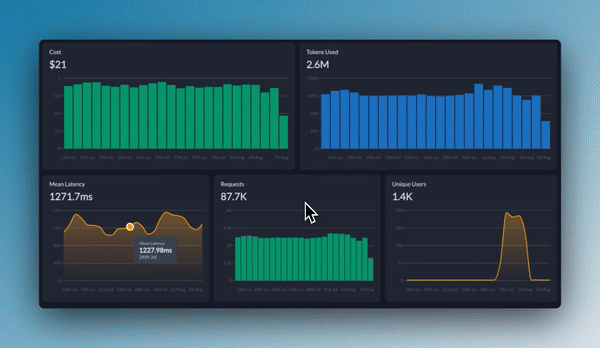
Portkey provides comprehensive observability for your private LLM deployments, just like it does for commercial providers:
* **Log Analysis**: View detailed request and response logs
* **Performance Metrics**: Track latency, token usage, and error rates
* **User Attribution**: Associate requests with specific users via metadata
 ***
## Troubleshooting
| Issue | Possible Causes | Solutions |
| ----------------------- | --------------------------------------------------- | ------------------------------------------------------------------------------ |
| Connection Errors | Incorrect URL, network issues, firewall rules | Verify URL format, check network connectivity, confirm firewall allows traffic |
| Authentication Failures | Invalid credentials, incorrect header format | Check credentials, ensure headers are correctly formatted and forwarded |
| Timeout Errors | LLM server overloaded, request too complex | Adjust timeout settings, implement load balancing, simplify requests |
| Inconsistent Responses | Different model versions, configuration differences | Standardize model versions, document expected behavior differences |
## FAQs
Yes, as long as it implements an API specification compatible with one of Portkey's supported providers (OpenAI, Anthropic, etc.). The model should accept requests and return responses in the format expected by that provider.
You have two options:
1. Create separate integration for each endpoint
2. Use Gateway Configs with load balancing to distribute traffic across multiple endpoints
Portkey itself doesn't impose specific request volume limitations for private LLMs. Your throughput will be limited only by your private LLM deployment's capabilities and any rate limits you configure in Portkey.
Yes, you can specify different model names in your requests as long as your private LLM deployment supports them. The model name is passed through to your deployment.
Absolutely! One of Portkey's key benefits is the ability to manage both private and commercial LLMs through a unified interface. You can even set up fallbacks between them or route requests conditionally.
***
## Next Steps
Explore these related resources to get the most out of your private LLM integration:
***
## Troubleshooting
| Issue | Possible Causes | Solutions |
| ----------------------- | --------------------------------------------------- | ------------------------------------------------------------------------------ |
| Connection Errors | Incorrect URL, network issues, firewall rules | Verify URL format, check network connectivity, confirm firewall allows traffic |
| Authentication Failures | Invalid credentials, incorrect header format | Check credentials, ensure headers are correctly formatted and forwarded |
| Timeout Errors | LLM server overloaded, request too complex | Adjust timeout settings, implement load balancing, simplify requests |
| Inconsistent Responses | Different model versions, configuration differences | Standardize model versions, document expected behavior differences |
## FAQs
Yes, as long as it implements an API specification compatible with one of Portkey's supported providers (OpenAI, Anthropic, etc.). The model should accept requests and return responses in the format expected by that provider.
You have two options:
1. Create separate integration for each endpoint
2. Use Gateway Configs with load balancing to distribute traffic across multiple endpoints
Portkey itself doesn't impose specific request volume limitations for private LLMs. Your throughput will be limited only by your private LLM deployment's capabilities and any rate limits you configure in Portkey.
Yes, you can specify different model names in your requests as long as your private LLM deployment supports them. The model name is passed through to your deployment.
Absolutely! One of Portkey's key benefits is the ability to manage both private and commercial LLMs through a unified interface. You can even set up fallbacks between them or route requests conditionally.
***
## Next Steps
Explore these related resources to get the most out of your private LLM integration: