> ## Documentation Index
> Fetch the complete documentation index at: https://portkey-docs-feat-rerank-documentation.mintlify.site/llms.txt
> Use this file to discover all available pages before exploring further.
# Google Vertex AI
Portkey provides a robust and secure gateway to facilitate the integration of various Large Language Models (LLMs), and embedding models into your apps, including [Google Vertex AI](https://cloud.google.com/vertex-ai?hl=en).
With Portkey, you can take advantage of features like fast AI gateway access, observability, prompt management, and more, all while ensuring the secure management of your Vertex auth through [Model Catalog](/product/model-catalog).
## Quick Start
```python Python icon="python" theme={"system"}
from portkey_ai import Portkey
# 1. Install: pip install portkey-ai
# 2. Add @vertex-ai provider in Model Catalog with Service Account JSON
# 3. Use it:
portkey = Portkey(api_key="PORTKEY_API_KEY")
response = portkey.chat.completions.create(
model="@vertex-ai/gemini-3-pro-preview",
messages=[{"role": "user", "content": "Say this is a test"}]
)
print(response.choices[0].message.content)
```
```js Javascript icon="square-js" theme={"system"}
import Portkey from 'portkey-ai'
// 1. Install: npm install portkey-ai
// 2. Add @vertex-ai provider in Model Catalog with Service Account JSON
// 3. Use it:
const portkey = new Portkey({
apiKey: "PORTKEY_API_KEY"
})
const response = await portkey.chat.completions.create({
model: "@vertex-ai/gemini-3-pro-preview",
messages: [{ role: "user", content: "Say this is a test" }]
})
console.log(response.choices[0].message.content)
```
```sh cURL icon="square-terminal" theme={"system"}
# 1. Add @vertex-ai provider in Model Catalog with Service Account JSON
# 2. Use it:
curl https://api.portkey.ai/v1/chat/completions \
-H "Content-Type: application/json" \
-H "x-portkey-api-key: $PORTKEY_API_KEY" \
-d '{
"model": "@vertex-ai/gemini-3-pro-preview",
"messages": [{"role": "user", "content": "Say this is a test"}]
}'
```
**Authentication Note:** When you configure Vertex AI in Model Catalog with **Service Account JSON** (recommended), authentication is handled automatically. If you only configure with **Project ID and Region**, you'll need to pass an OAuth2 access token with each request using the `Authorization` header. See the [Making Requests Without Model Catalog](#making-requests-without-portkeys-model-catalog) section for details.
***
## Add Provider in Model Catalog
Go to [**Model Catalog → Add Provider**](https://app.portkey.ai/model-catalog/providers) in your Portkey dashboard.
Find and select **Google Vertex AI** from the provider list.
You'll need your `Vertex Project ID` and `Vertex Region`. You can authenticate using either:
**Option 1: Service Account JSON** (Recommended for self-deployed models)
* Upload your Google Cloud service account JSON file
* Specify the Vertex Region
* Required for custom endpoints (must have `aiplatform.endpoints.predict` permission)
**Option 2: Project ID and Region**
* Enter your Vertex Project ID
* Enter your Vertex Region
* Simpler but may not support all features
[Here's a guide on how to find your Vertex Project details](#how-to-find-your-google-vertex-project-details)
If you're using Service Account File, [refer to this guide](#get-your-service-account-json).
Save your configuration. Your provider slug will be `@vertex-ai` (or a custom name you specify).
**Self-Hosted GKE Deployments:** When running the Portkey Gateway on GKE with [Workload Identity Federation](/self-hosting/hybrid-deployments/gcp#setting-up-iam-permission) enabled (`GCP_AUTH_MODE=workload`), the Gateway automatically acquires Vertex AI access tokens from the GCP metadata server. No manual `Authorization` header is needed.
The GSA bound to the Gateway's KSA must have the `roles/aiplatform.user` role. See the [GCP deployment guide](/self-hosting/hybrid-deployments/gcp#setting-up-iam-permission) for setup.
**To use Anthropic models on Vertex AI**, prepend `anthropic.` to the model name.\
Example: `@vertex-ai/anthropic.claude-3-5-sonnet@20240620`
Similarly, **for Meta models**, prepend `meta.` to the model name.\
Example: `@vertex-ai/meta.llama-3-8b-8192`
**Anthropic Beta Header Support**: When using Anthropic models on Vertex AI, you can pass the `anthropic-beta` header (or `x-portkey-anthropic-beta`) to enable beta features. This header is forwarded to the underlying Anthropic API.
***
## Vertex AI Capabilities
## Using the /messages Route with Vertex AI Models
Access Claude models on Vertex AI through Anthropic's native`/messages` endpoint using Portkey's SDK or Anthropic's SDK.
This route only works with Claude models. For other models, use the standard OpenAI compliant endpoint.
```sh theme={"system"}
curl --location 'https://api.portkey.ai/v1/messages' \
--header 'Content-Type: application/json' \
--header 'x-portkey-api-key: YOUR_PORTKEY_API_KEY' \
--data '{
"model": "@YOUR_VERTEX_PROVIDER/MODEL_NAME",
"max_tokens": 250,
"messages": [
{
"role": "user",
"content": "Hello, Claude"
}
]
}'
```
```python Anthropic Python SDK theme={"system"}
import anthropic
client = anthropic.Anthropic(
api_key="dummy", # we will use portkey's provider slug
default_headers={"x-portkey-api-key": "YOUR_PORTKEY_API_KEY"},
base_url="https://api.portkey.ai/v1"
)
message = client.messages.create(
model="@your-provider-slug/your-model-name",
max_tokens=250,
messages=[
{"role": "user", "content": "Hello, Claude"}
],
)
print(message.content)
```
```typescript Anthropic TS SDK theme={"system"}
import Anthropic from '@anthropic-ai/sdk';
const anthropic = new Anthropic({
apiKey: 'dummy', // we will use portkey's provider slug
baseURL: "https://api.portkey.ai/v1",
defaultHeaders: { "x-portkey-api-key": "YOUR_PORTKEY_API_KEY" }
});
const msg = await anthropic.messages.create({
model: "@your-provider-slug/your-model-name",
max_tokens: 1024,
messages: [{ role: "user", content: "Hello, Claude" }],
});
console.log(msg);
```
Portkey supports the [Google Vertex AI CountTokens API](https://docs.cloud.google.com/vertex-ai/generative-ai/docs/model-reference/count-tokens) to estimate token usage before sending requests. Check out the count-tokens guide for more details.
## Explicit context caching
Vertex AI supports [context caching](https://cloud.google.com/vertex-ai/generative-ai/docs/context-cache/context-cache-create) to reduce costs and latency for repeated prompts with large amounts of context. You can explicitly create a cache and then reference it in subsequent inference requests.
### Step 1: Create a context cache
Use the Vertex AI `cachedContents` endpoint through Portkey to create a cache:
```sh cURL theme={"system"}
curl --location 'https://api.portkey.ai/v1/projects/{{YOUR_PROJECT_ID}}/locations/{{LOCATION}}/cachedContents' \
--header 'x-portkey-provider: {{@my-vertex-ai-provider}}' \
--header 'Content-Type: application/json' \
--header 'x-portkey-api-key: {{your_api_key}}' \
--header 'x-portkey-custom-host: https://aiplatform.googleapis.com/v1' \
--data '{
"model": "projects/{{YOUR_PROJECT_ID}}/locations/{{LOCATION}}/publishers/google/models/{{MODEL_ID}}",
"displayName": "{{my-cache-display-name}}",
"contents": [{
"role": "user",
"parts": [{
"text": "This is sample text to demonstrate explicit caching. (you need a minimum of 1024 tokens)"
}]
},
{
"role": "model",
"parts": [{
"text": "thankyou I am your helpful assistant"
}]
}]
}'
```
**Request variables:**
| Variable | Description |
| ------------------------ | -------------------------------------------------------------- |
| `YOUR_PROJECT_ID` | Your Google Cloud project ID. |
| `LOCATION` | The region where your model is deployed (e.g., `us-central1`). |
| `MODEL_ID` | The model identifier (e.g., `gemini-1.5-pro-001`). |
| `my-cache-display-name` | A unique name to identify your cache. |
| `your_api_key` | Your Portkey API key. |
| `@my-vertex-ai-provider` | Your Vertex AI provider slug from Portkey's Model Catalog. |
Context caching requires a minimum of 1024 tokens in the cached content. The cache has a default TTL (time-to-live) which you can configure using the `ttl` parameter.
### Step 2: Use the cache in inference requests
Once the cache is created, reference it in your chat completion requests using the `cached_content` parameter:
```sh theme={"system"}
curl 'https://api.portkey.ai/v1/chat/completions' \
-H 'Content-Type: application/json' \
-H 'x-portkey-api-key: {{your_api_key}}' \
--data '{
"model": "@my-vertex-ai-provider/gemini-1.5-pro-001",
"cached_content": "{{my-cache-display-name}}",
"messages": [
{
"role": "user",
"content": "Based on the context I provided earlier, answer my question."
}
]
}'
```
```python theme={"system"}
from portkey_ai import Portkey
portkey = Portkey(
api_key="PORTKEY_API_KEY",
)
completion = portkey.chat.completions.create(
model="@my-vertex-ai-provider/gemini-1.5-pro-001",
cached_content="my-cache-display-name",
messages=[
{"role": "user", "content": "Based on the context I provided earlier, answer my question."}
]
)
print(completion)
```
```javascript theme={"system"}
import Portkey from 'portkey-ai';
const portkey = new Portkey({
apiKey: "PORTKEY_API_KEY",
});
const completion = await portkey.chat.completions.create({
model: "@my-vertex-ai-provider/gemini-1.5-pro-001",
cached_content: "my-cache-display-name",
messages: [
{ role: "user", content: "Based on the context I provided earlier, answer my question." }
]
});
console.log(completion);
```
The model and region used in the inference request must match the model and region used when creating the cache.
For more details on context caching options like TTL configuration and cache management, refer to the [Vertex AI context caching documentation](https://cloud.google.com/vertex-ai/generative-ai/docs/context-cache/context-cache-create).
***
## Using Self-Deployed Models on Vertex AI (Hugging Face, Custom Models)
Portkey supports connecting to self-deployed models on Vertex AI, including models from Hugging Face or any custom models you've deployed to a Vertex AI endpoint.
**Requirements for Self-Deployed Models**
To use self-deployed models on Vertex AI through Portkey:
1. **Model Naming Convention**: When making requests to your self-deployed model, you must prefix the model name with `endpoints.`
```
endpoints.my_endpoint_name
```
2. **Required Permissions**: The Google Cloud service account used in your Portkey Model Catalog must have the `aiplatform.endpoints.predict` permission.
```js theme={"system"}
const chatCompletion = await portkey.chat.completions.create({
messages: [{ role: 'user', content: 'Say this is a test' }],
model: '@vertex-ai/endpoints.my_custom_llm', // Use Model Catalog slug with 'endpoints.' prefix
});
console.log(chatCompletion.choices);
```
```python theme={"system"}
completion = portkey.chat.completions.create(
messages= [{ "role": 'user', "content": 'Say this is a test' }],
model= '@vertex-ai/endpoints.my_huggingface_model' # Use Model Catalog slug with 'endpoints.' prefix
)
print(completion)
```
**Why the prefix?** Vertex AI's product offering for self-deployed models is called "Endpoints." This naming convention indicates to Portkey that it should route requests to your custom endpoint rather than a standard Vertex AI model.
This approach works for all models you can self-deploy on Vertex AI Model Garden, including Hugging Face models and your own custom models.
## Document, Video, Audio Processing
Vertex AI supports attaching various file types to your Gemini messages including documents (`pdf`), images (`jpg`, `png`), videos (`webm`, `mp4`), and audio files.
**Supported Audio Formats:** `mp3`, `wav`, `opus`, `flac`, `pcm`, `aac`, `m4a`, `mpeg`, `mpga`, `mp4`, `webm`
Gemini Docs:
* [Document Processing](https://ai.google.dev/gemini-api/docs/document-processing?lang=python)
* [Video & Image Processing](https://ai.google.dev/gemini-api/docs/vision?lang=python)
* [Audio Processing](https://ai.google.dev/gemini-api/docs/audio?lang=python)
Using Portkey, here's how you can send these media files:
```javascript JavaScript theme={"system"}
const chatCompletion = await portkey.chat.completions.create({
messages: [
{ role: 'system', content: 'You are a helpful assistant' },
{ role: 'user', content: [
{
type: 'image_url',
image_url: {
url: 'gs://cloud-samples-data/generative-ai/image/scones.jpg'
}
},
{
type: 'text',
text: 'Describe the image'
}
]}
],
model: '@vertex-ai/gemini-3-pro-preview',
max_tokens: 200
});
```
```python Python theme={"system"}
completion = portkey.chat.completions.create(
messages=[
{
"role": "system",
"content": "You are a helpful assistant"
},
{
"role": "user",
"content": [
{
"type": "image_url",
"image_url": {
"url": "gs://cloud-samples-data/generative-ai/image/scones.jpg"
}
},
{
"type": "text",
"text": "Describe the image"
}
]
}
],
model='@vertex-ai/gemini-3-pro-preview',
max_tokens=200
)
print(completion)
```
```sh cURL theme={"system"}
curl --location 'https://api.portkey.ai/v1/chat/completions' \
--header 'Content-Type: application/json' \
--header 'x-portkey-api-key: PORTKEY_API_KEY' \
--data '{
"model": "@vertex-ai/gemini-3-pro-preview",
"max_tokens": 200,
"stream": false,
"messages": [
{
"role": "system",
"content": "You are a helpful assistant"
},
{
"role": "user",
"content": [
{
"type": "image_url",
"image_url": {
"url": "gs://cloud-samples-data/generative-ai/image/scones.jpg"
}
},
{
"type": "text",
"text": "describe this image"
}
]
}
]
}'
```
### Document Processing (PDF)
Gemini's vision capabilities excel at understanding the content of PDF documents, including text, tables, and images.
**Method 1: Sending a Document via Google Files URL**
Upload your PDF using the Files API to get a Google Files URL.
```javascript NodeJS theme={"system"}
const chatCompletion = await portkey.chat.completions.create({
model: '@vertex-ai/gemini-3-pro-preview',
messages: [{
role: 'user',
content: [
{
type: 'image_url',
image_url: {
url: 'https://generativelanguage.googleapis.com/v1beta/files/your-pdf-file-id'
}
},
{ type: 'text', text: 'Summarize the key findings of this research paper.' }
]
}],
});
console.log(chatCompletion.choices[0].message.content);
```
```python Python theme={"system"}
completion = portkey.chat.completions.create(
model='@vertex-ai/gemini-3-pro-preview',
messages=[{
"role": "user",
"content": [
{
"type": "image_url",
"image_url": {
"url": "https://generativelanguage.googleapis.com/v1beta/files/your-pdf-file-id"
}
},
{ "type": "text", "text": "Summarize the key findings of this research paper." }
]
}],
)
print(completion.choices[0].message.content)
```
```sh cURL theme={"system"}
curl --location 'https://api.portkey.ai/v1/chat/completions' \
--header 'x-portkey-api-key: YOUR_PORTKEY_API_KEY' \
--header 'Content-Type: application/json' \
--data '{
"model": "@VERTEX_PROVIDER/MODEL_NAME",
"messages": [{
"role": "user",
"content": [
{"type": "text", "text": "Summarize the key findings of this research paper."},
{"type": "image_url", "image_url": {"url": "https://generativelanguage.googleapis.com/v1beta/files/your-pdf-file-id"}}
]
}]
}'
```
**Method 2: Sending a Local Document as Base64 Data**
This is suitable for smaller, local PDF files.
```javascript NodeJS theme={"system"}
import fs from 'fs';
const pdfBytes = fs.readFileSync('whitepaper.pdf');
const base64Pdf = pdfBytes.toString('base64');
const pdfUri = `data:application/pdf;base64,${base64Pdf}`;
const chatCompletion = await portkey.chat.completions.create({
model: '@VERTEX_PROVIDER/MODEL_NAME',
messages: [{
role: 'user',
content: [
{ type: 'image_url', image_url: { url: pdfUri }},
{ type: 'text', text: 'What is the main conclusion of this document?' }
]
}],
});
console.log(chatCompletion.choices[0].message.content);
```
```python Python theme={"system"}
import base64
with open("whitepaper.pdf", "rb") as pdf_file:
pdf_bytes = pdf_file.read()
base64_pdf = base64.b64encode(pdf_bytes).decode('utf-8')
pdf_uri = f"data:application/pdf;base64,{base64_pdf}"
completion = portkey.chat.completions.create(
model='@VERTEX_PROVIDER/MODEL_NAME',
messages=[{
"role": "user",
"content": [
{ "type": "image_url", "image_url": { "url": pdf_uri }},
{ "type": "text", "text": "What is the main conclusion of this document?" }
]
}],
)
print(completion.choices[0].message.content)
```
```sh cURL theme={"system"}
# First, encode your PDF file to base64
# For example: base64 -i whitepaper.pdf -o pdf.b64
# Then use the encoded content in the request
curl --location 'https://api.portkey.ai/v1/chat/completions' \
--header 'x-portkey-api-key: YOUR_PORTKEY_API_KEY' \
--header 'Content-Type: application/json' \
--data '{
"model": "@VERTEX_PROVIDER/MODEL_NAME",
"messages": [{
"role": "user",
"content": [
{"type": "text", "text": "What is the main conclusion of this document?"},
{"type": "image_url", "image_url": {"url": "data:application/pdf;base64,YOUR_BASE64_PDF_DATA"}}
]
}]
}'
```
While you can send other document types like `.txt` or `.html`, they will be treated as plain text. Gemini's native document vision capabilities are optimized for the `application/pdf` MIME type.
***
## Media Resolution
The `media_resolution` parameter allows you to control token allocation for media inputs (images, videos, PDFs) when using Gemini models on Vertex AI. This helps balance between processing detail and cost/speed.
### Supported values
| Value | Description |
| ----------------------------- | --------------------------------------------------------- |
| `MEDIA_RESOLUTION_LOW` | Reduced tokens for faster, cheaper processing |
| `MEDIA_RESOLUTION_MEDIUM` | Balanced approach between detail and cost |
| `MEDIA_RESOLUTION_HIGH` | Maximum tokens for detailed analysis |
| `MEDIA_RESOLUTION_ULTRA_HIGH` | Highest resolution (per-part only, for specialized tasks) |
### Top-level configuration
Apply media resolution globally to all media in the request:
```python Python theme={"system"}
completion = portkey.chat.completions.create(
model="@vertex-ai/gemini-1.5-pro",
media_resolution="MEDIA_RESOLUTION_HIGH",
messages=[{
"role": "user",
"content": [
{
"type": "image_url",
"image_url": {
"url": "gs://cloud-samples-data/generative-ai/image/scones.jpg"
}
},
{"type": "text", "text": "Analyze this image in detail."}
]
}]
)
```
```javascript NodeJS theme={"system"}
const chatCompletion = await portkey.chat.completions.create({
model: "@vertex-ai/gemini-1.5-pro",
media_resolution: "MEDIA_RESOLUTION_HIGH",
messages: [{
role: "user",
content: [
{
type: "image_url",
image_url: {
url: "gs://cloud-samples-data/generative-ai/image/scones.jpg"
}
},
{type: "text", text: "Analyze this image in detail."}
]
}]
});
```
```sh cURL theme={"system"}
curl https://api.portkey.ai/v1/chat/completions \
-H "x-portkey-api-key: $PORTKEY_API_KEY" \
-H "Content-Type: application/json" \
-d '{
"model": "@vertex-ai/gemini-1.5-pro",
"media_resolution": "MEDIA_RESOLUTION_HIGH",
"messages": [{
"role": "user",
"content": [
{"type": "image_url", "image_url": {"url": "gs://cloud-samples-data/generative-ai/image/scones.jpg"}},
{"type": "text", "text": "Analyze this image in detail."}
]
}]
}'
```
### Per-part configuration (Gemini 3 only)
For Gemini 3 models, you can specify media resolution on individual media parts. Per-part settings take precedence over global settings when both are specified.
```python Python theme={"system"}
completion = portkey.chat.completions.create(
model="@vertex-ai/gemini-3.0-pro",
messages=[{
"role": "user",
"content": [
{
"type": "image_url",
"image_url": {
"url": "gs://cloud-samples-data/generative-ai/image/scones.jpg",
"media_resolution": "MEDIA_RESOLUTION_HIGH"
}
},
{"type": "text", "text": "Analyze this image in detail."}
]
}]
)
```
```javascript NodeJS theme={"system"}
const chatCompletion = await portkey.chat.completions.create({
model: "@vertex-ai/gemini-3.0-pro",
messages: [{
role: "user",
content: [
{
type: "image_url",
image_url: {
url: "gs://cloud-samples-data/generative-ai/image/scones.jpg",
media_resolution: "MEDIA_RESOLUTION_HIGH"
}
},
{type: "text", text: "Analyze this image in detail."}
]
}]
});
```
```sh cURL theme={"system"}
curl https://api.portkey.ai/v1/chat/completions \
-H "x-portkey-api-key: $PORTKEY_API_KEY" \
-H "Content-Type: application/json" \
-d '{
"model": "@vertex-ai/gemini-3.0-pro",
"messages": [{
"role": "user",
"content": [
{
"type": "image_url",
"image_url": {
"url": "gs://cloud-samples-data/generative-ai/image/scones.jpg",
"media_resolution": "MEDIA_RESOLUTION_HIGH"
}
},
{"type": "text", "text": "Analyze this image in detail."}
]
}]
}'
```
***
## Extended Thinking (Reasoning Models) (Beta)
The assistants thinking response is returned in the `response_chunk.choices[0].delta.content_blocks` array, not the `response.choices[0].message.content` string.
Gemini models do not support plugging back the reasoning into multi turn conversations, so you don't need to send the thinking message back to the model.
Models like `google.gemini-2.5-flash-preview-04-17` `anthropic.claude-3-7-sonnet@20250219` support [extended thinking](https://cloud.google.com/vertex-ai/generative-ai/docs/partner-models/use-claude#claude-3-7-sonnet).
This is similar to openai thinking, but you get the model's reasoning as it processes the request as well.
Note that you will have to set [`strict_open_ai_compliance=False`](/product/ai-gateway/strict-open-ai-compliance) in the headers to use this feature.
### Single turn conversation
```py Python theme={"system"}
from portkey_ai import Portkey
# Initialize the Portkey clien
portkey = Portkey(
api_key="PORTKEY_API_KEY", # Replace with your Portkey API key
strict_open_ai_compliance=False
)
# Create the request
response = portkey.chat.completions.create(
model="@VERTEX_PROVIDER/anthropic.claude-3-7-sonnet@20250219", # your model slug from Portkey's Model Catalog
max_tokens=3000,
thinking={
"type": "enabled",
"budget_tokens": 2030
},
stream=True,
messages=[
{
"role": "user",
"content": [
{
"type": "text",
"text": "when does the flight from new york to bengaluru land tomorrow, what time, what is its flight number, and what is its baggage belt?"
}
]
}
]
)
print(response)
# in case of streaming responses you'd have to parse the response_chunk.choices[0].delta.content_blocks array
# response = portkey.chat.completions.create(
# ...same config as above but with stream: true
# )
# for chunk in response:
# if chunk.choices[0].delta:
# content_blocks = chunk.choices[0].delta.get("content_blocks")
# if content_blocks is not None:
# for content_block in content_blocks:
# print(content_block)
```
```ts NodeJS theme={"system"}
import Portkey from 'portkey-ai';
// Initialize the Portkey client
const portkey = new Portkey({
apiKey: "PORTKEY_API_KEY", // Replace with your Portkey API key
strictOpenAiCompliance: false
});
// Generate a chat completion
async function getChatCompletionFunctions() {
const response = await portkey.chat.completions.create({
model: "@VERTEX_PROVIDER/anthropic.claude-3-7-sonnet@20250219", // your model slug from Portkey's Model Catalog
max_tokens: 3000,
thinking: {
type: "enabled",
budget_tokens: 2030
},
stream: true,
messages: [
{
role: "user",
content: [
{
type: "text",
text: "when does the flight from new york to bengaluru land tomorrow, what time, what is its flight number, and what is its baggage belt?"
}
]
}
]
});
console.log(response);
// in case of streaming responses you'd have to parse the response_chunk.choices[0].delta.content_blocks array
// const response = await portkey.chat.completions.create({
// ...same config as above but with stream: true
// });
// for await (const chunk of response) {
// if (chunk.choices[0].delta?.content_blocks) {
// for (const contentBlock of chunk.choices[0].delta.content_blocks) {
// console.log(contentBlock);
// }
// }
// }
}
// Call the function
getChatCompletionFunctions();
```
```js OpenAI NodeJS theme={"system"}
import OpenAI from 'openai'; // We're using the v4 SDK
import { PORTKEY_GATEWAY_URL, createHeaders } from 'portkey-ai'
const openai = new OpenAI({
apiKey: 'PORTKEY_API_KEY', // defaults to process.env["OPENAI_API_KEY"],
baseURL: PORTKEY_GATEWAY_URL,
defaultHeaders: createHeaders({
strictOpenAiCompliance: false
})
});
// Generate a chat completion with streaming
async function getChatCompletionFunctions(){
const response = await openai.chat.completions.create({
model: "@VERTEX_PROVIDER/anthropic.claude-3-7-sonnet@20250219", // your model slug from Portkey's Model Catalog
max_tokens: 3000,
thinking: {
type: "enabled",
budget_tokens: 2030
},
stream: true,
messages: [
{
role: "user",
content: [
{
type: "text",
text: "when does the flight from new york to bengaluru land tomorrow, what time, what is its flight number, and what is its baggage belt?"
}
]
}
],
});
console.log(response)
// in case of streaming responses you'd have to parse the response_chunk.choices[0].delta.content_blocks array
// const response = await openai.chat.completions.create({
// ...same config as above but with stream: true
// });
// for await (const chunk of response) {
// if (chunk.choices[0].delta?.content_blocks) {
// for (const contentBlock of chunk.choices[0].delta.content_blocks) {
// console.log(contentBlock);
// }
// }
// }
}
await getChatCompletionFunctions();
```
```py OpenAI Python theme={"system"}
from openai import OpenAI
from portkey_ai import PORTKEY_GATEWAY_URL, createHeaders
openai = OpenAI(
api_key='PORTKEY_API_KEY',
base_url=PORTKEY_GATEWAY_URL,
default_headers=createHeaders(
strict_open_ai_compliance=False
)
)
response = openai.chat.completions.create(
model="@VERTEX_PROVIDER/anthropic.claude-3-7-sonnet@20250219", # your model slug from Portkey's Model Catalog
max_tokens=3000,
thinking={
"type": "enabled",
"budget_tokens": 2030
},
stream=True,
messages=[
{
"role": "user",
"content": [
{
"type": "text",
"text": "when does the flight from new york to bengaluru land tomorrow, what time, what is its flight number, and what is its baggage belt?"
}
]
}
]
)
print(response)
```
```sh cURL theme={"system"}
curl "https://api.portkey.ai/v1/chat/completions" \
-H "Content-Type: application/json" \
-H "x-portkey-api-key: $PORTKEY_API_KEY" \
-H "x-portkey-strict-open-ai-compliance: false" \
-d '{
"model": "@VERTEX_PROVIDER/MODEL_NAME_FROM_PORTKEY_MODEL_CATALOG",
"max_tokens": 3000,
"thinking": {
"type": "enabled",
"budget_tokens": 2030
},
"stream": true,
"messages": [
{
"role": "user",
"content": [
{
"type": "text",
"text": "when does the flight from new york to bengaluru land tomorrow, what time, what is its flight number, and what is its baggage belt?"
}
]
}
]
}'
```
To disable thinking for gemini models like `google.gemini-2.5-flash-preview-04-17`, you are required to explicitly set `budget_tokens` to `0`.
```json theme={"system"}
"thinking": {
"type": "enabled",
"budget_tokens": 0
}
```
### Using reasoning\_effort parameter
Use the OpenAI-compatible `reasoning_effort` parameter as an alternative to `thinking.budget_tokens`:
```python theme={"system"}
response = portkey.chat.completions.create(
model="@VERTEX_PROVIDER/google.gemini-2.5-flash-preview-04-17",
max_tokens=3000,
reasoning_effort="medium", # Options: "none", "low", "medium", "high"
messages=[{"role": "user", "content": "Explain quantum computing"}]
)
```
#### Gemini 2.5 models
`reasoning_effort` maps to `thinking_budget` with specific token allocations:
| `reasoning_effort` | `thinking_budget` (tokens) |
| ------------------ | -------------------------- |
| `none` | Disabled |
| `low` | 1,024 |
| `medium` | 8,192 |
| `high` | 24,576 |
#### Gemini 3.0+ models
`reasoning_effort` maps directly to `thinkingLevel`:
| `reasoning_effort` | Vertex `thinkingLevel` |
| ------------------ | ---------------------- |
| `none` | Disabled |
| `minimal` | `minimal` |
| `low` | `low` |
| `medium` | `medium` |
| `high` | `high` |
### Multi turn conversation
```py Python theme={"system"}
from portkey_ai import Portkey
# Initialize the Portkey client
portkey = Portkey(
api_key="PORTKEY_API_KEY", # Replace with your Portkey API key
strict_open_ai_compliance=False
)
# Create the request
response = portkey.chat.completions.create(
model="@VERTEX_PROVIDER/anthropic.claude-3-7-sonnet@20250219", # your model slug from Portkey's Model Catalog
max_tokens=3000,
thinking={
"type": "enabled",
"budget_tokens": 2030
},
stream=True,
messages=[
{
"role": "user",
"content": [
{
"type": "text",
"text": "when does the flight from baroda to bangalore land tomorrow, what time, what is its flight number, and what is its baggage belt?"
}
]
},
{
"role": "assistant",
"content": [
{
"type": "thinking",
"thinking": "The user is asking several questions about a flight from Baroda (also known as Vadodara) to Bangalore:\n1. When does the flight land tomorrow\n2. What time does it land\n3. What is the flight number\n4. What is the baggage belt number at the arrival airport\n\nTo properly answer these questions, I would need access to airline flight schedules and airport information systems. However, I don't have:\n- Real-time or scheduled flight information\n- Access to airport baggage claim allocation systems\n- Information about specific flights between these cities\n- The ability to look up tomorrow's specific flight schedules\n\nThis question requires current, specific flight information that I don't have access to. Instead of guessing or providing potentially incorrect information, I should explain this limitation and suggest ways the user could find this information.",
"signature": "EqoBCkgIARABGAIiQBVA7FBNLRtWarDSy9TAjwtOpcTSYHJ+2GYEoaorq3V+d3eapde04bvEfykD/66xZXjJ5yyqogJ8DEkNMotspRsSDKzuUJ9FKhSNt/3PdxoMaFZuH+1z1aLF8OeQIjCrA1+T2lsErrbgrve6eDWeMvP+1sqVqv/JcIn1jOmuzrPi2tNz5M0oqkOO9txJf7QqEPPw6RG3JLO2h7nV1BMN6wE="
}
]
},
{
"role": "user",
"content": "thanks that's good to know, how about to chennai?"
}
]
)
print(response)
```
```ts NodeJS theme={"system"}
import Portkey from 'portkey-ai';
// Initialize the Portkey client
const portkey = new Portkey({
apiKey: "PORTKEY_API_KEY", // Replace with your Portkey API key
strictOpenAiCompliance: false
});
// Generate a chat completion
async function getChatCompletionFunctions() {
const response = await portkey.chat.completions.create({
model: "@VERTEX_PROVIDER/anthropic.claude-3-7-sonnet@20250219", // your model slug from Portkey's Model Catalog
max_tokens: 3000,
thinking: {
type: "enabled",
budget_tokens: 2030
},
stream: true,
messages: [
{
role: "user",
content: [
{
type: "text",
text: "when does the flight from baroda to bangalore land tomorrow, what time, what is its flight number, and what is its baggage belt?"
}
]
},
{
role: "assistant",
content: [
{
type: "thinking",
thinking: "The user is asking several questions about a flight from Baroda (also known as Vadodara) to Bangalore:\n1. When does the flight land tomorrow\n2. What time does it land\n3. What is the flight number\n4. What is the baggage belt number at the arrival airport\n\nTo properly answer these questions, I would need access to airline flight schedules and airport information systems. However, I don't have:\n- Real-time or scheduled flight information\n- Access to airport baggage claim allocation systems\n- Information about specific flights between these cities\n- The ability to look up tomorrow's specific flight schedules\n\nThis question requires current, specific flight information that I don't have access to. Instead of guessing or providing potentially incorrect information, I should explain this limitation and suggest ways the user could find this information.",
signature: "EqoBCkgIARABGAIiQBVA7FBNLRtWarDSy9TAjwtOpcTSYHJ+2GYEoaorq3V+d3eapde04bvEfykD/66xZXjJ5yyqogJ8DEkNMotspRsSDKzuUJ9FKhSNt/3PdxoMaFZuH+1z1aLF8OeQIjCrA1+T2lsErrbgrve6eDWeMvP+1sqVqv/JcIn1jOmuzrPi2tNz5M0oqkOO9txJf7QqEPPw6RG3JLO2h7nV1BMN6wE="
}
]
},
{
role: "user",
content: "thanks that's good to know, how about to chennai?"
}
]
});
console.log(response);
}
// Call the function
getChatCompletionFunctions();
```
```js OpenAI NodeJS theme={"system"}
import OpenAI from 'openai'; // We're using the v4 SDK
import { PORTKEY_GATEWAY_URL, createHeaders } from 'portkey-ai'
const openai = new OpenAI({
apiKey: 'PORTKEY_API_KEY', // defaults to process.env["OPENAI_API_KEY"],
baseURL: PORTKEY_GATEWAY_URL,
defaultHeaders: createHeaders({
strictOpenAiCompliance: false
})
});
// Generate a chat completion with streaming
async function getChatCompletionFunctions(){
const response = await openai.chat.completions.create({
model: "@VERTEX_PROVIDER/anthropic.claude-3-7-sonnet@20250219", // your model slug from Portkey's Model Catalog
max_tokens: 3000,
thinking: {
type: "enabled",
budget_tokens: 2030
},
stream: true,
messages: [
{
role: "user",
content: [
{
type: "text",
text: "when does the flight from baroda to bangalore land tomorrow, what time, what is its flight number, and what is its baggage belt?"
}
]
},
{
role: "assistant",
content: [
{
type: "thinking",
thinking: "The user is asking several questions about a flight from Baroda (also known as Vadodara) to Bangalore:\n1. When does the flight land tomorrow\n2. What time does it land\n3. What is the flight number\n4. What is the baggage belt number at the arrival airport\n\nTo properly answer these questions, I would need access to airline flight schedules and airport information systems. However, I don't have:\n- Real-time or scheduled flight information\n- Access to airport baggage claim allocation systems\n- Information about specific flights between these cities\n- The ability to look up tomorrow's specific flight schedules\n\nThis question requires current, specific flight information that I don't have access to. Instead of guessing or providing potentially incorrect information, I should explain this limitation and suggest ways the user could find this information.",
signature: "EqoBCkgIARABGAIiQBVA7FBNLRtWarDSy9TAjwtOpcTSYHJ+2GYEoaorq3V+d3eapde04bvEfykD/66xZXjJ5yyqogJ8DEkNMotspRsSDKzuUJ9FKhSNt/3PdxoMaFZuH+1z1aLF8OeQIjCrA1+T2lsErrbgrve6eDWeMvP+1sqVqv/JcIn1jOmuzrPi2tNz5M0oqkOO9txJf7QqEPPw6RG3JLO2h7nV1BMN6wE="
}
]
},
{
role: "user",
content: "thanks that's good to know, how about to chennai?"
}
],
});
console.log(response)
}
await getChatCompletionFunctions();
```
```py OpenAI Python theme={"system"}
from openai import OpenAI
from portkey_ai import PORTKEY_GATEWAY_URL, createHeaders
openai = OpenAI(
api_key='PORTKEY_API_KEY',
base_url=PORTKEY_GATEWAY_URL,
default_headers=createHeaders(
strict_open_ai_compliance=False
)
)
response = openai.chat.completions.create(
model="@VERTEX_PROVIDER/anthropic.claude-3-7-sonnet@20250219", # your model slug from Portkey's Model Catalog
max_tokens=3000,
thinking={
"type": "enabled",
"budget_tokens": 2030
},
stream=True,
messages=[
{
"role": "user",
"content": [
{
"type": "text",
"text": "when does the flight from baroda to bangalore land tomorrow, what time, what is its flight number, and what is its baggage belt?"
}
]
},
{
"role": "assistant",
"content": [
{
"type": "thinking",
"thinking": "The user is asking several questions about a flight from Baroda (also known as Vadodara) to Bangalore:\n1. When does the flight land tomorrow\n2. What time does it land\n3. What is the flight number\n4. What is the baggage belt number at the arrival airport\n\nTo properly answer these questions, I would need access to airline flight schedules and airport information systems. However, I don't have:\n- Real-time or scheduled flight information\n- Access to airport baggage claim allocation systems\n- Information about specific flights between these cities\n- The ability to look up tomorrow's specific flight schedules\n\nThis question requires current, specific flight information that I don't have access to. Instead of guessing or providing potentially incorrect information, I should explain this limitation and suggest ways the user could find this information.",
signature: "EqoBCkgIARABGAIiQBVA7FBNLRtWarDSy9TAjwtOpcTSYHJ+2GYEoaorq3V+d3eapde04bvEfykD/66xZXjJ5yyqogJ8DEkNMotspRsSDKzuUJ9FKhSNt/3PdxoMaFZuH+1z1aLF8OeQIjCrA1+T2lsErrbgrve6eDWeMvP+1sqVqv/JcIn1jOmuzrPi2tNz5M0oqkOO9txJf7QqEPPw6RG3JLO2h7nV1BMN6wE="
}
]
},
{
"role": "user",
"content": "thanks that's good to know, how about to chennai?"
}
]
)
print(response)
```
```sh cURL theme={"system"}
curl "https://api.portkey.ai/v1/chat/completions" \
-H "Content-Type: application/json" \
-H "x-portkey-api-key: $PORTKEY_API_KEY" \
-H "x-portkey-strict-open-ai-compliance: false" \
-d '{
"model": "@VERTEX_PROVIDER/MODEL_NAME_FROM_PORTKEY_MODEL_CATALOG",
"max_tokens": 3000,
"thinking": {
"type": "enabled",
"budget_tokens": 2030
},
"stream": true,
"messages": [
{
"role": "user",
"content": [
{
"type": "text",
"text": "when does the flight from baroda to bangalore land tomorrow, what time, what is its flight number, and what is its baggage belt?"
}
]
},
{
"role": "assistant",
"content": [
{
"type": "thinking",
"thinking": "The user is asking several questions about a flight from Baroda (also known as Vadodara) to Bangalore:\n1. When does the flight land tomorrow\n2. What time does it land\n3. What is the flight number\n4. What is the baggage belt number at the arrival airport\n\nTo properly answer these questions, I would need access to airline flight schedules and airport information systems. However, I don't have:\n- Real-time or scheduled flight information\n- Access to airport baggage claim allocation systems\n- Information about specific flights between these cities\n- The ability to look up tomorrow's specific flight schedules\n\nThis question requires current, specific flight information that I don't have access to. Instead of guessing or providing potentially incorrect information, I should explain this limitation and suggest ways the user could find this information.",
"signature": "EqoBCkgIARABGAIiQBVA7FBNLRtWarDSy9TAjwtOpcTSYHJ+2GYEoaorq3V+d3eapde04bvEfykD/66xZXjJ5yyqogJ8DEkNMotspRsSDKzuUJ9FKhSNt/3PdxoMaFZuH+1z1aLF8OeQIjCrA1+T2lsErrbgrve6eDWeMvP+1sqVqv/JcIn1jOmuzrPi2tNz5M0oqkOO9txJf7QqEPPw6RG3JLO2h7nV1BMN6wE="
}
]
},
{
"role": "user",
"content": "thanks that's good to know, how about to chennai?"
}
]
}'
```
### Sending `base64` Image
Here, you can send the `base64` image data along with the `url` field too:
```json theme={"system"}
"url": "data:image/png;base64,UklGRkacAABXRUJQVlA4IDqcAAC....."
```
This same message format also works for all other media types — just send your media file in the `url` field, like `"url": "gs://cloud-samples-data/video/animals.mp4"` for google cloud urls and `"url":"https://download.samplelib.com/mp3/sample-3s.mp3"` for public urls
Your URL should have the file extension, this is used for inferring `MIME_TYPE` which is a required parameter for prompting Gemini models with files
## Text Embedding Models
You can use any of Vertex AI's `English` and `Multilingual` models through Portkey, in the familar OpenAI-schema.
The Gemini-specific parameter `task_type` is also supported on Portkey.
```javascript theme={"system"}
import Portkey from 'portkey-ai';
const portkey = new Portkey({
apiKey: "PORTKEY_API_KEY",
});
// Generate embeddings
async function getEmbeddings() {
const embeddings = await portkey.embeddings.create({
input: "embed this",
model: "@VERTEX_PROVIDER/text-multilingual-embedding-002", // your model slug from Portkey's Model Catalog
// @ts-ignore (if using typescript)
task_type: "CLASSIFICATION", // Optional
});
console.log(embeddings);
}
await getEmbeddings();
```
```python theme={"system"}
from portkey_ai import Portkey
# Initialize the Portkey client
portkey = Portkey(
api_key="PORTKEY_API_KEY", # Replace with your Portkey API key
)
# Generate embeddings
def get_embeddings():
embeddings = portkey.embeddings.create(
input='The vector representation for this text',
model='@VERTEX_PROVIDER/text-embedding-004', # your model slug from Portkey's Model Catalog
task_type="CLASSIFICATION" # Optional
)
print(embeddings)
get_embeddings()
```
```sh theme={"system"}
curl 'https://api.portkey.ai/v1/embeddings' \
-H 'Content-Type: application/json' \
-H 'x-portkey-api-key: PORTKEY_API_KEY' \
--data-raw '{
"model": "@VERTEX_PROVIDER/text-embedding-004", # your model slug from Portkey's Model Catalog
"input": "A HTTP 246 code is used to signify an AI response containing hallucinations or other inaccuracies",
"task_type": "CLASSIFICATION"
}'
```
## Function Calling
Portkey supports function calling mode on Google's Gemini Models. Explore this Cookbook for a deep dive and examples:
[Function Calling](/guides/getting-started/function-calling)
## Managing Vertex AI Prompts
You can manage all prompts to Google Gemini in the [Prompt Library](/product/prompt-library). All the models in the model garden are supported and you can easily start testing different prompts.
Once you're ready with your prompt, you can use the `portkey.prompts.completions.create` interface to use the prompt in your application.
## Image Generation Models
Portkey supports the `Imagen API` on Vertex AI for image generations, letting you easily make requests in the familar OpenAI-compliant schema.
```sh cURL theme={"system"}
curl https://api.portkey.ai/v1/images/generations \
-H "Content-Type: application/json" \
-H "x-portkey-api-key: $PORTKEY_API_KEY" \
-d '{
"prompt": "Cat flying to mars from moon",
"model":"@vertex-ai/imagen-3.0-generate-001"
}'
```
```py Python theme={"system"}
from portkey_ai import Portkey
client = Portkey(
api_key = "PORTKEY_API_KEY",
)
client.images.generate(
prompt = "Cat flying to mars from moon",
model = "@vertex-ai/imagen-3.0-generate-001" # your model slug from Portkey's Model Catalog
)
```
```ts JavaScript theme={"system"}
import Portkey from 'portkey-ai';
const client = new Portkey({
apiKey: 'PORTKEY_API_KEY',
});
async function main() {
const image = await client.images.generate({
prompt: "Cat flying to mars from moon",
model: "@vertex-ai/imagen-3.0-generate-001" # your model slug from Portkey's Model Catalog
});
console.log(image.data);
}
main();
```
[Image Generation API Reference](/api-reference/inference-api/images/create-image)
### List of Supported Imagen Models
* `imagen-3.0-generate-001`
* `imagen-3.0-fast-generate-001`
* `imagegeneration@006`
* `imagegeneration@005`
* `imagegeneration@002`
## Video Generation (Veo)
Portkey supports [Veo on Vertex AI](https://docs.cloud.google.com/vertex-ai/generative-ai/docs/model-reference/veo-video-generation) for video generation from text or image prompts. Veo uses a **two-step long-running flow**: you first submit a generation request and receive an operation name, then poll until the operation completes and the video is ready.
### How Veo Differs From Other Video APIs
Unlike single-call video APIs (for example, [OpenAI’s Sora API](https://platform.openai.com/docs/guides/video-generation), where you create a job and then check status or download separately), Vertex AI’s Veo video API is explicitly built as a **long-running operation**:
1. **Step 1 – Start generation:** Send a `predictLongRunning` request with your prompt (and optional image/video inputs). The API returns immediately with an **operation name** (no video yet).
2. **Step 2 – Poll until done:** Call `fetchPredictOperation` with that operation name repeatedly (e.g., every 30–60 seconds) until `done` is `true`. The final response contains the generated video(s), either as URIs (if you set `storageUri`) or as base64-encoded bytes.
For full request/response shapes, parameters, and polling behavior, see the [Veo on Vertex AI video generation API reference](https://docs.cloud.google.com/vertex-ai/generative-ai/docs/model-reference/veo-video-generation).
### Implementation: Request Then Poll
Use two scripts (or two phases in one app):
1. **Request script** – Calls `predictLongRunning` with your prompt and parameters, then writes the returned operation name (and related data) to a file such as `veo_operation.json`.
2. **Poll script** – Reads that file, calls `fetchPredictOperation` in a loop until the operation is done, then saves the first generated video (e.g., to `./videos/dialogue_example.mp4`).
Run the **request script first**; after it finishes, run the **poll script** (possibly in another terminal). The poll script will wait between attempts (e.g., 50 seconds) until the job completes.
**1. Request script** (`veo_request.js`) – The script sends your text prompt and options (duration, resolution, etc.) to Veo’s `predictLongRunning` endpoint. The API starts the job on Google’s side and returns right away with an operation ID. The script writes that ID plus project/location/model info to `veo_operation.json` so the poll script can use it.
```js theme={"system"}
// veo_request.js
import { Portkey } from 'portkey-ai';
import fs from 'fs';
const projectId = 'YOUR_GCP_PROJECT_ID';
const location = 'us-central1';
const modelId = 'veo-3.1-generate-preview';
const client = new Portkey({
apiKey: process.env.PORTKEY_API_KEY,
baseURL: 'https://api.portkey.ai/v1',
customHost: 'https://us-central1-aiplatform.googleapis.com/v1',
provider: '@vertex-json',
});
async function main() {
const urlPath = `/projects/${projectId}/locations/${location}/publishers/google/models/${modelId}:predictLongRunning`;
const body = {
instances: [
{
prompt:
"A close up of two people staring at a cryptic drawing on a wall, torchlight flickering. ...",
},
],
parameters: {
durationSeconds: 4,
generateAudio: false,
resolution: '720p',
},
};
const operation = await client.post(urlPath, body);
const opDict =
typeof operation?.toJSON === 'function' ? operation.toJSON() : operation;
const operationName = opDict.name || opDict.data?.name;
if (!operationName) {
throw new Error(`Could not find operation name in: ${JSON.stringify(opDict)}`);
}
const payload = {
project_id: projectId,
location,
model_id: modelId,
operation_name: operationName,
operation: opDict,
};
const outputPath = 'veo_operation.json';
fs.writeFileSync(outputPath, JSON.stringify(payload, null, 2), 'utf8');
console.log(`Saved operation info to ${outputPath}. Run the poll script next.`);
}
main().catch((err) => {
console.error(err);
process.exit(1);
});
```
**2. Poll script** (`veo_poll.js`) – This script reads `veo_operation.json`, then calls `fetchPredictOperation` in a loop with the saved operation name. Each call returns the current job status; when `done` is true, the response includes the generated video(s). The script then decodes the first video from base64 and writes it to `./videos/dialogue_example.mp4`.
```js theme={"system"}
// veo_poll.js
import { Portkey } from 'portkey-ai';
import fs from 'fs';
import path from 'path';
const operationPath = 'veo_operation.json';
if (!fs.existsSync(operationPath)) {
throw new Error(`${operationPath} not found. Run veo_request.js first to create it.`);
}
const opInfo = JSON.parse(fs.readFileSync(operationPath, 'utf8'));
const projectId = opInfo.project_id;
const location = opInfo.location;
const modelId = opInfo.model_id;
let operationName = opInfo.operation_name;
if (!operationName) {
const raw = opInfo.operation || {};
operationName = raw.name || raw.data?.name;
}
if (!operationName) {
throw new Error(`Could not determine operation name from: ${JSON.stringify(opInfo)}`);
}
const client = new Portkey({
apiKey: process.env.PORTKEY_API_KEY,
baseURL: 'https://api.portkey.ai/v1',
customHost: 'https://us-central1-aiplatform.googleapis.com/v1',
provider: '@vertex-json',
});
async function main() {
const pollPath = `/projects/${projectId}/locations/${location}/publishers/google/models/${modelId}:fetchPredictOperation`;
const pollBody = { operationName };
let checkDict;
while (true) {
const checkOperation = await client.post(pollPath, pollBody);
checkDict =
typeof checkOperation?.toJSON === 'function'
? checkOperation.toJSON()
: checkOperation;
const done = checkDict.done || checkDict.data?.done;
if (done) break;
console.log('Still running, sleeping 50s...');
await new Promise((r) => setTimeout(r, 50_000));
}
const body = checkDict.response || checkDict.data?.response || {};
const videos = body.videos || [];
if (!videos.length) {
throw new Error(`No videos found in response: ${JSON.stringify(body)}`);
}
const generatedVideo = videos[0].bytesBase64Encoded;
const videosDir = './videos/';
fs.mkdirSync(videosDir, { recursive: true });
const videoBuffer = Buffer.from(generatedVideo, 'base64');
const filePath = path.join(videosDir, 'dialogue_example.mp4');
fs.writeFileSync(filePath, videoBuffer);
console.log(`Video saved to: ${filePath}`);
}
main().catch((err) => {
console.error(err);
process.exit(1);
});
```
Run: `node veo_request.js`, then `node veo_poll.js`.
**1. Request script** (`veo_request.py`) – The script sends your text prompt and options (duration, resolution, etc.) to Veo’s `predictLongRunning` endpoint. The API starts the job on Google’s side and returns immediately with an operation ID. The script writes that ID plus project/location/model info to `veo_operation.json` for the poll script to use.
```python theme={"system"}
# veo_request.py
from portkey_ai import Portkey
import json
import os
project_id = os.environ.get("VERTEX_PROJECT_ID", "YOUR_GCP_PROJECT_ID")
location = "us-central1"
model_id = "veo-3.1-generate-preview"
client = Portkey(
api_key=os.environ.get("PORTKEY_API_KEY"),
base_url="https://api.portkey.ai/v1",
custom_host="https://us-central1-aiplatform.googleapis.com/v1",
provider="@vertex-json",
)
body = {
"instances": [
{
"prompt": "A close up of two people staring at a cryptic drawing on a wall, torchlight flickering. ...",
}
],
"parameters": {
"durationSeconds": 4,
"generateAudio": False,
"resolution": "720p",
},
}
url = f"projects/{project_id}/locations/{location}/publishers/google/models/{model_id}:predictLongRunning"
operation = client.post(url, body)
op_dict = operation.model_dump() if hasattr(operation, "model_dump") else operation
operation_name = op_dict.get("name") or op_dict.get("data", {}).get("name")
if not operation_name:
raise RuntimeError(f"Could not find operation name in: {op_dict}")
payload = {
"project_id": project_id,
"location": location,
"model_id": model_id,
"operation_name": operation_name,
"operation": op_dict,
}
output_path = "veo_operation.json"
with open(output_path, "w", encoding="utf-8") as f:
json.dump(payload, f, indent=2)
print(f"Saved operation info to {output_path}. Run the poll script next.")
```
**2. Poll script** (`veo_poll.py`) – This script reads `veo_operation.json`, then calls `fetchPredictOperation` in a loop with the saved operation name. Each call returns the current job status; when `done` is true, the response includes the generated video(s). The script decodes the first video from base64 and writes it to `./videos/dialogue_example.mp4`.
```python theme={"system"}
# veo_poll.py
from portkey_ai import Portkey
import base64
import json
import os
import time
operation_path = "veo_operation.json"
if not os.path.exists(operation_path):
raise FileNotFoundError(
f"{operation_path} not found. Run veo_request.py first to create it."
)
with open(operation_path, "r", encoding="utf-8") as f:
op_info = json.load(f)
project_id = op_info["project_id"]
location = op_info["location"]
model_id = op_info["model_id"]
operation_name = op_info.get("operation_name")
if not operation_name:
raw = op_info.get("operation", {})
operation_name = raw.get("name") or raw.get("data", {}).get("name")
if not operation_name:
raise RuntimeError(f"Could not determine operation name from: {op_info}")
client = Portkey(
api_key=os.environ.get("PORTKEY_API_KEY"),
base_url="https://api.portkey.ai/v1",
custom_host="https://us-central1-aiplatform.googleapis.com/v1",
provider="@vertex-json",
)
poll_url = f"projects/{project_id}/locations/{location}/publishers/google/models/{model_id}:fetchPredictOperation"
poll_body = {"operationName": operation_name}
while True:
check_operation = client.post(poll_url, poll_body)
check_dict = check_operation.model_dump() if hasattr(check_operation, "model_dump") else check_operation
done = check_dict.get("done") or check_dict.get("data", {}).get("done")
if done:
break
print("Still running, sleeping 50s...")
time.sleep(50)
body = check_dict.get("response") or check_dict.get("data", {}).get("response", {})
videos = body.get("videos") or []
if not videos:
raise RuntimeError(f"No videos found in response: {body}")
generated_video = videos[0]["bytesBase64Encoded"]
os.makedirs("./videos/", exist_ok=True)
video_data = base64.b64decode(generated_video)
file_path = os.path.join("./videos/", "dialogue_example.mp4")
with open(file_path, "wb") as video_file:
video_file.write(video_data)
print(f"Video saved to: {file_path}")
```
Run: `python veo_request.py`, then `python veo_poll.py`.
Ensure `PORTKEY_API_KEY` is set (and, for Python, optionally `VERTEX_PROJECT_ID`). Configure Vertex AI and project access in the Portkey dashboard or via the client so the gateway can call the Vertex Veo API.
## Custom Metadata Labels
The recommended way to attribute costs and track usage is to use [metadata](/product/observability/metadata) which allows your workflows to be vendor agnostic
Vertex AI supports adding custom labels to your API calls for attribution.
Pass labels in your request body or configure them in your gateway config using `override_params`.
```python theme={"system"}
completion = portkey.chat.completions.create(
messages=[{"role": "user", "content": "Say this is a test"}],
model="@VERTEX_PROVIDER/gemini-3-pro-preview",
labels={"service_id": "backend-api", "environment": "production"}
)
```
```javascript theme={"system"}
const completion = await portkey.chat.completions.create({
messages: [{ role: 'user', content: 'Say this is a test' }],
model: '@VERTEX_PROVIDER/gemini-3-pro-preview',
labels: { service_id: "backend-api", environment: "production" }
});
```
```json theme={"system"}
{
"provider": "vertex-ai",
"override_params": {
"labels": { "service_id": "backend-api", "environment": "production" }
}
}
```
***
## Grounding with Google Search
Vertex AI supports grounding with Google Search. This is a feature that allows you to ground your LLM responses with real-time search results.
Grounding is invoked by passing the `google_search` tool (for newer models like gemini-2.0-flash-001), and `google_search_retrieval` (for older models like gemini-1.5-flash) in the `tools` array.
```json theme={"system"}
"tools": [
{
"type": "function",
"function": {
"name": "google_search" // or google_search_retrieval for older models
}
}]
```
If you mix regular tools with grounding tools, vertex might throw an error saying only one tool can be used at a time.
## Grounding with Google Maps
Vertex AI supports grounding with Google Maps for location-based queries — places, directions, ratings, and geographic information.
Pass the `google_maps` tool in the `tools` array:
```sh cURL theme={"system"}
curl --location 'https://api.portkey.ai/v1/chat/completions' \
--header 'x-portkey-api-key: YOUR_PORTKEY_API_KEY' \
--header 'Content-Type: application/json' \
--data '{
"model": "@YOUR_VERTEX_PROVIDER/gemini-2.5-pro",
"messages": [{"role": "user", "content": "What are the best Italian restaurants near Times Square?"}],
"tools": [{"type": "function", "function": {"name": "google_maps"}}]
}'
```
```python Python theme={"system"}
from portkey_ai import Portkey
portkey = Portkey(api_key="YOUR_PORTKEY_API_KEY")
response = portkey.chat.completions.create(
model="@YOUR_VERTEX_PROVIDER/gemini-2.5-pro",
messages=[{"role": "user", "content": "What are the best Italian restaurants near Times Square?"}],
tools=[{"type": "function", "function": {"name": "google_maps"}}]
)
print(response)
```
```typescript NodeJS theme={"system"}
import Portkey from 'portkey-ai';
const portkey = new Portkey({ apiKey: "YOUR_PORTKEY_API_KEY" });
const response = await portkey.chat.completions.create({
model: "@YOUR_VERTEX_PROVIDER/gemini-2.5-pro",
messages: [{ role: "user", content: "What are the best Italian restaurants near Times Square?" }],
tools: [{ type: "function", function: { name: "google_maps" } }]
});
console.log(response);
```
### With retrieval configuration
Optionally pass location coordinates, language, and widget options inside the function `parameters`:
```sh cURL theme={"system"}
curl --location 'https://api.portkey.ai/v1/chat/completions' \
--header 'x-portkey-api-key: YOUR_PORTKEY_API_KEY' \
--header 'Content-Type: application/json' \
--data '{
"model": "@YOUR_VERTEX_PROVIDER/gemini-2.5-pro",
"messages": [{"role": "user", "content": "What are the best coffee shops nearby?"}],
"tools": [{
"type": "function",
"function": {
"name": "google_maps",
"parameters": {
"enableWidget": true,
"retrievalConfig": {
"latLng": {"latitude": 37.7749, "longitude": -122.4194},
"languageCode": "en_US"
}
}
}
}]
}'
```
```python Python theme={"system"}
from portkey_ai import Portkey
portkey = Portkey(api_key="YOUR_PORTKEY_API_KEY")
response = portkey.chat.completions.create(
model="@YOUR_VERTEX_PROVIDER/gemini-2.5-pro",
messages=[{"role": "user", "content": "What are the best coffee shops nearby?"}],
tools=[{
"type": "function",
"function": {
"name": "google_maps",
"parameters": {
"enableWidget": True,
"retrievalConfig": {
"latLng": {"latitude": 37.7749, "longitude": -122.4194},
"languageCode": "en_US"
}
}
}
}]
)
print(response)
```
```typescript NodeJS theme={"system"}
import Portkey from 'portkey-ai';
const portkey = new Portkey({ apiKey: "YOUR_PORTKEY_API_KEY" });
const response = await portkey.chat.completions.create({
model: "@YOUR_VERTEX_PROVIDER/gemini-2.5-pro",
messages: [{ role: "user", content: "What are the best coffee shops nearby?" }],
tools: [{
type: "function",
function: {
name: "google_maps",
parameters: {
enableWidget: true,
retrievalConfig: {
latLng: { latitude: 37.7749, longitude: -122.4194 },
languageCode: "en_US"
}
}
}
}]
});
console.log(response);
```
| Parameter | Description |
| ---------------------------------- | ------------------------------------------------------------------ |
| `enableWidget` | Return a token to enable the Google Maps widget (default: `false`) |
| `retrievalConfig.latLng.latitude` | Latitude (e.g., `37.7749` for San Francisco) |
| `retrievalConfig.latLng.longitude` | Longitude (e.g., `-122.4194` for San Francisco) |
| `retrievalConfig.languageCode` | Language code for results (e.g., `en_US`) |
Mixing regular tools with grounding tools may cause errors — use only one tool type per request.
## Grounding with Enterprise Web Search
Vertex AI supports enterprise web search grounding for organizations with [Vertex AI Search](https://cloud.google.com/generative-ai-app-builder/docs/enterprise-search-introduction) configured. Pass the `enterpriseWebSearch` (or `enterprise_web_search`) tool in the `tools` array:
```json theme={"system"}
"tools": [
{
"type": "function",
"function": {
"name": "enterpriseWebSearch"
}
}]
```
Cost attribution automatically distinguishes between standard Google Search grounding and enterprise web search grounding based on the tool used in the request.
## gemini-2.0-flash-thinking-exp and other thinking/reasoning models
`gemini-2.0-flash-thinking-exp` models return a Chain of Thought response along with the actual inference text,
this is not openai compatible, however, Portkey supports this by adding a `\r\n\r\n` and appending the two responses together.
You can split the response along this pattern to get the Chain of Thought response and the actual inference text.
If you require the Chain of Thought response along with the actual inference text, pass the [strict open ai compliance flag](/product/ai-gateway/strict-open-ai-compliance) as `false` in the request.
If you want to get the inference text only, pass the [strict open ai compliance flag](/product/ai-gateway/strict-open-ai-compliance) as `true` in the request.
***
## Multiple Modalities on chat completions endpoint
### gemini-2.5-flash-image (nano banana)
The image data is available in the `content_parts` field in the response and it can be plugged back in for multi turn conversations
#### single turn conversation
```py Python theme={"system"}
from portkey_ai import Portkey
# Initialize the Portkey clien
portkey = Portkey(
api_key="PORTKEY_API_KEY", # Replace with your Portkey API key
strict_open_ai_compliance=False
)
# Create the request
response = portkey.chat.completions.create(
model="gemini-2.5-flash-image-preview", # your model slug from Portkey's Model Catalog
max_tokens=32768,
stream=False,
modalities=["text", "image"],
messages= [
{
"role": "system",
"content": "You are a helpful assistant"
},
{
"role": "user",
"content": [
{
"type": "text",
"text": "Add some chocolate drizzle to the croissants. Include text across the top of the image that says \"Made Fresh Daily\"."
},
{
"type": "image_url",
"image_url": {
"url": "gs://cloud-samples-data/generative-ai/image/croissant.jpeg"
}
}
]
}
]
)
print(response)
# in case of streaming responses you'd have to parse the response_chunk.choices[0].delta.content_blocks array
# response = portkey.chat.completions.create(
# ...same config as above but with stream: true
# )
# for chunk in response:
# if chunk.choices[0].delta:
# content_blocks = chunk.choices[0].delta.get("content_blocks")
# if content_blocks is not None:
# for content_block in content_blocks:
# print(content_block)
```
```ts NodeJS theme={"system"}
import Portkey from 'portkey-ai';
// Initialize the Portkey client
const portkey = new Portkey({
apiKey: "PORTKEY_API_KEY", // Replace with your Portkey API key
strictOpenAiCompliance: false
});
// Generate a chat completion
async function getChatCompletionFunctions() {
const response = await portkey.chat.completions.create({
model: "gemini-2.5-flash-image-preview", // your model slug from Portkey's Model Catalog
max_tokens: 32768,
stream: false,
modalities: ["text", "image"],
messages: [
{
role: "system",
content: "You are a helpful assistant"
},
{
role: "user",
content: [
{
type: "text",
text: "Add some chocolate drizzle to the croissants. Include text across the top of the image that says \"Made Fresh Daily\"."
},
{
type: "image_url",
image_url: {
url: "gs://cloud-samples-data/generative-ai/image/croissant.jpeg"
}
}
]
}
]
});
console.log(response);
// in case of streaming responses you'd have to parse the response_chunk.choices[0].delta.content_blocks array
// const response = await portkey.chat.completions.create({
// ...same config as above but with stream: true
// });
// for await (const chunk of response) {
// if (chunk.choices[0].delta?.content_blocks) {
// for (const contentBlock of chunk.choices[0].delta.content_blocks) {
// console.log(contentBlock);
// }
// }
// }
}
// Call the function
getChatCompletionFunctions();
```
```js OpenAI NodeJS theme={"system"}
import OpenAI from 'openai'; // We're using the v4 SDK
import { PORTKEY_GATEWAY_URL, createHeaders } from 'portkey-ai'
const openai = new OpenAI({
apiKey: 'PORTKEY_API_KEY', // defaults to process.env["OPENAI_API_KEY"],
baseURL: PORTKEY_GATEWAY_URL,
defaultHeaders: createHeaders({
strictOpenAiCompliance: false
})
});
async function run() {
const response = await openai.chat.completions.create({
model: "gemini-2.5-flash-image-preview",
max_tokens: 32768,
stream: false,
modalities: ["text", "image"],
messages: [
{
role: "system",
content: "You are a helpful assistant"
},
{
role: "user",
content: [
{
type: "text",
text: "Add some chocolate drizzle to the croissants. Include text across the top of the image that says \"Made Fresh Daily\"."
},
{
type: "image_url",
image_url: {
url: "gs://cloud-samples-data/generative-ai/image/croissant.jpeg"
}
}
]
}
]
});
console.log(response);
}
run();
```
```py OpenAI Python theme={"system"}
from openai import OpenAI
from portkey_ai import PORTKEY_GATEWAY_URL, createHeaders
openai = OpenAI(
api_key='PORTKEY_API_KEY',
base_url=PORTKEY_GATEWAY_URL,
default_headers=createHeaders(
strict_open_ai_compliance=False
)
)
response = openai.chat.completions.create(
model="gemini-2.5-flash-image-preview",
max_tokens=32768,
stream=False,
modalities=["text", "image"],
messages=[
{
"role": "system",
"content": "You are a helpful assistant"
},
{
"role": "user",
"content": [
{
"type": "text",
"text": "Add some chocolate drizzle to the croissants. Include text across the top of the image that says \"Made Fresh Daily\"."
},
{
"type": "image_url",
"image_url": {
"url": "gs://cloud-samples-data/generative-ai/image/croissant.jpeg"
}
}
]
}
]
)
print(response)
```
```sh cURL theme={"system"}
curl "https://api.portkey.ai/v1/chat/completions" \
-H "Content-Type: application/json" \
-H "x-portkey-api-key: $PORTKEY_API_KEY" \
-H "x-portkey-strict-open-ai-compliance: false" \
-d '{
"model": "gemini-2.5-flash-image-preview",
"max_tokens": 32768,
"stream": false,
"modalities": ["text", "image"],
"messages": [
{
"role": "system",
"content": "You are a helpful assistant"
},
{
"role": "user",
"content": [
{
"type": "text",
"text": "Add some chocolate drizzle to the croissants. Include text across the top of the image that says \"Made Fresh Daily\"."
},
{
"type": "image_url",
"image_url": {
"url": "gs://cloud-samples-data/generative-ai/image/croissant.jpeg"
}
}
]
}
]
}'
```
***
## Thought Signatures (Tool Calling Verification)
Set `x-portkey-strict-open-ai-compliance` to `false` to receive the `thought_signature` in the response. This header must be included in all requests when using thought signatures.
Google's Gemini 3 Pro model requires passing a `thought_signature` parameter in tool calling conversations for verifying the payload. This signature is returned by the model in the assistant's tool call response and must be included when continuing multi-turn conversations.
### Single turn conversation
In a single-turn conversation, you make a request with tools defined, and the model returns tool calls with thought signatures.
```sh cURL theme={"system"}
curl --location 'https://api.portkey.ai/v1/chat/completions' \
--header 'x-portkey-provider: @my-vertex-ai-provider' \
--header 'Content-Type: application/json' \
--header 'x-portkey-api-key: your-api-key' \
--header 'x-portkey-strict-open-ai-compliance: false' \
--data '{
"model": "gemini-3-pro-preview",
"max_tokens": 1000,
"stream": true,
"messages": [
{
"role": "system",
"content": [
{
"type": "text",
"text": "You are a helpful assistant"
}
]
},
{
"role": "user",
"content": "What is the current time in Bombay?"
}
],
"tools": [
{
"type": "function",
"function": {
"name": "get_current_time",
"description": "Get the current time for a specific location",
"parameters": {
"type": "object",
"properties": {
"location": {
"type": "string",
"description": "The city and state, e.g., San Francisco, CA"
}
},
"required": [
"location"
]
}
}
}
]
}'
```
```py Python theme={"system"}
from portkey_ai import Portkey
portkey = Portkey(
api_key="PORTKEY_API_KEY",
provider="@VERTEX_PROVIDER",
strict_open_ai_compliance=False
)
response = portkey.chat.completions.create(
model="gemini-3-pro-preview",
max_tokens=1000,
stream=True,
messages=[
{
"role": "system",
"content": [
{
"type": "text",
"text": "You are a helpful assistant"
}
]
},
{
"role": "user",
"content": "What is the current time in Bombay?"
}
],
tools=[
{
"type": "function",
"function": {
"name": "get_current_time",
"description": "Get the current time for a specific location",
"parameters": {
"type": "object",
"properties": {
"location": {
"type": "string",
"description": "The city and state, e.g., San Francisco, CA"
}
},
"required": [
"location"
]
}
}
}
]
)
print(response)
```
```ts NodeJS theme={"system"}
import Portkey from 'portkey-ai';
const portkey = new Portkey({
apiKey: 'PORTKEY_API_KEY',
provider: '@VERTEX_PROVIDER',
strictOpenAiCompliance: false
});
const response = await portkey.chat.completions.create({
model: 'gemini-3-pro-preview',
max_tokens: 1000,
stream: true,
messages: [
{
role: 'system',
content: [
{
type: 'text',
text: 'You are a helpful assistant'
}
]
},
{
role: 'user',
content: 'What is the current time in Bombay?'
}
],
tools: [
{
type: 'function',
function: {
name: 'get_current_time',
description: 'Get the current time for a specific location',
parameters: {
type: 'object',
properties: {
location: {
type: 'string',
description: 'The city and state, e.g., San Francisco, CA'
}
},
required: [
'location'
]
}
}
}
]
});
console.log(response);
```
```py OpenAI Python theme={"system"}
from openai import OpenAI
from portkey_ai import PORTKEY_GATEWAY_URL, createHeaders
openai = OpenAI(
api_key='PORTKEY_API_KEY',
base_url=PORTKEY_GATEWAY_URL,
default_headers=createHeaders(
provider='@VERTEX_PROVIDER',
strict_open_ai_compliance=False
)
)
response = openai.chat.completions.create(
model='gemini-3-pro-preview',
max_tokens=1000,
stream=True,
messages=[
{
"role": "system",
"content": [
{
"type": "text",
"text": "You are a helpful assistant"
}
]
},
{
"role": "user",
"content": "What is the current time in Bombay?"
}
],
tools=[
{
"type": "function",
"function": {
"name": "get_current_time",
"description": "Get the current time for a specific location",
"parameters": {
"type": "object",
"properties": {
"location": {
"type": "string",
"description": "The city and state, e.g., San Francisco, CA"
}
},
"required": [
"location"
]
}
}
}
]
)
print(response)
```
```js OpenAI NodeJS theme={"system"}
import OpenAI from 'openai';
import { PORTKEY_GATEWAY_URL, createHeaders } from 'portkey-ai';
const openai = new OpenAI({
apiKey: 'PORTKEY_API_KEY',
baseURL: PORTKEY_GATEWAY_URL,
defaultHeaders: createHeaders({
provider: '@VERTEX_PROVIDER',
strictOpenAiCompliance: false
})
});
const response = await openai.chat.completions.create({
model: 'gemini-3-pro-preview',
max_tokens: 1000,
stream: true,
messages: [
{
role: 'system',
content: [
{
type: 'text',
text: 'You are a helpful assistant'
}
]
},
{
role: 'user',
content: 'What is the current time in Bombay?'
}
],
tools: [
{
type: 'function',
function: {
name: 'get_current_time',
description: 'Get the current time for a specific location',
parameters: {
type: 'object',
properties: {
location: {
type: 'string',
description: 'The city and state, e.g., San Francisco, CA'
}
},
required: [
'location'
]
}
}
}
]
});
console.log(response);
```
### Multi turn conversation
In multi-turn conversations, you must include the `thought_signature` field in the assistant's tool call when continuing the conversation.
```sh cURL theme={"system"}
curl --location 'https://api.portkey.ai/v1/chat/completions' \
--header 'x-portkey-provider: @my-vertex-ai-provider' \
--header 'Content-Type: application/json' \
--header 'x-portkey-api-key: your-api-key' \
--header 'x-portkey-strict-open-ai-compliance: false' \
--data '{
"model": "gemini-3-pro-preview",
"max_tokens": 1000,
"stream": true,
"messages": [
{
"role": "system",
"content": [
{
"type": "text",
"text": "You are a helpful assistant"
}
]
},
{
"role": "user",
"content": "Check the time in Chennai and if it is later than 9Pm get the temperature"
},
{
"role": "assistant",
"tool_calls": [
{
"id": "portkey-1dcd51a0-a20a-482d-b244-2d4aff5aebdb",
"type": "function",
"function": {
"name": "get_current_time",
"arguments": "{\"location\":\"Chennai, India\"}",
"thought_signature": "CtQBAePx/17ARdotHH1RN31zOtCF+YpuOFTpU//tJRF4dEvegfDKLUaZnuG38II1POmVFdzBbzt87cTDr0TsEKHyHScN9PURHrhRer7liusjRrLR5QF4n1ZYJJYF3C+3bgC9YJsJyQhY/HAgVZQ53gq7n4I63CgXhYA+tzNN3CnHqdStgY0wLK0mCu/tb1kReSrXYMbre27SB5t2eRA7Wl+OKasKCOk7sYCJ8VkT+NaD+s6+NVTX2Au3RmUGVxYdjapo0vc7nnjvfmpTJHviyGJZIGIdXWw="
}
}
]
},
{
"role": "tool",
"content": "{ '\''time'\'': '\''10PM'\'' }",
"tool_call_id": "toolu_014jEfKqGbfFvRaKfiauxgPv"
}
],
"tools": [
{
"type": "function",
"function": {
"name": "get_current_time",
"description": "Get the current time for a specific location",
"parameters": {
"type": "object",
"properties": {
"location": {
"type": "string",
"description": "The city and state, e.g., San Francisco, CA"
}
},
"required": [
"location"
]
}
}
},
{
"type": "function",
"function": {
"name": "get_current_temperature",
"description": "Get the current temperature for a specific location",
"parameters": {
"type": "object",
"properties": {
"location": {
"type": "string",
"description": "The city and state, e.g., San Francisco, CA"
},
"unit": {
"type": "string",
"enum": [
"Celsius",
"Fahrenheit"
],
"description": "The temperature unit to use. Infer this from the user'\''s location."
}
},
"required": [
"location",
"unit"
]
}
}
}
]
}'
```
```py Python theme={"system"}
from portkey_ai import Portkey
portkey = Portkey(
api_key="PORTKEY_API_KEY",
provider="@VERTEX_PROVIDER",
strict_open_ai_compliance=False
)
response = portkey.chat.completions.create(
model="gemini-3-pro-preview",
max_tokens=1000,
stream=True,
messages=[
{
"role": "system",
"content": [
{
"type": "text",
"text": "You are a helpful assistant"
}
]
},
{
"role": "user",
"content": "Check the time in Chennai and if it is later than 9Pm get the temperature"
},
{
"role": "assistant",
"tool_calls": [
{
"id": "portkey-1dcd51a0-a20a-482d-b244-2d4aff5aebdb",
"type": "function",
"function": {
"name": "get_current_time",
"arguments": "{\"location\":\"Chennai, India\"}",
"thought_signature": "CtQBAePx/17ARdotHH1RN31zOtCF+YpuOFTpU//tJRF4dEvegfDKLUaZnuG38II1POmVFdzBbzt87cTDr0TsEKHyHScN9PURHrhRer7liusjRrLR5QF4n1ZYJJYF3C+3bgC9YJsJyQhY/HAgVZQ53gq7n4I63CgXhYA+tzNN3CnHqdStgY0wLK0mCu/tb1kReSrXYMbre27SB5t2eRA7Wl+OKasKCOk7sYCJ8VkT+NaD+s6+NVTX2Au3RmUGVxYdjapo0vc7nnjvfmpTJHviyGJZIGIdXWw="
}
}
]
},
{
"role": "tool",
"content": "{ 'time': '10PM' }",
"tool_call_id": "toolu_014jEfKqGbfFvRaKfiauxgPv"
}
],
tools=[
{
"type": "function",
"function": {
"name": "get_current_time",
"description": "Get the current time for a specific location",
"parameters": {
"type": "object",
"properties": {
"location": {
"type": "string",
"description": "The city and state, e.g., San Francisco, CA"
}
},
"required": [
"location"
]
}
}
},
{
"type": "function",
"function": {
"name": "get_current_temperature",
"description": "Get the current temperature for a specific location",
"parameters": {
"type": "object",
"properties": {
"location": {
"type": "string",
"description": "The city and state, e.g., San Francisco, CA"
},
"unit": {
"type": "string",
"enum": [
"Celsius",
"Fahrenheit"
],
"description": "The temperature unit to use. Infer this from the user's location."
}
},
"required": [
"location",
"unit"
]
}
}
}
]
)
print(response)
```
```ts NodeJS theme={"system"}
import Portkey from 'portkey-ai';
const portkey = new Portkey({
apiKey: 'PORTKEY_API_KEY',
provider: '@VERTEX_PROVIDER'
});
const response = await portkey.chat.completions.create({
model: 'gemini-3-pro-preview',
max_tokens: 1000,
stream: true,
messages: [
{
role: 'system',
content: [
{
type: 'text',
text: 'You are a helpful assistant'
}
]
},
{
role: 'user',
content: 'Check the time in Chennai and if it is later than 9Pm get the temperature'
},
{
role: 'assistant',
tool_calls: [
{
id: 'portkey-1dcd51a0-a20a-482d-b244-2d4aff5aebdb',
type: 'function',
function: {
name: 'get_current_time',
arguments: '{"location":"Chennai, India"}',
thought_signature: 'CtQBAePx/17ARdotHH1RN31zOtCF+YpuOFTpU//tJRF4dEvegfDKLUaZnuG38II1POmVFdzBbzt87cTDr0TsEKHyHScN9PURHrhRer7liusjRrLR5QF4n1ZYJJYF3C+3bgC9YJsJyQhY/HAgVZQ53gq7n4I63CgXhYA+tzNN3CnHqdStgY0wLK0mCu/tb1kReSrXYMbre27SB5t2eRA7Wl+OKasKCOk7sYCJ8VkT+NaD+s6+NVTX2Au3RmUGVxYdjapo0vc7nnjvfmpTJHviyGJZIGIdXWw='
}
}
]
},
{
role: 'tool',
content: "{ 'time': '10PM' }",
tool_call_id: 'toolu_014jEfKqGbfFvRaKfiauxgPv'
}
],
tools: [
{
type: 'function',
function: {
name: 'get_current_time',
description: 'Get the current time for a specific location',
parameters: {
type: 'object',
properties: {
location: {
type: 'string',
description: 'The city and state, e.g., San Francisco, CA'
}
},
required: [
'location'
]
}
}
},
{
type: 'function',
function: {
name: 'get_current_temperature',
description: 'Get the current temperature for a specific location',
parameters: {
type: 'object',
properties: {
location: {
type: 'string',
description: 'The city and state, e.g., San Francisco, CA'
},
unit: {
type: 'string',
enum: [
'Celsius',
'Fahrenheit'
],
description: 'The temperature unit to use. Infer this from the user\'s location.'
}
},
required: [
'location',
'unit'
]
}
}
}
]
});
console.log(response);
```
```py OpenAI Python theme={"system"}
from openai import OpenAI
from portkey_ai import PORTKEY_GATEWAY_URL, createHeaders
openai = OpenAI(
api_key='PORTKEY_API_KEY',
base_url=PORTKEY_GATEWAY_URL,
default_headers=createHeaders(
provider='@VERTEX_PROVIDER'
)
)
response = openai.chat.completions.create(
model='gemini-3-pro-preview',
max_tokens=1000,
stream=True,
messages=[
{
"role": "system",
"content": [
{
"type": "text",
"text": "You are a helpful assistant"
}
]
},
{
"role": "user",
"content": "Check the time in Chennai and if it is later than 9Pm get the temperature"
},
{
"role": "assistant",
"tool_calls": [
{
"id": "portkey-1dcd51a0-a20a-482d-b244-2d4aff5aebdb",
"type": "function",
"function": {
"name": "get_current_time",
"arguments": "{\"location\":\"Chennai, India\"}",
"thought_signature": "CtQBAePx/17ARdotHH1RN31zOtCF+YpuOFTpU//tJRF4dEvegfDKLUaZnuG38II1POmVFdzBbzt87cTDr0TsEKHyHScN9PURHrhRer7liusjRrLR5QF4n1ZYJJYF3C+3bgC9YJsJyQhY/HAgVZQ53gq7n4I63CgXhYA+tzNN3CnHqdStgY0wLK0mCu/tb1kReSrXYMbre27SB5t2eRA7Wl+OKasKCOk7sYCJ8VkT+NaD+s6+NVTX2Au3RmUGVxYdjapo0vc7nnjvfmpTJHviyGJZIGIdXWw="
}
}
]
},
{
"role": "tool",
"content": "{ 'time': '10PM' }",
"tool_call_id": "toolu_014jEfKqGbfFvRaKfiauxgPv"
}
],
tools=[
{
"type": "function",
"function": {
"name": "get_current_time",
"description": "Get the current time for a specific location",
"parameters": {
"type": "object",
"properties": {
"location": {
"type": "string",
"description": "The city and state, e.g., San Francisco, CA"
}
},
"required": [
"location"
]
}
}
},
{
"type": "function",
"function": {
"name": "get_current_temperature",
"description": "Get the current temperature for a specific location",
"parameters": {
"type": "object",
"properties": {
"location": {
"type": "string",
"description": "The city and state, e.g., San Francisco, CA"
},
"unit": {
"type": "string",
"enum": [
"Celsius",
"Fahrenheit"
],
"description": "The temperature unit to use. Infer this from the user's location."
}
},
"required": [
"location",
"unit"
]
}
}
}
]
)
print(response)
```
```js OpenAI NodeJS theme={"system"}
import OpenAI from 'openai';
import { PORTKEY_GATEWAY_URL, createHeaders } from 'portkey-ai';
const openai = new OpenAI({
apiKey: 'PORTKEY_API_KEY',
baseURL: PORTKEY_GATEWAY_URL,
defaultHeaders: createHeaders({
provider: '@VERTEX_PROVIDER'
})
});
const response = await openai.chat.completions.create({
model: 'gemini-3-pro-preview',
max_tokens: 1000,
stream: true,
messages: [
{
role: 'system',
content: [
{
type: 'text',
text: 'You are a helpful assistant'
}
]
},
{
role: 'user',
content: 'Check the time in Chennai and if it is later than 9Pm get the temperature'
},
{
role: 'assistant',
tool_calls: [
{
id: 'portkey-1dcd51a0-a20a-482d-b244-2d4aff5aebdb',
type: 'function',
function: {
name: 'get_current_time',
arguments: '{"location":"Chennai, India"}',
thought_signature: 'CtQBAePx/17ARdotHH1RN31zOtCF+YpuOFTpU//tJRF4dEvegfDKLUaZnuG38II1POmVFdzBbzt87cTDr0TsEKHyHScN9PURHrhRer7liusjRrLR5QF4n1ZYJJYF3C+3bgC9YJsJyQhY/HAgVZQ53gq7n4I63CgXhYA+tzNN3CnHqdStgY0wLK0mCu/tb1kReSrXYMbre27SB5t2eRA7Wl+OKasKCOk7sYCJ8VkT+NaD+s6+NVTX2Au3RmUGVxYdjapo0vc7nnjvfmpTJHviyGJZIGIdXWw='
}
}
]
},
{
role: 'tool',
content: "{ 'time': '10PM' }",
tool_call_id: 'toolu_014jEfKqGbfFvRaKfiauxgPv'
}
],
tools: [
{
type: 'function',
function: {
name: 'get_current_time',
description: 'Get the current time for a specific location',
parameters: {
type: 'object',
properties: {
location: {
type: 'string',
description: 'The city and state, e.g., San Francisco, CA'
}
},
required: [
'location'
]
}
}
},
{
type: 'function',
function: {
name: 'get_current_temperature',
description: 'Get the current temperature for a specific location',
parameters: {
type: 'object',
properties: {
location: {
type: 'string',
description: 'The city and state, e.g., San Francisco, CA'
},
unit: {
type: 'string',
enum: [
'Celsius',
'Fahrenheit'
],
description: 'The temperature unit to use. Infer this from the user\'s location.'
}
},
required: [
'location',
'unit'
]
}
}
}
]
});
console.log(response);
```
The `thought_signature` is automatically generated by the model and returned in the tool call response. You must preserve this signature when including the assistant's message in subsequent requests.
***
## Computer Use (Browser Automation) (Preview)
This uses the Gemini computer-use preview model. Set strict\_open\_ai\_compliance to false.
### Single turn conversation
```ts NodeJS theme={"system"}
import Portkey from 'portkey-ai';
const portkey = new Portkey({
apiKey: 'PORTKEY_API_KEY',
provider: '@VERTEX_PROVIDER',
strictOpenAiCompliance: false
});
const response = await portkey.chat.completions.create({
model: 'gemini-2.5-computer-use-preview-10-2025',
stream: false,
messages: [
{ role: 'system', content: 'You are a helpful assistant' },
{ role: 'user', content: "Go to google.com and search for 'weather in New York'" }
],
tools: [
{
type: 'function',
function: {
name: 'computer_use',
parameters: { environment: 'ENVIRONMENT_BROWSER' }
}
}
]
});
console.log(response);
```
```py Python theme={"system"}
from portkey_ai import Portkey
portkey = Portkey(
api_key="PORTKEY_API_KEY",
provider="@VERTEX_PROVIDER",
strict_open_ai_compliance=False
)
response = portkey.chat.completions.create(
model="gemini-2.5-computer-use-preview-10-2025",
stream=False,
messages=[
{"role": "system", "content": "You are a helpful assistant"},
{"role": "user", "content": "Go to google.com and search for 'weather in New York'"}
],
tools=[{
"type": "function",
"function": {"name": "computer_use", "parameters": {"environment": "ENVIRONMENT_BROWSER"}}
}]
)
print(response)
```
```js OpenAI NodeJS theme={"system"}
import OpenAI from 'openai';
import { PORTKEY_GATEWAY_URL, createHeaders } from 'portkey-ai';
const openai = new OpenAI({
apiKey: 'PORTKEY_API_KEY',
baseURL: PORTKEY_GATEWAY_URL,
defaultHeaders: createHeaders({ provider: 'vertex-ai', strictOpenAiCompliance: false })
});
const response = await openai.chat.completions.create({
model: 'gemini-2.5-computer-use-preview-10-2025',
stream: false,
messages: [
{ role: 'system', content: 'You are a helpful assistant' },
{ role: 'user', content: "Go to google.com and search for 'weather in New York'" }
],
tools: [{ type: 'function', function: { name: 'computer_use', parameters: { environment: 'ENVIRONMENT_BROWSER' } } }]
});
console.log(response);
```
```py OpenAI Python theme={"system"}
from openai import OpenAI
from portkey_ai import PORTKEY_GATEWAY_URL, createHeaders
openai = OpenAI(
api_key='PORTKEY_API_KEY',
base_url=PORTKEY_GATEWAY_URL,
default_headers=createHeaders(provider='@vertex-ai', strict_open_ai_compliance=False)
)
response = openai.chat.completions.create(
model='gemini-2.5-computer-use-preview-10-2025',
stream=False,
messages=[
{"role": "system", "content": "You are a helpful assistant"},
{"role": "user", "content": "Go to google.com and search for 'weather in New York'"}
],
tools=[{ "type": "function", "function": { "name": "computer_use", "parameters": { "environment": "ENVIRONMENT_BROWSER" } } }]
)
print(response)
```
```sh cURL theme={"system"}
curl --location 'https://api.portkey.ai/v1/chat/completions' \
--header 'x-portkey-provider: @my-vertex-ai-provider' \
--header 'Content-Type: application/json' \
--header 'x-portkey-api-key: your-api-key' \
--header 'x-portkey-strict-open-ai-compliance: false' \
--data '{
"model": "gemini-2.5-computer-use-preview-10-2025",
"stream": false,
"messages": [
{"role": "system", "content": "You are a helpful assistant"},
{"role": "user", "content": "Go to google.com and search for '\''weather in New York'\''"}
],
"tools": [
{"type": "function", "function": {"name": "computer_use", "parameters": {"environment": "ENVIRONMENT_BROWSER"}}}
]
}'
```
### Multi turn conversation
```ts NodeJS theme={"system"}
import Portkey from 'portkey-ai';
const portkey = new Portkey({
apiKey: 'PORTKEY_API_KEY',
provider: '@VERTEX_PROVIDER',
strictOpenAiCompliance: false
});
const response = await portkey.chat.completions.create({
model: 'gemini-2.5-computer-use-preview-10-2025',
stream: false,
messages: [
{ role: 'system', content: 'You are a helpful assistant' },
{ role: 'user', content: "Go to google.com and search for 'weather in New York'" },
{ role: 'assistant', tool_calls: [ { id: 'portkey-50925c03-b8cc-4057-948b-13a9d9de19e0', type: 'function', function: { name: 'open_web_browser', arguments: '{}' } } ] },
{ role: 'user', content: "I've opened the browser" }
],
tools: [{ type: 'function', function: { name: 'computerUse', parameters: { environment: 'ENVIRONMENT_BROWSER' } } }]
});
console.log(response);
```
```py Python theme={"system"}
from portkey_ai import Portkey
portkey = Portkey(
api_key="PORTKEY_API_KEY",
provider="@VERTEX_PROVIDER",
strict_open_ai_compliance=False
)
response = portkey.chat.completions.create(
model="gemini-2.5-computer-use-preview-10-2025",
stream=False,
messages=[
{"role": "system", "content": "You are a helpful assistant"},
{"role": "user", "content": "Go to google.com and search for 'weather in New York'"},
{"role": "assistant", "tool_calls": [{"id": "portkey-50925c03-b8cc-4057-948b-13a9d9de19e0", "type": "function", "function": {"name": "open_web_browser", "arguments": "{}"}}]},
{"role": "user", "content": "I've opened the browser"}
],
tools=[{ "type": "function", "function": { "name": "computerUse", "parameters": { "environment": "ENVIRONMENT_BROWSER" } } }]
)
print(response)
```
```js OpenAI NodeJS theme={"system"}
import OpenAI from 'openai';
import { PORTKEY_GATEWAY_URL, createHeaders } from 'portkey-ai';
const openai = new OpenAI({
apiKey: 'PORTKEY_API_KEY',
baseURL: PORTKEY_GATEWAY_URL,
defaultHeaders: createHeaders({ provider: 'vertex-ai', strictOpenAiCompliance: false })
});
const response = await openai.chat.completions.create({
model: 'gemini-2.5-computer-use-preview-10-2025',
stream: false,
messages: [
{ role: 'system', content: 'You are a helpful assistant' },
{ role: 'user', content: "Go to google.com and search for 'weather in New York'" },
{ role: 'assistant', tool_calls: [{ id: 'portkey-50925c03-b8cc-4057-948b-13a9d9de19e0', type: 'function', function: { name: 'open_web_browser', arguments: '{}' } }] },
{ role: 'user', content: "I've opened the browser" }
],
tools: [{ type: 'function', function: { name: 'computerUse', parameters: { environment: 'ENVIRONMENT_BROWSER' } } }]
});
console.log(response);
```
```py OpenAI Python theme={"system"}
from openai import OpenAI
from portkey_ai import PORTKEY_GATEWAY_URL, createHeaders
openai = OpenAI(
api_key='PORTKEY_API_KEY',
base_url=PORTKEY_GATEWAY_URL,
default_headers=createHeaders(provider='@vertex-ai', strict_open_ai_compliance=False)
)
response = openai.chat.completions.create(
model='gemini-2.5-computer-use-preview-10-2025',
stream=False,
messages=[
{"role": "system", "content": "You are a helpful assistant"},
{"role": "user", "content": "Go to google.com and search for 'weather in New York'"},
{"role": "assistant", "tool_calls": [{"id": "portkey-50925c03-b8cc-4057-948b-13a9d9de19e0", "type": "function", "function": {"name": "open_web_browser", "arguments": "{}"}}]},
{"role": "user", "content": "I've opened the browser"}
],
tools=[{ "type": "function", "function": { "name": "computerUse", "parameters": { "environment": "ENVIRONMENT_BROWSER" } } }]
)
print(response)
```
```sh cURL theme={"system"}
curl --location 'https://api.portkey.ai/v1/chat/completions' \
--header 'x-portkey-provider: @my-vertex-ai-provider' \
--header 'Content-Type: application/json' \
--header 'x-portkey-api-key: your-api-key' \
--header 'x-portkey-strict-open-ai-compliance: false' \
--data '{
"model": "gemini-2.5-computer-use-preview-10-2025",
"stream": false,
"messages": [
{"role": "system", "content": "You are a helpful assistant"},
{"role": "user", "content": "Go to google.com and search for 'weather in New York'"},
{"role": "assistant", "tool_calls": [{"id": "portkey-50925c03-b8cc-4057-948b-13a9d9de19e0", "type": "function", "function": {"name": "open_web_browser", "arguments": "{}"}}]},
{"role": "user", "content": "I've opened the browser"}
],
"tools": [{"type": "function", "function": {"name": "computerUse", "parameters": {"environment": "ENVIRONMENT_BROWSER"}}}]
}'
```
#### multi turn conversation
```py Python theme={"system"}
from portkey_ai import Portkey
# Initialize the Portkey clien
portkey = Portkey(
api_key="PORTKEY_API_KEY", # Replace with your Portkey API key
strict_open_ai_compliance=False
)
# Create the request
response = portkey.chat.completions.create(
model="gemini-2.5-flash-image-preview", # your model slug from Portkey's Model Catalog
max_tokens=32768,
stream=False,
modalities=["text", "image"],
messages= [
{
"role": "system",
"content": "You are a helpful assistant"
},
{
"role": "user",
"content": [
{
"type": "text",
"text": "Add some chocolate drizzle to the croissants. Include text across the top of the image that says \"Made Fresh Daily\"."
},
{
"type": "image_url",
"image_url": {
"url": "gs://cloud-samples-data/generative-ai/image/croissant.jpeg"
}
}
]
},
{
"role": "assistant",
"content": [
{
"type": "text",
"text": "Here are the croissants with chocolate drizzle and the requested text: "
},
{
"type": "image_url",
"image_url": {
"url": "data:image/jpeg;base64,UKDhasdhj....."
}
}
]
},
{
"role": "user",
"content": "looking good, thanks fam"
}
]
)
print(response)
# in case of streaming responses you'd have to parse the response_chunk.choices[0].delta.content_blocks array
# response = portkey.chat.completions.create(
# ...same config as above but with stream: true
# )
# for chunk in response:
# if chunk.choices[0].delta:
# content_blocks = chunk.choices[0].delta.get("content_blocks")
# if content_blocks is not None:
# for content_block in content_blocks:
# print(content_block)
```
```ts NodeJS theme={"system"}
import Portkey from 'portkey-ai';
// Initialize the Portkey client
const portkey = new Portkey({
apiKey: "PORTKEY_API_KEY", // Replace with your Portkey API key
strictOpenAiCompliance: false
});
// Generate a chat completion
async function getChatCompletionFunctions() {
const response = await portkey.chat.completions.create({
model: "gemini-2.5-flash-image-preview", // your model slug from Portkey's Model Catalog
max_tokens: 32768,
stream: false,
modalities: ["text", "image"],
messages: [
{
role: "system",
content: "You are a helpful assistant"
},
{
role: "user",
content: [
{
type: "text",
text: "Add some chocolate drizzle to the croissants. Include text across the top of the image that says \"Made Fresh Daily\"."
},
{
type: "image_url",
image_url: {
url: "gs://cloud-samples-data/generative-ai/image/croissant.jpeg"
}
}
]
},
{
"role": "assistant",
"content": [
{
"type": "text",
"text": "Here are the croissants with chocolate drizzle and the requested text: "
},
{
"type": "image_url",
"image_url": {
"url": "data:image/jpeg;base64,UKDhasdhj....."
}
}
]
},
{
"role": "user",
"content": "looking good, thanks fam"
}
]
});
console.log(response);
// in case of streaming responses you'd have to parse the response_chunk.choices[0].delta.content_blocks array
// const response = await portkey.chat.completions.create({
// ...same config as above but with stream: true
// });
// for await (const chunk of response) {
// if (chunk.choices[0].delta?.content_blocks) {
// for (const contentBlock of chunk.choices[0].delta.content_blocks) {
// console.log(contentBlock);
// }
// }
// }
}
// Call the function
getChatCompletionFunctions();
```
```js OpenAI NodeJS theme={"system"}
import OpenAI from 'openai'; // We're using the v4 SDK
import { PORTKEY_GATEWAY_URL, createHeaders } from 'portkey-ai'
const openai = new OpenAI({
apiKey: 'PORTKEY_API_KEY', // defaults to process.env["OPENAI_API_KEY"],
baseURL: PORTKEY_GATEWAY_URL,
defaultHeaders: createHeaders({
strictOpenAiCompliance: false
})
});
async function run() {
const response = await openai.chat.completions.create({
model: "gemini-2.5-flash-image-preview",
max_tokens: 32768,
stream: false,
modalities: ["text", "image"],
messages: [
{
role: "system",
content: "You are a helpful assistant"
},
{
role: "user",
content: [
{
type: "text",
text: "Add some chocolate drizzle to the croissants. Include text across the top of the image that says \"Made Fresh Daily\"."
},
{
type: "image_url",
image_url: {
url: "gs://cloud-samples-data/generative-ai/image/croissant.jpeg"
}
}
]
},
{
"role": "assistant",
"content": [
{
"type": "text",
"text": "Here are the croissants with chocolate drizzle and the requested text: "
},
{
"type": "image_url",
"image_url": {
"url": "data:image/jpeg;base64,UKDhasdhj....."
}
}
]
},
{
"role": "user",
"content": "looking good, thanks fam"
}
]
});
console.log(response);
}
run();
```
```py OpenAI Python theme={"system"}
from openai import OpenAI
from portkey_ai import PORTKEY_GATEWAY_URL, createHeaders
openai = OpenAI(
api_key='PORTKEY_API_KEY',
base_url=PORTKEY_GATEWAY_URL,
default_headers=createHeaders(
strict_open_ai_compliance=False
)
)
response = openai.chat.completions.create(
model="gemini-2.5-flash-image-preview",
max_tokens=32768,
stream=False,
modalities=["text", "image"],
messages=[
{
"role": "system",
"content": "You are a helpful assistant"
},
{
"role": "user",
"content": [
{
"type": "text",
"text": "Add some chocolate drizzle to the croissants. Include text across the top of the image that says \"Made Fresh Daily\"."
},
{
"type": "image_url",
"image_url": {
"url": "gs://cloud-samples-data/generative-ai/image/croissant.jpeg"
}
}
]
},
{
"role": "assistant",
"content": [
{
"type": "text",
"text": "Here are the croissants with chocolate drizzle and the requested text: "
},
{
"type": "image_url",
"image_url": {
"url": "data:image/jpeg;base64,UKDhasdhj....."
}
}
]
},
{
"role": "user",
"content": "looking good, thanks fam"
}
]
)
print(response)
```
```sh cURL theme={"system"}
curl "https://api.portkey.ai/v1/chat/completions" \
-H "Content-Type: application/json" \
-H "x-portkey-api-key: $PORTKEY_API_KEY" \
-H "x-portkey-strict-open-ai-compliance: false" \
-d '{
"model": "gemini-2.5-flash-image-preview",
"max_tokens": 32768,
"stream": false,
"modalities": ["text", "image"],
"messages": [
{
"role": "system",
"content": "You are a helpful assistant"
},
{
"role": "user",
"content": [
{
"type": "text",
"text": "Add some chocolate drizzle to the croissants. Include text across the top of the image that says \"Made Fresh Daily\"."
},
{
"type": "image_url",
"image_url": {
"url": "gs://cloud-samples-data/generative-ai/image/croissant.jpeg"
}
}
]
},
{
"role": "assistant",
"content": [
{
"type": "text",
"text": "Here are the croissants with chocolate drizzle and the requested text: "
},
{
"type": "image_url",
"image_url": {
"url": "data:image/jpeg;base64,UKDhasdhj....."
}
}
]
},
{
"role": "user",
"content": "looking good, thanks fam"
}
]
}'
```
## Safety settings
Gemini models support [configuring safety settings](https://cloud.google.com/vertex-ai/generative-ai/docs/multimodal/configure-safety-filters) to control how potentially harmful content is handled.
Pass `safety_settings` as an array with `category` and `threshold` values:
```typescript TypeScript theme={"system"}
import Portkey from 'portkey-ai';
const portkey = new Portkey({
apiKey: "PORTKEY_API_KEY",
});
const response = await portkey.chat.completions.create({
model: "@my-vertex-provider/gemini-2.5-flash",
temperature: 0,
stream: false,
messages: [
{
role: "user",
content: "Speak explicitly like a gangster harassing someone for money"
}
],
safety_settings: [
{ category: "HARM_CATEGORY_SEXUALLY_EXPLICIT", threshold: "BLOCK_LOW_AND_ABOVE" },
{ category: "HARM_CATEGORY_HATE_SPEECH", threshold: "BLOCK_LOW_AND_ABOVE" },
{ category: "HARM_CATEGORY_HARASSMENT", threshold: "BLOCK_LOW_AND_ABOVE" },
{ category: "HARM_CATEGORY_DANGEROUS_CONTENT", threshold: "BLOCK_LOW_AND_ABOVE" }
]
});
console.log(response.choices);
```
```python Python theme={"system"}
from portkey_ai import Portkey
portkey = Portkey(
api_key="PORTKEY_API_KEY",
)
response = portkey.chat.completions.create(
model="@my-vertex-provider/gemini-2.5-flash",
temperature=0,
stream=False,
messages=[
{
"role": "user",
"content": "Speak explicitly like a gangster harassing someone for money"
}
],
safety_settings=[
{"category": "HARM_CATEGORY_SEXUALLY_EXPLICIT", "threshold": "BLOCK_LOW_AND_ABOVE"},
{"category": "HARM_CATEGORY_HATE_SPEECH", "threshold": "BLOCK_LOW_AND_ABOVE"},
{"category": "HARM_CATEGORY_HARASSMENT", "threshold": "BLOCK_LOW_AND_ABOVE"},
{"category": "HARM_CATEGORY_DANGEROUS_CONTENT", "threshold": "BLOCK_LOW_AND_ABOVE"}
]
)
print(response.choices)
```
```js OpenAI NodeJS theme={"system"}
import OpenAI from "openai";
const openai = new OpenAI({
apiKey: "PORTKEY_API_KEY",
baseURL: "https://api.portkey.ai/v1",
defaultHeaders: {
"x-portkey-strict-open-ai-compliance": "false",
},
});
const response = await openai.chat.completions.create({
model: "@my-vertex-provider/gemini-2.5-flash",
temperature: 0,
stream: false,
messages: [
{
role: "user",
content: "Speak explicitly like a gangster harassing someone for money"
}
],
safety_settings: [
{ category: "HARM_CATEGORY_SEXUALLY_EXPLICIT", threshold: "BLOCK_LOW_AND_ABOVE" },
{ category: "HARM_CATEGORY_HATE_SPEECH", threshold: "BLOCK_LOW_AND_ABOVE" },
{ category: "HARM_CATEGORY_HARASSMENT", threshold: "BLOCK_LOW_AND_ABOVE" },
{ category: "HARM_CATEGORY_DANGEROUS_CONTENT", threshold: "BLOCK_LOW_AND_ABOVE" }
]
});
console.log(response.choices);
```
```python OpenAI Python theme={"system"}
import openai
client = openai.OpenAI(
api_key="PORTKEY_API_KEY",
base_url="https://api.portkey.ai/v1",
default_headers={
"x-portkey-strict-open-ai-compliance": "false"
}
)
response = client.chat.completions.create(
model="@my-vertex-provider/gemini-2.5-flash",
temperature=0,
stream=False,
messages=[
{
"role": "user",
"content": "Speak explicitly like a gangster harassing someone for money"
}
],
safety_settings=[
{"category": "HARM_CATEGORY_SEXUALLY_EXPLICIT", "threshold": "BLOCK_LOW_AND_ABOVE"},
{"category": "HARM_CATEGORY_HATE_SPEECH", "threshold": "BLOCK_LOW_AND_ABOVE"},
{"category": "HARM_CATEGORY_HARASSMENT", "threshold": "BLOCK_LOW_AND_ABOVE"},
{"category": "HARM_CATEGORY_DANGEROUS_CONTENT", "threshold": "BLOCK_LOW_AND_ABOVE"}
]
)
print(response.choices)
```
```sh cURL theme={"system"}
curl --location 'https://api.portkey.ai/v1/chat/completions' \
--header 'Content-Type: application/json' \
--header 'x-portkey-api-key: $PORTKEY_API_KEY' \
--header 'x-portkey-strict-open-ai-compliance: false' \
--data '{
"model": "@my-vertex-provider/gemini-2.5-flash",
"temperature": 0,
"stream": false,
"messages": [
{
"role": "user",
"content": "Speak explicitly like a gangster harassing someone for money"
}
],
"safety_settings": [
{"category": "HARM_CATEGORY_SEXUALLY_EXPLICIT", "threshold": "BLOCK_LOW_AND_ABOVE"},
{"category": "HARM_CATEGORY_HATE_SPEECH", "threshold": "BLOCK_LOW_AND_ABOVE"},
{"category": "HARM_CATEGORY_HARASSMENT", "threshold": "BLOCK_LOW_AND_ABOVE"},
{"category": "HARM_CATEGORY_DANGEROUS_CONTENT", "threshold": "BLOCK_LOW_AND_ABOVE"}
]
}'
```
The response includes `safetyRatings` in each choice object. Set [`strict-open-ai-compliance`](/product/ai-gateway/strict-open-ai-compliance) to `false` to receive `safetyRatings` in the response.
***
## Making Requests Without Portkey's Model Catalog
You can also pass your Vertex AI details & secrets directly without using the Portkey's Model Catalog.
Vertex AI expects a `region`, a `project ID` and the `access token` in the request for a successful completion request. This is how you can specify these fields directly in your requests:
### Example Request
```js theme={"system"}
import Portkey from 'portkey-ai'
const portkey = new Portkey({
apiKey: "PORTKEY_API_KEY",
vertexProjectId: "sample-55646",
vertexRegion: "us-central1",
provider:"vertex-ai",
Authorization: "$GCLOUD AUTH PRINT-ACCESS-TOKEN"
})
const chatCompletion = await portkey.chat.completions.create({
messages: [{ role: 'user', content: 'Say this is a test' }],
model: 'gemini-3-pro-preview',
});
console.log(chatCompletion.choices);
```
```python theme={"system"}
from portkey_ai import Portkey
portkey = Portkey(
api_key="PORTKEY_API_KEY",
vertex_project_id="sample-55646",
vertex_region="us-central1",
provider="vertex-ai",
Authorization="$GCLOUD AUTH PRINT-ACCESS-TOKEN"
)
completion = portkey.chat.completions.create(
messages= [{ "role": 'user', "content": 'Say this is a test' }],
model= 'gemini-3-pro-preview'
)
print(completion)
```
```js theme={"system"}
import OpenAI from "openai";
import { PORTKEY_GATEWAY_URL, createHeaders } from "portkey-ai";
const portkey = new OpenAI({
baseURL: PORTKEY_GATEWAY_URL,
defaultHeaders: createHeaders({
apiKey: "PORTKEY_API_KEY",
provider: "vertex-ai",
vertexRegion: "us-central1",
vertexProjectId: "xxx"
Authorization: "Bearer $GCLOUD AUTH PRINT-ACCESS-TOKEN",
// forwardHeaders: ["Authorization"] // You can also directly forward the auth token to Google
}),
});
async function main() {
const response = await portkey.chat.completions.create({
messages: [{ role: "user", content: "1729" }],
model: "gemini-3-pro-preview",
max_tokens: 32,
});
console.log(response.choices[0].message.content);
}
main();
```
```sh theme={"system"}
curl 'https://api.portkey.ai/v1/chat/completions' \
-H 'Content-Type: application/json' \
-H 'x-portkey-api-key: PORTKEY_API_KEY' \
-H 'x-portkey-provider: vertex-ai' \
-H 'Authorization: Bearer VERTEX_AI_ACCESS_TOKEN' \
-H 'x-portkey-vertex-project-id: sample-94994' \
-H 'x-portkey-vertex-region: us-central1' \
--data '{
"model": "gemini-3-pro-preview",
"messages": [
{
"role": "system",
"content": "You are a helpful assistant"
},
{
"role": "user",
"content": "what is a portkey?"
}
]
}'
```
For further questions on custom Vertex AI deployments or fine-grained access tokens, reach out to us on [support@portkey.ai](mailto:support@portkey.ai)
### How to Find Your Google Vertex Project Details
To obtain your **Vertex Project ID and Region,** [navigate to Google Vertex Dashboard](https://console.cloud.google.com/vertex-ai).
* You can copy the **Project ID** located at the top left corner of your screen.
* Find the **Region dropdown** on the same page to get your Vertex Region.
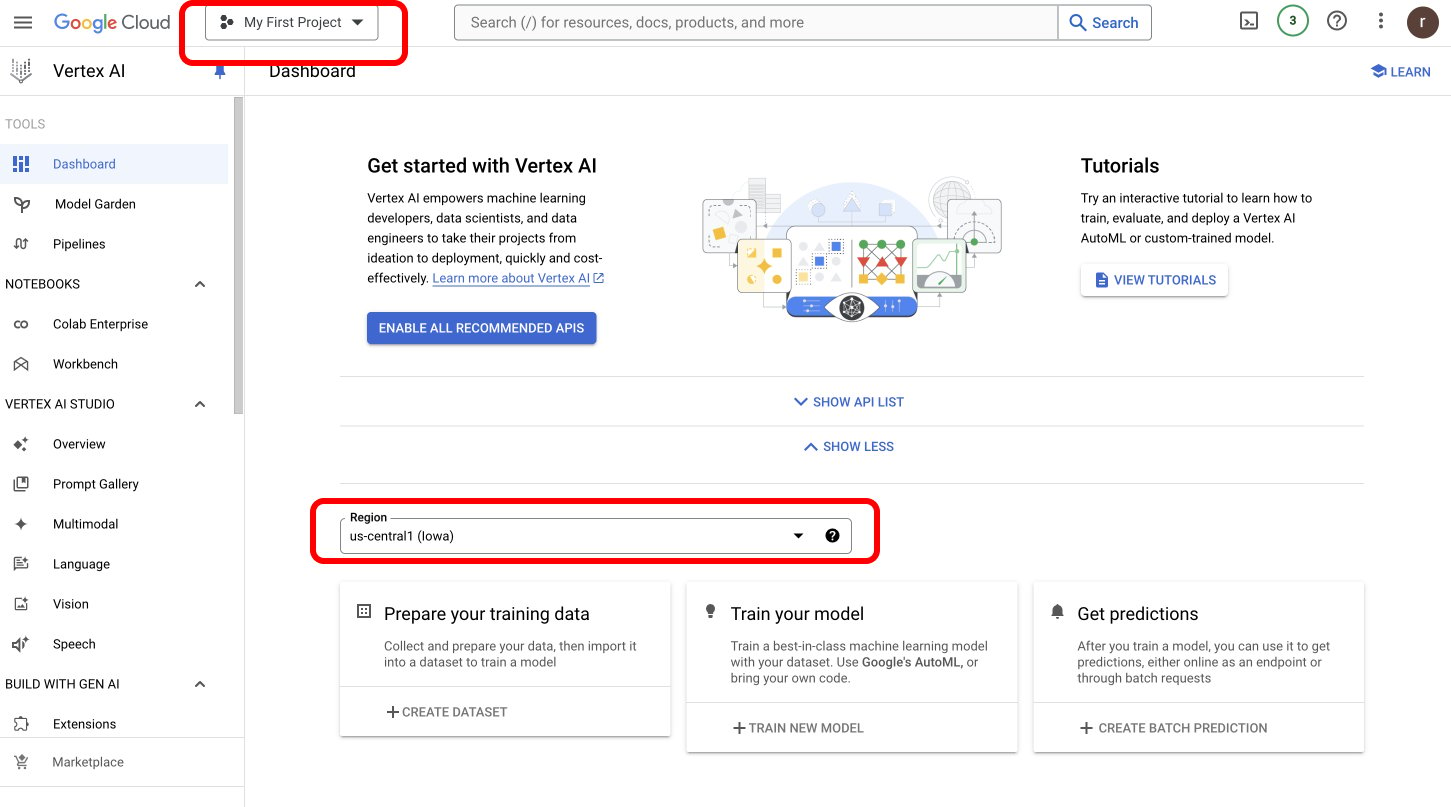 ### Get Your Service Account JSON
* [Follow this process](https://cloud.google.com/iam/docs/keys-create-delete) to get your Service Account JSON.
When selecting Service Account File as your authentication method, you'll need to:
1. Upload your Google Cloud service account JSON file
2. Specify the Vertex Region
This method is particularly important for using self-deployed models, as your service account must have the `aiplatform.endpoints.predict` permission to access custom endpoints.
Learn more about permission on your Vertex IAM key [here](https://cloud.google.com/vertex-ai/docs/general/iam-permissions).
**For Self-Deployed Models**: Your service account **must** have the `aiplatform.endpoints.predict` permission in Google Cloud IAM. Without this specific permission, requests to custom endpoints will fail.
### Using Project ID and Region Authentication
For standard Vertex AI models, you can simply provide:
1. Your Vertex Project ID (found in your Google Cloud console)
2. The Vertex Region where your models are deployed
This method is simpler but may not have all the permissions needed for custom endpoints.
### Workload Identity Federation Authentication
For environments where Portkey runs on Google Cloud infrastructure (e.g., GKE), you can use **Workload Identity Federation** to authenticate without managing service account keys. This method uses the attached service account identity of the workload environment.
To use this method, configure your integration with:
1. Set the auth type to **Workload Identity Federation**
2. Provide your Vertex Project ID
This is the recommended approach for GKE or Cloud Run deployments as it eliminates the need to manage and rotate service account key files.
### Cross-Cloud Workload Identity Federation (AWS to GCP)
For deployments where Portkey runs on **AWS infrastructure** but needs to access Vertex AI on GCP, you can use cross-cloud Workload Identity Federation. This enables AWS-hosted Portkey instances to authenticate with GCP using AWS IAM credentials without managing GCP service account keys.
Set the following environment variables on your Gateway:
| Variable | Description |
| ------------------------------- | ----------------------------------------------------------------------------------------------------------------------------------------------------------------------------------------- |
| `GCP_WIF_AUDIENCE` | The full resource name of the Workload Identity Pool Provider (e.g., `//iam.googleapis.com/projects/PROJECT_NUMBER/locations/global/workloadIdentityPools/POOL_ID/providers/PROVIDER_ID`) |
| `GCP_WIF_SERVICE_ACCOUNT_EMAIL` | The GCP service account email to impersonate (e.g., `my-sa@my-project.iam.gserviceaccount.com`) |
The Gateway uses AWS STS `GetCallerIdentity` to generate a signed token, which is exchanged for a GCP access token via the Security Token Service.
***
## Next Steps
Complete SDK documentation and API reference
Add metadata to your Vertex AI requests
Configure advanced gateway features
Trace and monitor your Vertex AI requests
Create fallback configurations between providers
### Get Your Service Account JSON
* [Follow this process](https://cloud.google.com/iam/docs/keys-create-delete) to get your Service Account JSON.
When selecting Service Account File as your authentication method, you'll need to:
1. Upload your Google Cloud service account JSON file
2. Specify the Vertex Region
This method is particularly important for using self-deployed models, as your service account must have the `aiplatform.endpoints.predict` permission to access custom endpoints.
Learn more about permission on your Vertex IAM key [here](https://cloud.google.com/vertex-ai/docs/general/iam-permissions).
**For Self-Deployed Models**: Your service account **must** have the `aiplatform.endpoints.predict` permission in Google Cloud IAM. Without this specific permission, requests to custom endpoints will fail.
### Using Project ID and Region Authentication
For standard Vertex AI models, you can simply provide:
1. Your Vertex Project ID (found in your Google Cloud console)
2. The Vertex Region where your models are deployed
This method is simpler but may not have all the permissions needed for custom endpoints.
### Workload Identity Federation Authentication
For environments where Portkey runs on Google Cloud infrastructure (e.g., GKE), you can use **Workload Identity Federation** to authenticate without managing service account keys. This method uses the attached service account identity of the workload environment.
To use this method, configure your integration with:
1. Set the auth type to **Workload Identity Federation**
2. Provide your Vertex Project ID
This is the recommended approach for GKE or Cloud Run deployments as it eliminates the need to manage and rotate service account key files.
### Cross-Cloud Workload Identity Federation (AWS to GCP)
For deployments where Portkey runs on **AWS infrastructure** but needs to access Vertex AI on GCP, you can use cross-cloud Workload Identity Federation. This enables AWS-hosted Portkey instances to authenticate with GCP using AWS IAM credentials without managing GCP service account keys.
Set the following environment variables on your Gateway:
| Variable | Description |
| ------------------------------- | ----------------------------------------------------------------------------------------------------------------------------------------------------------------------------------------- |
| `GCP_WIF_AUDIENCE` | The full resource name of the Workload Identity Pool Provider (e.g., `//iam.googleapis.com/projects/PROJECT_NUMBER/locations/global/workloadIdentityPools/POOL_ID/providers/PROVIDER_ID`) |
| `GCP_WIF_SERVICE_ACCOUNT_EMAIL` | The GCP service account email to impersonate (e.g., `my-sa@my-project.iam.gserviceaccount.com`) |
The Gateway uses AWS STS `GetCallerIdentity` to generate a signed token, which is exchanged for a GCP access token via the Security Token Service.
***
## Next Steps
Complete SDK documentation and API reference
Add metadata to your Vertex AI requests
Configure advanced gateway features
Trace and monitor your Vertex AI requests
Create fallback configurations between providers