> ## Documentation Index
> Fetch the complete documentation index at: https://portkey-docs-feat-rerank-documentation.mintlify.site/llms.txt
> Use this file to discover all available pages before exploring further.
# FutureAGI
> Integrate FutureAGI with Portkey for automated LLM evaluation and comprehensive observability
FutureAGI is an AI lifecycle platform that provides automated evaluation, tracing, and quality assessment for LLM applications. When combined with Portkey, you get a complete end-to-end observability solution covering both operational performance and response quality.
Portkey handles the "what happened, how fast, and how much did it cost?" while FutureAGI answers "how good was the response?"
## Why FutureAGI + Portkey?
The integration creates a powerful synergy:
* **Portkey** acts as the operational layer - unifying API calls, managing keys, and monitoring metrics like latency, cost, and request volume
* **FutureAGI** acts as the quality layer - capturing full request context and running automated evaluations to score model outputs
## Getting Started
### Prerequisites
Before integrating FutureAGI with Portkey, ensure you have:
1. Python 3.8+ installed
2. API Keys:
* [Portkey API Key](https://app.portkey.ai)
* [FutureAGI API Key](https://app.futureagi.com/dashboard/keys)
* AI Providers configured in your [Model Catalog](https://app.portkey.ai/model-catalog)
### Installation
```bash theme={"system"}
pip install portkey-ai fi-instrumentation traceai-portkey
```
### Setting up Environment Variables
Create a `.env` file in your project root:
```bash theme={"system"}
# .env
PORTKEY_API_KEY="your-portkey-api-key"
FI_API_KEY="your-futureagi-api-key"
FI_SECRET_KEY="your-futureagi-secret-key"
```
## Integration Guide
### Step 1: Basic Setup
Import the necessary libraries and configure your environment:
```python theme={"system"}
import asyncio
import json
import time
from portkey_ai import Portkey
from traceai_portkey import PortkeyInstrumentor
from fi_instrumentation import register
from fi_instrumentation.fi_types import (
ProjectType, EvalTag, EvalTagType,
EvalSpanKind, EvalName, ModelChoices
)
from dotenv import load_dotenv
load_dotenv()
```
### Step 2: Configure FutureAGI Tracing
Set up comprehensive evaluation tags to automatically assess model responses:
```python theme={"system"}
def setup_tracing(project_version_name: str):
"""Setup tracing with comprehensive evaluation tags"""
tracer_provider = register(
project_name="Model-Benchmarking",
project_type=ProjectType.EXPERIMENT,
project_version_name=project_version_name,
eval_tags=[
# Evaluates if the response is concise
EvalTag(
type=EvalTagType.OBSERVATION_SPAN,
value=EvalSpanKind.LLM,
eval_name=EvalName.IS_CONCISE,
custom_eval_name="Is_Concise",
mapping={"input": "llm.output_messages.0.message.content"},
model=ModelChoices.TURING_LARGE
),
# Evaluates context adherence
EvalTag(
type=EvalTagType.OBSERVATION_SPAN,
value=EvalSpanKind.LLM,
eval_name=EvalName.CONTEXT_ADHERENCE,
custom_eval_name="Response_Quality",
mapping={
"context": "llm.input_messages.0.message.content",
"output": "llm.output_messages.0.message.content",
},
model=ModelChoices.TURING_LARGE
),
# Evaluates task completion
EvalTag(
type=EvalTagType.OBSERVATION_SPAN,
value=EvalSpanKind.LLM,
eval_name=EvalName.TASK_COMPLETION,
custom_eval_name="Task_Completion",
mapping={
"input": "llm.input_messages.0.message.content",
"output": "llm.output_messages.0.message.content",
},
model=ModelChoices.TURING_LARGE
),
]
)
# Instrument the Portkey library
PortkeyInstrumentor().instrument(tracer_provider=tracer_provider)
return tracer_provider
```
The `mapping` parameter in EvalTag tells the evaluator where to find the necessary data within the trace. This is crucial for accurate evaluation.
### Step 3: Define Models and Test Scenarios
Configure the models you want to test and create test scenarios:
```python theme={"system"}
def get_models():
"""Setup model configurations with AI Provider slugs from Model Catalog"""
return [
{
"name": "GPT-4o",
"provider_slug": "@openai-prod",
"model_id": "gpt-4o"
},
{
"name": "Claude-3.7-Sonnet",
"provider_slug": "@anthropic-prod",
"model_id": "claude-3-7-sonnet-latest"
},
{
"name": "Llama-3-70b",
"provider_slug": "@groq-prod",
"model_id": "llama3-70b-8192"
},
]
def get_test_scenarios():
"""Returns a dictionary of test scenarios"""
return {
"reasoning_logic": "A farmer has 17 sheep. All but 9 die. How many are left?",
"creative_writing": "Write a 6-word story about a robot who discovers music.",
"code_generation": "Write a Python function to find the nth Fibonacci number.",
}
```
### Step 4: Execute Tests with Automatic Evaluation
Run tests on each model while capturing both operational metrics and quality evaluations:
```python theme={"system"}
async def test_model(model_config, prompt):
"""Tests a single model with a single prompt and returns the response"""
tracer_provider = setup_tracing(model_config["name"])
print(f"Testing {model_config['name']}...")
client = Portkey(api_key=os.environ["PORTKEY_API_KEY"])
start_time = time.time()
completion = await client.chat.completions.create(
messages=[{"role": "user", "content": prompt}],
model=f"{model_config['provider_slug']}/{model_config['model_id']}",
max_tokens=1024,
temperature=0.5
)
response_time = time.time() - start_time
response_text = completion.choices[0].message.content or ""
return response_text
async def main():
"""Main execution function to run all tests"""
models_to_test = get_models()
scenarios = get_test_scenarios()
for test_name, prompt in scenarios.items():
print(f"\n{'='*20} SCENARIO: {test_name.upper()} {'='*20}")
print(f"PROMPT: {prompt}")
print("-" * 60)
for model in models_to_test:
await test_model(model, prompt)
await asyncio.sleep(1) # Brief pause between scenarios
PortkeyInstrumentor().uninstrument()
if __name__ == "__main__":
asyncio.run(main())
```
## Viewing Results
After running your tests, you'll have two powerful dashboards to analyze performance:
### FutureAGI Dashboard - Quality View
Navigate to the **Prototype Tab** in your FutureAGI Dashboard to find your "Model-Benchmarking" project.
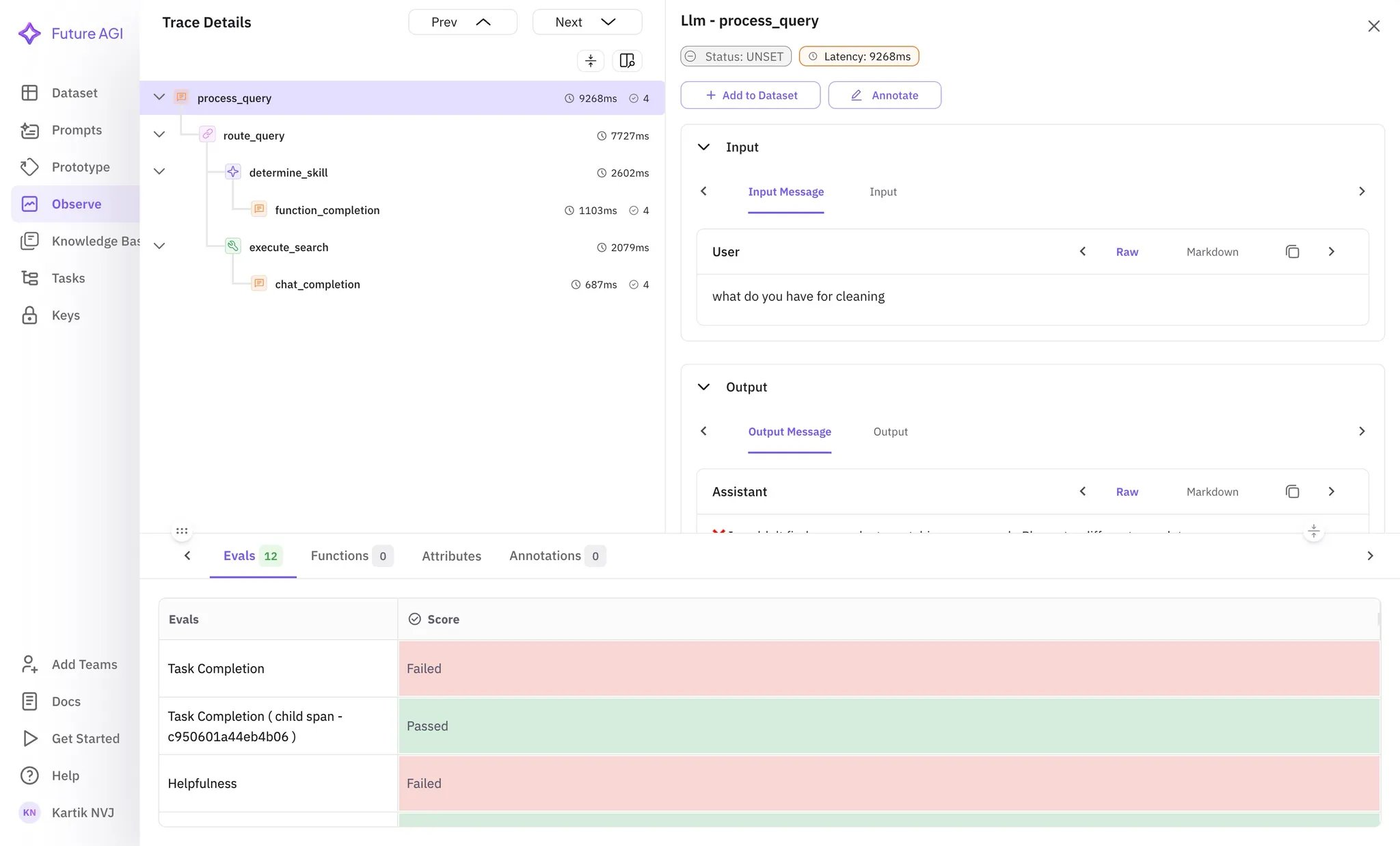 Key features:
* Automated evaluation scores for each model response
* Detailed trace analysis with quality metrics
* Comparison views across different models
### Portkey Dashboard - Operational View
Access your Portkey dashboard to see operational metrics for all API calls:
Key features:
* Automated evaluation scores for each model response
* Detailed trace analysis with quality metrics
* Comparison views across different models
### Portkey Dashboard - Operational View
Access your Portkey dashboard to see operational metrics for all API calls:
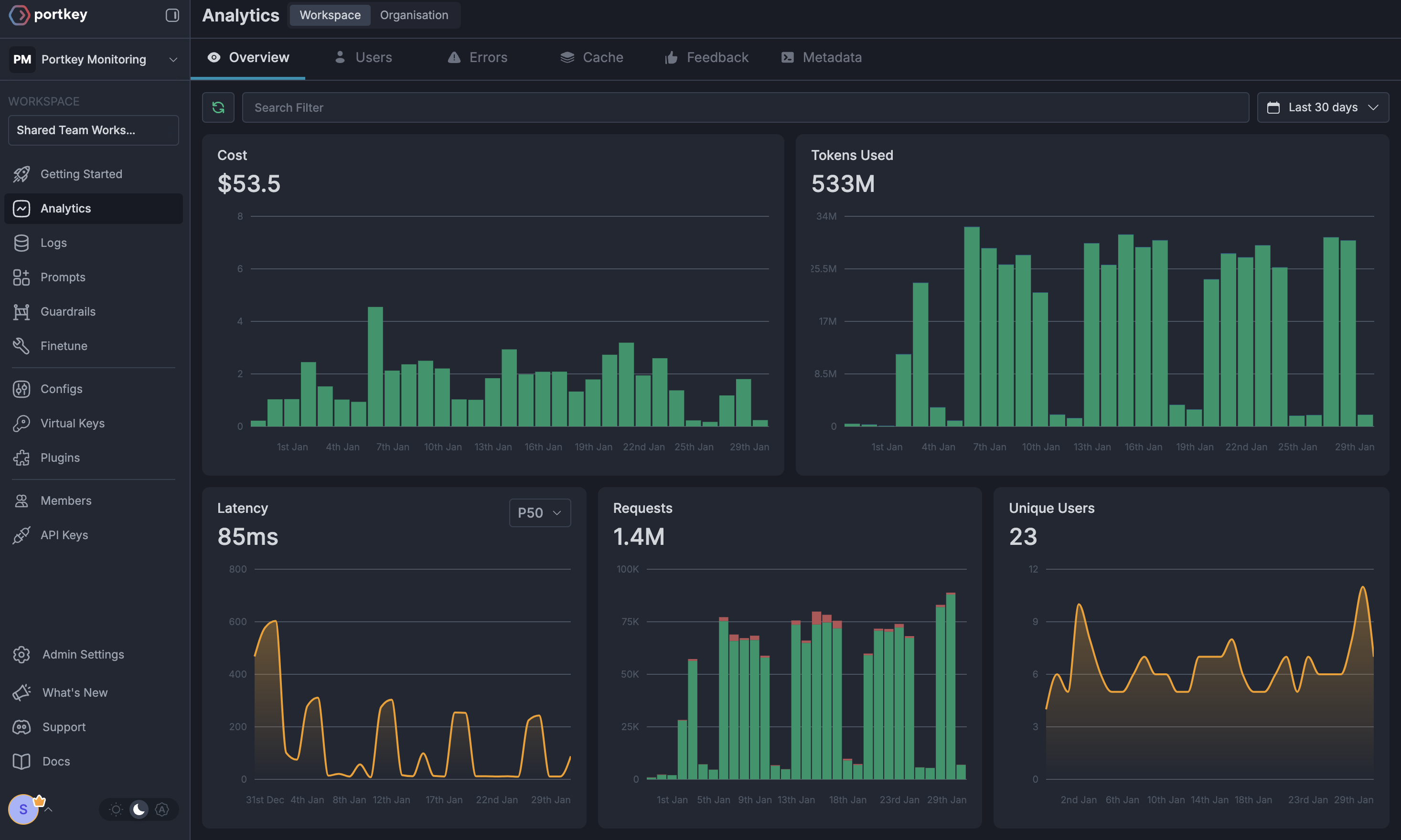 Key metrics:
* **Unified Logs**: Single view of all requests across providers
* **Cost Tracking**: Automatic cost calculation for every call
* **Latency Monitoring**: Response time comparisons across models
* **Token Usage**: Detailed token consumption analytics
## Advanced Use Cases
### Complex Agentic Workflows
The integration supports tracing complex workflows where you chain multiple LLM calls:
```python theme={"system"}
# Example: E-commerce assistant with multiple LLM calls
async def ecommerce_assistant_workflow(user_query):
# Step 1: Intent classification
intent = await classify_intent(user_query)
# Step 2: Product search
products = await search_products(intent)
# Step 3: Generate response
response = await generate_response(products, user_query)
# All steps are automatically traced and evaluated
return response
```
### CI/CD Integration
Leverage this integration in your CI/CD pipelines for:
* **Automated Model Testing**: Run evaluation suites on new model versions
* **Quality Gates**: Set thresholds for evaluation scores before deployment
* **Performance Monitoring**: Track degradation in model quality over time
* **Cost Optimization**: Monitor and alert on cost spikes
## Benefits
Track both operational metrics (cost, latency) and quality metrics (accuracy, relevance) in one place
No manual evaluation needed - FutureAGI automatically scores responses on multiple dimensions
Easily compare different models side-by-side on the same tasks
Built-in alerting and monitoring for your production LLM applications
## Example Notebooks
Try out the FutureAGI + Portkey integration with our interactive notebook
## Next Steps
1. [Create your FutureAGI account](https://app.futureagi.com)
2. [Set up AI Providers in Portkey](https://app.portkey.ai/model-catalog)
3. Run the example code to see automated evaluation in action
4. Customize evaluation tags for your specific use cases
5. Integrate into your CI/CD pipeline for continuous model quality monitoring
For advanced configurations and custom evaluators, check out the [FutureAGI documentation](https://docs.futureagi.com) and join our [Discord community](https://portkey.sh/discord) for support.
Key metrics:
* **Unified Logs**: Single view of all requests across providers
* **Cost Tracking**: Automatic cost calculation for every call
* **Latency Monitoring**: Response time comparisons across models
* **Token Usage**: Detailed token consumption analytics
## Advanced Use Cases
### Complex Agentic Workflows
The integration supports tracing complex workflows where you chain multiple LLM calls:
```python theme={"system"}
# Example: E-commerce assistant with multiple LLM calls
async def ecommerce_assistant_workflow(user_query):
# Step 1: Intent classification
intent = await classify_intent(user_query)
# Step 2: Product search
products = await search_products(intent)
# Step 3: Generate response
response = await generate_response(products, user_query)
# All steps are automatically traced and evaluated
return response
```
### CI/CD Integration
Leverage this integration in your CI/CD pipelines for:
* **Automated Model Testing**: Run evaluation suites on new model versions
* **Quality Gates**: Set thresholds for evaluation scores before deployment
* **Performance Monitoring**: Track degradation in model quality over time
* **Cost Optimization**: Monitor and alert on cost spikes
## Benefits
Track both operational metrics (cost, latency) and quality metrics (accuracy, relevance) in one place
No manual evaluation needed - FutureAGI automatically scores responses on multiple dimensions
Easily compare different models side-by-side on the same tasks
Built-in alerting and monitoring for your production LLM applications
## Example Notebooks
Try out the FutureAGI + Portkey integration with our interactive notebook
## Next Steps
1. [Create your FutureAGI account](https://app.futureagi.com)
2. [Set up AI Providers in Portkey](https://app.portkey.ai/model-catalog)
3. Run the example code to see automated evaluation in action
4. Customize evaluation tags for your specific use cases
5. Integrate into your CI/CD pipeline for continuous model quality monitoring
For advanced configurations and custom evaluators, check out the [FutureAGI documentation](https://docs.futureagi.com) and join our [Discord community](https://portkey.sh/discord) for support.