> ## Documentation Index
> Fetch the complete documentation index at: https://portkey-docs-feat-rerank-documentation.mintlify.site/llms.txt
> Use this file to discover all available pages before exploring further.
# OpenLIT
> Simplify AI development with OpenTelemetry-native observability and intelligent gateway routing
[OpenLIT](https://openlit.io/) allows you to simplify your AI development workflow, especially for Generative AI and LLMs. It streamlines essential tasks like experimenting with LLMs, organizing and versioning prompts, and securely handling API keys. With just one line of code, you can enable OpenTelemetry-native observability, offering full-stack monitoring that includes LLMs, vector databases, and GPUs.
OpenLIT's automatic instrumentation combined with Portkey's intelligent gateway creates a comprehensive observability solution where every trace captures model performance, prompt versioning, and cost optimization data in real-time.
## Why OpenLIT + Portkey?
Enable complete observability with a single line of code for all AI components
Monitor LLMs, vector databases, and GPUs in a unified view
Built on OpenTelemetry standards for seamless integration
Smooth transition from experimentation to production deployment
## Quick Start
### Prerequisites
* Python
* Portkey account with API key
* OpenAI API key (or add it to [Model Catalog](/product/model-catalog))
### Step 1: Install Dependencies
Install the required packages for OpenLIT and Portkey integration:
```bash theme={"system"}
pip install openlit openai portkey-ai
```
### Step 2: Configure OpenTelemetry Export
Set up the environment variables to send traces to Portkey's OpenTelemetry endpoint:
```python theme={"system"}
import os
# Configure Portkey endpoint and authentication
os.environ["OTEL_EXPORTER_OTLP_ENDPOINT"] = "https://api.portkey.ai/v1/logs/otel"
os.environ["OTEL_EXPORTER_OTLP_HEADERS"] = "x-portkey-api-key=YOUR_PORTKEY_API_KEY"
```
### Step 3: Initialize OpenLIT with Custom Tracer
Set up OpenTelemetry tracer and initialize OpenLIT:
```python theme={"system"}
import openlit
from opentelemetry.sdk.trace import TracerProvider
from opentelemetry.exporter.otlp.proto.http.trace_exporter import OTLPSpanExporter
from opentelemetry.sdk.trace.export import SimpleSpanProcessor
from opentelemetry import trace
# Create and configure the tracer provider
trace_provider = TracerProvider()
trace_provider.add_span_processor(SimpleSpanProcessor(OTLPSpanExporter()))
# Set the global default tracer provider
trace.set_tracer_provider(trace_provider)
# Create a tracer from the global tracer provider
tracer = trace.get_tracer(__name__)
# Initialize OpenLIT with the custom tracer
# disable_batch=True ensures traces are processed immediately
openlit.init(tracer=tracer, disable_batch=True)
```
### Step 4: Configure Portkey Gateway
Set up the OpenAI client to use Portkey's intelligent gateway:
```python theme={"system"}
from openai import OpenAI
from portkey_ai import createHeaders
# Create OpenAI client with Portkey's gateway
client = OpenAI(
api_key="PORTKEY_API_KEY",
base_url="https://api.portkey.ai/v1",
default_headers=createHeaders(
api_key="PORTKEY_API_KEY",
provider="@openai-prod" # Your AI Provider slug from Model Catalog
)
)
```
### Step 5: Make Instrumented LLM Calls
Now your LLM calls are automatically traced by OpenLIT and enhanced by Portkey:
```python theme={"system"}
# Make calls through Portkey's gateway
# OpenLIT instruments the call, Portkey adds gateway intelligence
response = client.chat.completions.create(
model="gpt-4o",
messages=[{"role": "user", "content": "Explain the benefits of OpenTelemetry in AI applications"}],
temperature=0.7
)
print(response.choices[0].message.content)
# You now get:
# 1. Automatic tracing from OpenLIT
# 2. Gateway features from Portkey (caching, fallbacks, routing)
# 3. Combined insights in Portkey's dashboard
```
## Complete Example
Here's a full example bringing everything together:
```python theme={"system"}
import os
import openlit
from openai import OpenAI
from portkey_ai import createHeaders
from opentelemetry.sdk.trace import TracerProvider
from opentelemetry.exporter.otlp.proto.http.trace_exporter import OTLPSpanExporter
from opentelemetry.sdk.trace.export import SimpleSpanProcessor
from opentelemetry import trace
# Step 1: Configure Portkey endpoint
os.environ["OTEL_EXPORTER_OTLP_ENDPOINT"] = "https://api.portkey.ai/v1/logs/otel"
os.environ["OTEL_EXPORTER_OTLP_HEADERS"] = "x-portkey-api-key=YOUR_PORTKEY_API_KEY"
# Step 2: Set up OpenTelemetry
trace_provider = TracerProvider()
trace_provider.add_span_processor(SimpleSpanProcessor(OTLPSpanExporter()))
trace.set_tracer_provider(trace_provider)
tracer = trace.get_tracer(__name__)
# Step 3: Initialize OpenLIT
openlit.init(tracer=tracer, disable_batch=True)
# Step 4: Configure Portkey Gateway
client = OpenAI(
api_key="PORTKEY_API_KEY",
base_url="https://api.portkey.ai/v1",
default_headers=createHeaders(
api_key="PORTKEY_API_KEY",
provider="@openai-prod"
)
)
# Step 5: Make instrumented calls
response = client.chat.completions.create(
model="gpt-4o",
messages=[
{"role": "system", "content": "You are a helpful assistant."},
{"role": "user", "content": "What are the key benefits of observability in AI?"}
]
)
print(response.choices[0].message.content)
```
## Next Steps
Set up intelligent routing, fallbacks, and caching
Manage AI providers, credentials, and model access centrally
Analyze costs, performance, and usage patterns
Configure alerts for anomalies and performance issues
***
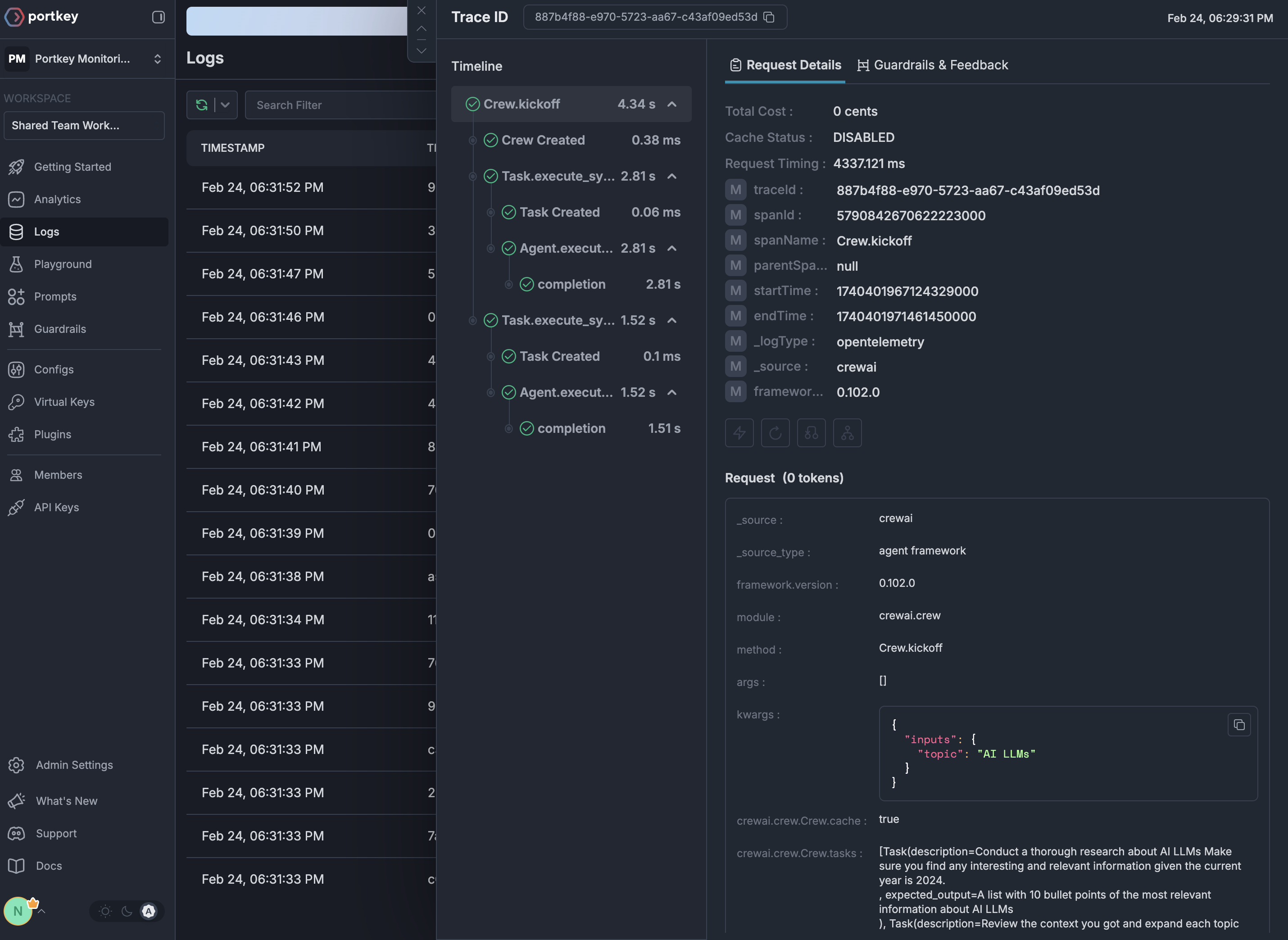
## See Your Traces in Action
Once configured, navigate to the [Portkey dashboard](https://app.portkey.ai/logs) to see your OpenLIT instrumentation combined with gateway intelligence: