

Azure Content Safety
A comprehensive content moderation service that detects harmful content including hate speech, violence, sexual content, and self-harm references in text.
Azure PII Detection
Advanced detection of personally identifiable information (PII) and protected health information (PHI) to safeguard sensitive data.
Azure Shield Prompt
Detects jailbreak and prompt injection attacks using Azure AI Content Safety Prompt Shields API.
Azure Protected Material
Detects known protected/copyrighted text content in LLM outputs to help ensure intellectual property compliance.
Setting Up Azure Guardrails
Follow these steps to integrate Azure’s content moderation services with Portkey:1. Configure Azure Authentication
Navigate to the Integrations page under Settings to set up your Azure credentials. You can authenticate using three different methods:- API Key - Uses a simple API key for authentication
- Entra (formerly Azure AD) - Uses Azure Active Directory authentication
- Managed - Uses managed identity authentication within Azure
- API Key
- Entra
- Managed
- Resource Name: Your Azure resource name
- API Key: Your Azure API key
2. Create Azure Guardrail Checks
Once authentication is set up, you can add Azure guardrail checks to your Portkey workflow:- Navigate to the Guardrails page
- Search for either Azure Content Safety or Azure PII Detection
- Click Add to configure your chosen guardrail
- Configure the specific settings for your guardrail
- Save your configuration and create the guardrail
Guardrail Actions allow you to orchestrate your guardrails logic. You can learn more about them here
Azure Content Safety
Azure Content Safety analyzes text for harmful content across several categories. Configuration OptionsUsing Blocklists
Blocklists allow you to define custom terms or patterns to be flagged. You’ll need to create Content Safety blocklists in your Azure account first, then reference them in the Blocklist Names field.For more information on Azure Content Safety blocklists, visit the official documentation.
Azure PII Detection
Azure PII Detection identifies and can help protect personal and health-related information in your content. Configuration OptionsAzure Shield Prompt
Azure Shield Prompt detects jailbreak and prompt injection attacks in your requests using Azure AI Content Safety Prompt Shields API. This guardrail analyzes system prompts and user messages to identify potential security threats before they reach your LLM.Shield Prompt is designed to run on the input (before request) only. It cannot be used as an output guardrail.
How It Works
Shield Prompt analyzes:
- System prompts: Checks if system messages contain potential attacks
- User documents: Analyzes user-provided content for injection attempts
For more information on Azure Prompt Shields, visit the official documentation.
Azure Protected Material
Azure Protected Material detects known copyrighted or protected text content in LLM outputs using Azure AI Content Safety Protected Material Detection API. This helps ensure your AI applications don’t inadvertently generate content that may infringe on intellectual property rights.Protected Material is designed to run on the output (after request) only. It cannot be used as an input guardrail.
How It Works
Protected Material scans the LLM’s response text and checks it against Azure’s database of known protected content. If protected material is detected, the guardrail returns a failed verdict, allowing you to:
- Block the response from being returned to the user
- Log the incident for compliance review
- Take alternative action based on your policies
- Compliance with copyright and intellectual property laws
- Preventing reproduction of licensed content
- Enterprise content governance
For more information on Azure Protected Material Detection, visit the official documentation.
Add Guardrail ID to a Config and Make Your Request
- When you save a Guardrail, you’ll get an associated Guardrail ID - add this ID to the
input_guardrailsoroutput_guardrailsparams in your Portkey Config - Create these Configs in Portkey UI, save them, and get an associated Config ID to attach to your requests. More here.
- NodeJS
- Python
- OpenAI NodeJS
- OpenAI Python
- cURL
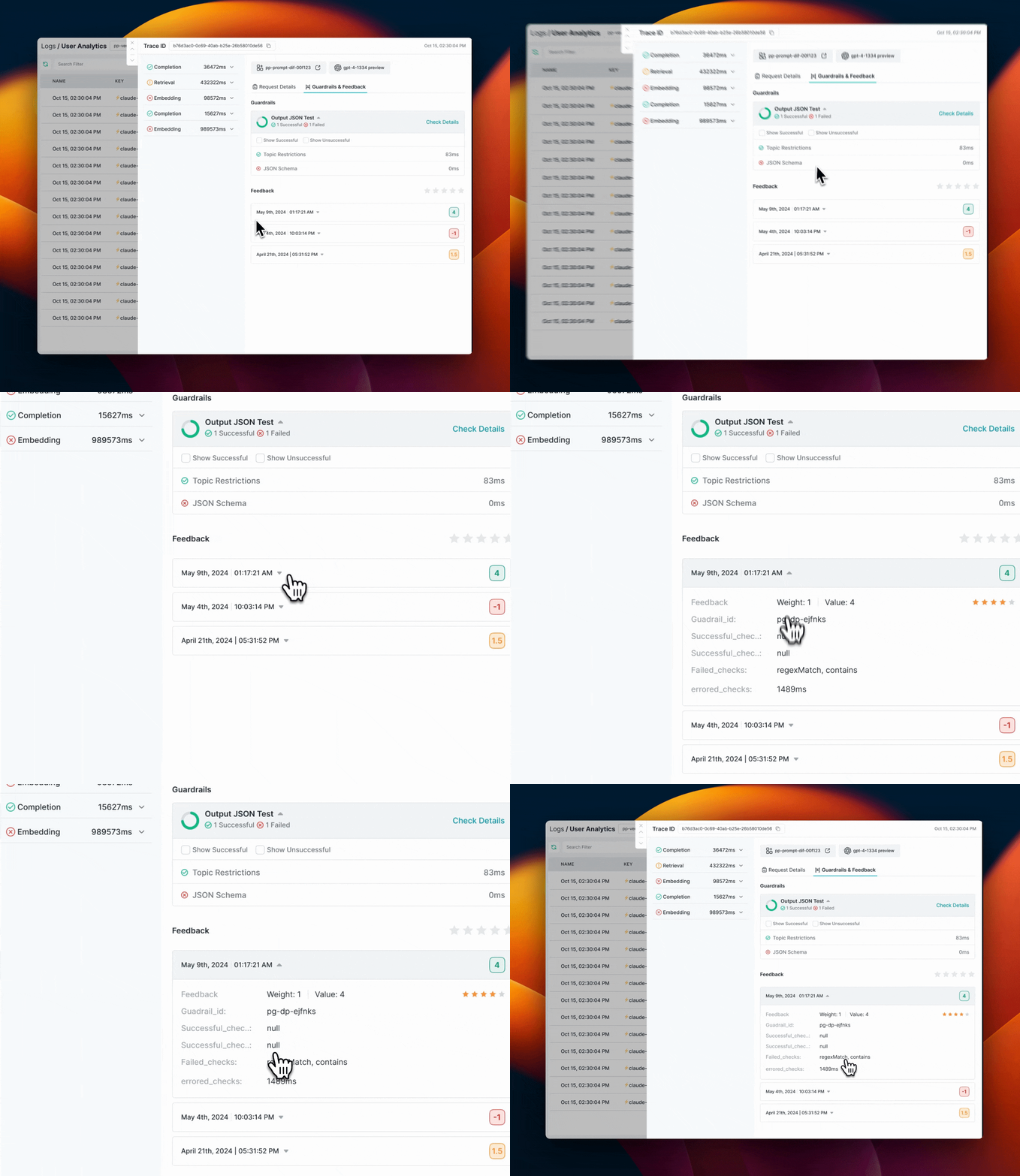
Monitoring and Logs
All guardrail actions and verdicts are visible in your Portkey logs, allowing you to:- Track which content has been flagged
- See guardrail verdicts and actions
- Monitor the performance of your content moderation pipeline
Using Azure Guardrails - Scenarios
After setting up your guardrails, there are different ways to use them depending on your security requirements:Detect and Monitor Only
To simply detect but not block content:- Configure your guardrail actions without enabling “Deny”
- Monitor the guardrail results in your Portkey logs
- If any issues are detected, the response will include a
hook_resultsobject with details
Redact PII Automatically
To automatically remove sensitive information:- Enable the
Redactoption for Azure PII Detection - When PII is detected, it will be automatically redacted and replaced with standardized identifiers
- The response will include a
transformedflag set totruein the results
Block Harmful Content
To completely block requests that violate your policies:- Enable the
Denyoption in the guardrails action tab - If harmful content is detected, the request will fail with an appropriate status code
- You can customize denial messages to provide guidance to users