> ## Documentation Index
> Fetch the complete documentation index at: https://portkey-docs-feat-rerank-documentation.mintlify.site/llms.txt
> Use this file to discover all available pages before exploring further.
# xAI
> Portkey supports xAI's chat completions, completions, and embeddings APIs.
[Supported Endpoints](/api-reference/inference-api/supported-providers)
## Integrate
Just paste your xAI API Key to [Portkey](https://app.portkey.ai/virtual-keys) to create your Virtual Key.
## Sample Request
Portkey is a drop-in replacement for xAI. You can make request using the official Portkey SDK.
Popular libraries & agent frameworks like LangChain, CrewAI, AutoGen, etc. are [also supported](#popular-libraries).
```ts NodeJS theme={"system"}
import Portkey from 'portkey-ai';
const client = new Portkey({
apiKey: 'PORTKEY_API_KEY',
virtualKey: 'PROVIDER_VIRTUAL_KEY'
});
async function main() {
const response = await client.chat.completions.create({
messages: [{ role: "user", content: "Bob the builder.." }],
model: "grok-beta",
});
console.log(response.choices[0].message.content);
}
main();
```
```py Python theme={"system"}
from portkey_ai import Portkey
client = Portkey(
api_key = "PORTKEY_API_KEY",
virtual_key = "PROVIDER_VIRTUAL_KEY"
)
response = client.chat.completions.create(
model="grok-beta",
messages=[{"role": "user", "content": "Hello!"}]
)
print(response.choices[0].message)
```
```sh cURL theme={"system"}
curl https://api.portkey.ai/v1/chat/completions \
-H "Content-Type: application/json" \
-H "x-portkey-api-key: $PORTKEY_API_KEY" \
-H "x-portkey-virtual-key: $PORTKEY_PROVIDER_VIRTUAL_KEY" \
-d '{
"model": "grok-beta",
"messages": [
{ "role": "user", "content": "Hello!" }
]
}'
```
```py OpenAI Python SDK theme={"system"}
from openai import OpenAI
from portkey_ai import createHeaders, PORTKEY_GATEWAY_URL
client = OpenAI(
api_key="xx",
base_url=PORTKEY_GATEWAY_URL,
default_headers=createHeaders(
api_key="PORTKEY_API_KEY",
virtual_key="OPENAI_VIRTUAL_KEY"
)
)
completion = client.chat.completions.create(
model="grok-beta",
messages=[
{"role": "user", "content": "Hello!"}
]
)
print(completion.choices[0].message)
```
```ts OpenAI NodeJS SDK theme={"system"}
import OpenAI from 'openai';
import { PORTKEY_GATEWAY_URL, createHeaders } from 'portkey-ai'
const openai = new OpenAI({
apiKey: 'xx',
baseURL: PORTKEY_GATEWAY_URL,
defaultHeaders: createHeaders({
apiKey: "PORTKEY_API_KEY",
virtualKey: "OPENAI_VIRTUAL_KEY"
})
});
async function main() {
const completion = await openai.chat.completions.create({
messages: [{ role: 'user', content: 'Say this is a test' }],
model: 'grok-beta',
});
console.log(chatCompletion.choices);
}
main();
```
## Local Setup
If you do not want to use Portkey's hosted API, you can also run Portkey locally:
Portkey runs on our popular [open source Gateway](https://git.new/portkey). You can spin it up locally to make requests without sending them to the Portkey API.
```sh Install the Gateway theme={"system"}
npx @portkey-ai/gateway
```
```sh Docker Image theme={"system"}
npx @portkey-ai/gateway
```
| Your Gateway is running on [http://localhost:8080/v1](http://localhost:8080/v1) 🚀 | |
| ---------------------------------------------------------------------------------- | - |
Then, just change the `baseURL` to the local Gateway URL, and make requests:
```ts NodeJS theme={"system"}
import Portkey from 'portkey-ai';
const client = new Portkey({
baseUrl: 'http://localhost:8080/v1',
apiKey: 'PORTKEY_API_KEY',
virtualKey: 'PROVIDER_VIRTUAL_KEY'
});
async function main() {
const response = await client.chat.completions.create({
messages: [{ role: "user", content: "Bob the builder.." }],
model: "grok-beta",
});
console.log(response.choices[0].message.content);
}
main();
```
```py Python theme={"system"}
from portkey_ai import Portkey
client = Portkey(
base_url = 'http://localhost:8080/v1',
api_key = "PORTKEY_API_KEY",
virtual_key = "PROVIDER_VIRTUAL_KEY"
)
response = client.chat.completions.create(
model="grok-beta",
messages=[
{"role": "user", "content": "Hello!"}
]
)
print(response.choices[0].message)
```
```sh cURL theme={"system"}
curl http://localhost:8080/v1/chat/completions \
-H "Content-Type: application/json" \
-H "x-portkey-api-key: $PORTKEY_API_KEY" \
-H "x-portkey-virtual-key: $PORTKEY_PROVIDER_VIRTUAL_KEY" \
-d '{
"model": "grok-beta",
"messages": [
{ "role": "user", "content": "Hello!" }
]
}'
```
```py OpenAI Python SDK theme={"system"}
from openai import OpenAI
from portkey_ai import createHeaders, PORTKEY_GATEWAY_URL
client = OpenAI(
api_key="xx",
base_url="https://localhost:8080/v1",
default_headers=createHeaders(
api_key="PORTKEY_API_KEY",
virtual_key="OPENAI_VIRTUAL_KEY"
)
)
completion = client.chat.completions.create(
model="grok-beta",
messages=[
{"role": "user", "content": "Hello!"}
]
)
print(completion.choices[0].message)
```
```ts OpenAI NodeJS SDK theme={"system"}
import OpenAI from 'openai';
import { PORTKEY_GATEWAY_URL, createHeaders } from 'portkey-ai'
const openai = new OpenAI({
apiKey: 'xx',
baseURL: 'https://localhost:8080/v1',
defaultHeaders: createHeaders({
apiKey: "PORTKEY_API_KEY",
virtualKey: "OPENAI_VIRTUAL_KEY"
})
});
async function main() {
const completion = await openai.chat.completions.create({
messages: [{ role: 'user', content: 'Say this is a test' }],
model: 'grok-beta',
});
console.log(chatCompletion.choices);
}
main();
```
Portkey's data & control planes can be fully deployed on-prem with the Enterprise license.
[More details here](/product/enterprise-offering/private-cloud-deployments)
***
## Integration Overview
### xAI Endpoints & Capabilities
Portkey works with *all* of xAI's endpoints and supports all xAI capabilities like function calling and image understanding. Find examples for each below:
```javascript Node.js theme={"system"}
let tools = [{
type: "function",
function: {
name: "getWeather",
description: "Get the current weather",
parameters: {
type: "object",
properties: {
location: { type: "string", description: "City and state" },
unit: { type: "string", enum: ["celsius", "fahrenheit"] }
},
required: ["location"]
}
}
}];
let response = await portkey.chat.completions.create({
model: "grok-beta",
messages: [
{ role: "system", content: "You are a helpful assistant." },
{ role: "user", content: "What's the weather like in Delhi - respond in JSON" }
],
tools,
tool_choice: "auto",
});
console.log(response.choices[0].finish_reason);
```
```python Python theme={"system"}
tools = [{
"type": "function",
"function": {
"name": "getWeather",
"description": "Get the current weather",
"parameters": {
"type": "object",
"properties": {
"location": {"type": "string", "description": "City and state"},
"unit": {"type": "string", "enum": ["celsius", "fahrenheit"]}
},
"required": ["location"]
}
}
}]
response = portkey.chat.completions.create(
model="grok-beta",
messages=[
{"role": "system", "content": "You are a helpful assistant."},
{"role": "user", "content": "What's the weather like in Delhi - respond in JSON"}
],
tools=tools,
tool_choice="auto"
)
print(response.choices[0].finish_reason)
```
```curl REST theme={"system"}
curl -X POST "https://api.portkey.ai/v1/chat/completions" \
-H "Content-Type: application/json" \
-H "Authorization: Bearer YOUR_PORTKEY_API_KEY" \
-d '{
"model": "grok-beta",
"messages": [
{"role": "system", "content": "You are a helpful assistant."},
{"role": "user", "content": "What'\''s the weather like in Delhi - respond in JSON"}
],
"tools": [{
"type": "function",
"function": {
"name": "getWeather",
"description": "Get the current weather",
"parameters": {
"type": "object",
"properties": {
"location": {"type": "string", "description": "City and state"},
"unit": {"type": "string", "enum": ["celsius", "fahrenheit"]}
},
"required": ["location"]
}
}
}],
"tool_choice": "auto"
}'
```
Process images alongside text using xAI's vision capabilities:
```python Python theme={"system"}
response = portkey.chat.completions.create(
model="grok-beta",
messages=[
{
"role": "user",
"content": [
{"type": "text", "text": "What's in this image?"},
{
"type": "image_url",
"image_url": "https://upload.wikimedia.org/wikipedia/commons/thumb/d/dd/Gfp-wisconsin-madison-the-nature-boardwalk.jpg/2560px-Gfp-wisconsin-madison-the-nature-boardwalk.jpg",
},
],
}
],
max_tokens=300,
)
print(response)
```
```javascript Node.js theme={"system"}
const response = await portkey.chat.completions.create({
model: "grok-beta",
messages: [
{
role: "user",
content: [
{ type: "text", text: "What's in this image?" },
{
type: "image_url",
image_url: "https://upload.wikimedia.org/wikipedia/commons/thumb/d/dd/Gfp-wisconsin-madison-the-nature-boardwalk.jpg/2560px-Gfp-wisconsin-madison-the-nature-boardwalk.jpg",
},
],
},
],
max_tokens: 300,
});
console.log(response);
```
```curl REST theme={"system"}
curl -X POST "https://api.portkey.ai/v1/chat/completions" \
-H "Content-Type: application/json" \
-H "Authorization: Bearer YOUR_PORTKEY_API_KEY" \
-d '{
"model": "grok-beta",
"messages": [
{
"role": "user",
"content": [
{"type": "text", "text": "What'\''s in this image?"},
{
"type": "image_url",
"image_url": "https://upload.wikimedia.org/wikipedia/commons/thumb/d/dd/Gfp-wisconsin-madison-the-nature-boardwalk.jpg/2560px-Gfp-wisconsin-madison-the-nature-boardwalk.jpg"
}
]
}
],
"max_tokens": 300
}'
```
Generate embeddings for text using xAI's embedding models:
`Coming Soon!`
### Portkey Features
Here's a simplified version of how to use Portkey's Gateway Configuration:
You can create a Gateway configuration using the Portkey Config Dashboard or by writing a JSON configuration in your code. In this example, requests are routed based on the user's subscription plan (paid or free).
```json theme={"system"}
config = {
"strategy": {
"mode": "conditional",
"conditions": [
{
"query": { "metadata.user_plan": { "$eq": "paid" } },
"then": "grok-beta"
},
{
"query": { "metadata.user_plan": { "$eq": "free" } },
"then": "grok-2-1212"
}
],
"default": "grok-beta"
},
"targets": [
{
"name": "grok-beta",
"virtual_key": "xx"
},
{
"name": "grok-2-1212",
"virtual_key": "yy"
}
]
}
```
When a user makes a request, it will pass through Portkey's AI Gateway. Based on the configuration, the Gateway routes the request according to the user's metadata.
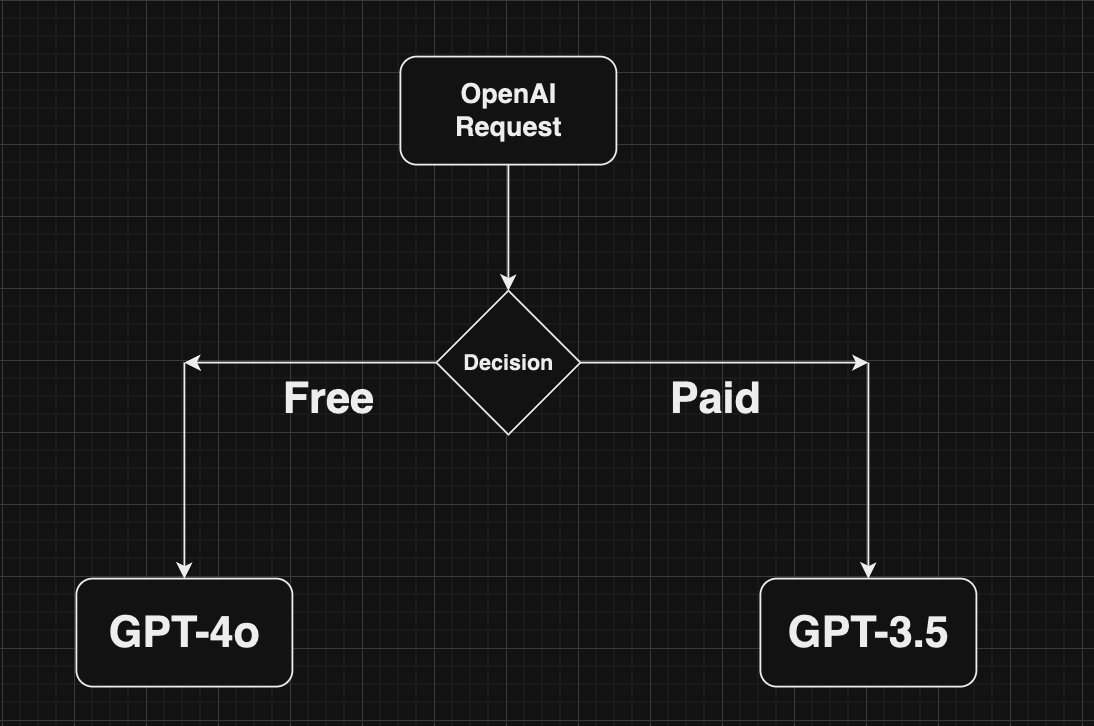 Pass the Gateway configuration to your Portkey client. You can either use the config object or the Config ID from Portkey's hosted version.
```python Python theme={"system"}
from portkey_ai import Portkey
portkey = Portkey(
api_key="PORTKEY_API_KEY",
virtual_key="VIRTUAL_KEY",
config=portkey_config
)
```
```javascript Node.js theme={"system"}
import Portkey from 'portkey-ai'
const portkey = new Portkey({
apiKey: "PORTKEY_API_KEY",
virtualKey: "VIRTUAL_KEY",
config: portkeyConfig
})
```
That's it! Portkey seamlessly allows you to make your AI app more robust using built-in gateway features. Learn more about advanced gateway features:
Distribute requests across multiple targets based on defined weights.
Automatically switch to backup targets if the primary target fails.
Route requests to different targets based on specified conditions.
Enable caching of responses to improve performance and reduce costs.
Portkey's AI gateway enables you to enforce input/output checks on requests by applying custom hooks before and after processing. Protect your user's/company's data by using PII guardrails and many more available on Portkey Guardrails:
```json theme={"system"}
{
"virtual_key":"xai-xxx",
"before_request_hooks": [{
"id": "input-guardrail-id-xx"
}],
"after_request_hooks": [{
"id": "output-guardrail-id-xx"
}]
}
```
Explore Portkey's guardrail features to enhance the security and reliability of your AI applications.
***
## Appendix
### FAQs
You can sign up to xAI [here](https://accounts.x.ai/) and grab your API key.
xAI typically gives some amount of free credits without you having to add your credit card. Reach out to their support team if you'd like additional free credits.
You can find your current rate limits imposed by xAI on the console. Use Portkey's loadbalancer to tackle rate limiting by xAI.
Pass the Gateway configuration to your Portkey client. You can either use the config object or the Config ID from Portkey's hosted version.
```python Python theme={"system"}
from portkey_ai import Portkey
portkey = Portkey(
api_key="PORTKEY_API_KEY",
virtual_key="VIRTUAL_KEY",
config=portkey_config
)
```
```javascript Node.js theme={"system"}
import Portkey from 'portkey-ai'
const portkey = new Portkey({
apiKey: "PORTKEY_API_KEY",
virtualKey: "VIRTUAL_KEY",
config: portkeyConfig
})
```
That's it! Portkey seamlessly allows you to make your AI app more robust using built-in gateway features. Learn more about advanced gateway features:
Distribute requests across multiple targets based on defined weights.
Automatically switch to backup targets if the primary target fails.
Route requests to different targets based on specified conditions.
Enable caching of responses to improve performance and reduce costs.
Portkey's AI gateway enables you to enforce input/output checks on requests by applying custom hooks before and after processing. Protect your user's/company's data by using PII guardrails and many more available on Portkey Guardrails:
```json theme={"system"}
{
"virtual_key":"xai-xxx",
"before_request_hooks": [{
"id": "input-guardrail-id-xx"
}],
"after_request_hooks": [{
"id": "output-guardrail-id-xx"
}]
}
```
Explore Portkey's guardrail features to enhance the security and reliability of your AI applications.
***
## Appendix
### FAQs
You can sign up to xAI [here](https://accounts.x.ai/) and grab your API key.
xAI typically gives some amount of free credits without you having to add your credit card. Reach out to their support team if you'd like additional free credits.
You can find your current rate limits imposed by xAI on the console. Use Portkey's loadbalancer to tackle rate limiting by xAI.